Generate summary with AI

A growing number of enterprises that have relied on hard disk drives (HDDs) for high data throughput and low transaction latency now have performance bottlenecks. The truth is, HDDs can’t keep up with the speed and security demands of modern applications.
As a solution, many enterprises are looking for enterprise solid-state drives (SSDs) to increase data center performance, security, and reliability.
Choosing the best enterprise SSD can be a challenging task. You need to learn and compare dozens of SSD vendors just to realize: not all enterprise SSDs are created equal. Fortunately, our team at Atera has done the work and researched the best enterprise SSDs.
Before we review the best options, let’s look at the three buying considerations for the best enterprise SSDs.
3 key considerations when buying an enterprise SSD
1. Power Loss Protection (PLP)
In addition to giving our own expert advice, we looked at what other sysadmins and IT professionals recommend on platforms like Reddit and Spiceworks.
The main thing that kept coming up was the importance of Power Loss Protection (PLP). Whether or not an SSD is labeled “enterprise” depends on the vendor, but PLP is the non-negotiable feature for most professionals.
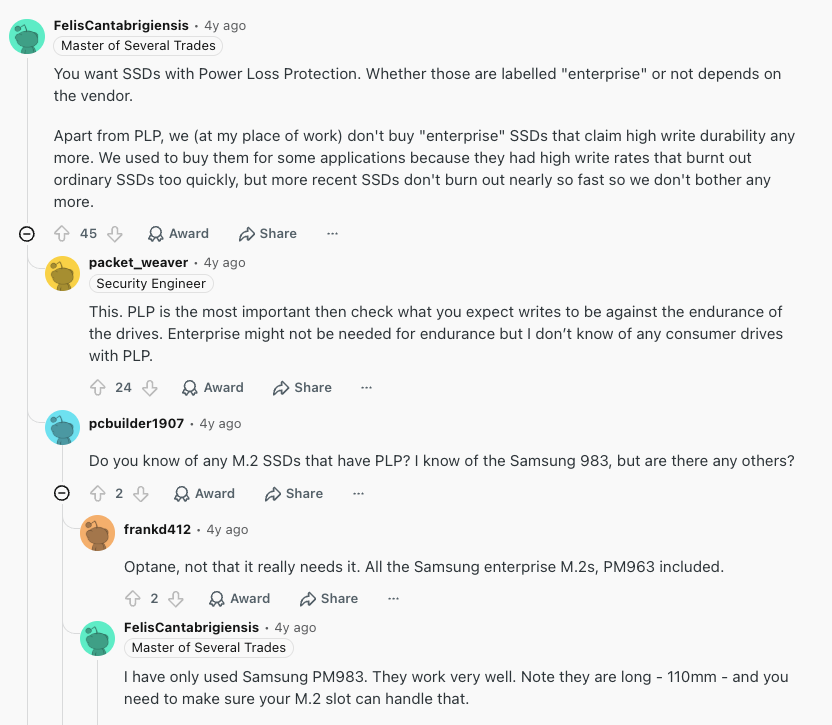
Reddit thread discussing the importance of PLP
Without PLP, sudden power cuts can lead to data loss or corruption, which no business wants to risk.
Aside from PLP, other data protection features to look for include built-in encryption and end-to-end path protection.
2. Performance and endurance requirements
Understanding enterprise SSDs performance and endurance specs is important. This is what we recommend:
- Performance: Find out the read and write speeds, input/output operations per second (IOPS), and latency requirements for your workload.
- Endurance: Choose an SSD with endurance ratings (DWPD) that match your workload’s write intensity. This helps to prevent premature drive failure.
Ideally, you should choose an SSD that meets or even exceeds your performance and endurance requirements, so your operations continue to run smoothly.
Also check which form factors your servers support. Newer servers increasingly use EDSFF drives like E1.S and E3.S instead of 2.5-inch U.2 drives.
3. The cost and warranty
The total cost of ownership (TCO) for enterprise SSDs is significantly more than for consumer SSDs.
Nevertheless, as several sysadmins point out in the Reddit thread below, “enterprise drives might cost more, but compare that to how much it would cost the company if a drive fails and they have to replace it.”
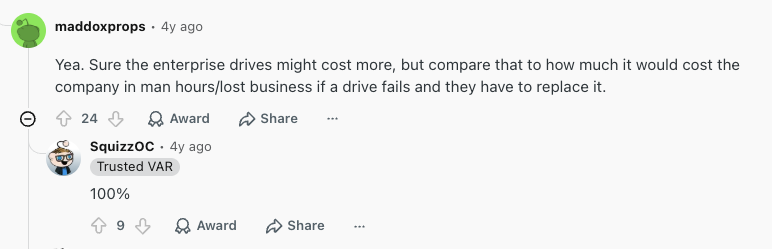
Reddit thread discussing enterprise SSD costs
And we wholeheartedly agree to this. However, this doesn’t mean you shouldn’t try to optimize your IT costs by comparing the costs of different enterprise SSDs.
Request pricing information from multiple SSD vendors and see how they compare. You should also have a general understanding of the warranty offered. In most cases, SSD vendors, like Samsung, SanDisk, and Solidigm, offer a 5-year limited warranty.
The best enterprise SSDs in 2026
To choose the best enterprise SSDs, we compared the offerings from leading SSD vendors and looked at what other IT pros use and recommend.
Based on these factors, the best enterprise SSDs are:
- Samsung PM1743 – Best overall enterprise SSD
- Solidigm D5-P5336 – Best high-capacity SSD for cold storage
- Seagate Nytro 5060 – Best value NVMe SSD for general enterprise use
- Samsung 980 PRO – Best for workstation use and testing
- Solidigm D7-P5810 – Best for write-intensive workloads
- Ultrastar DC SN655 NVMe – Best for balanced performance and reliability
- SanDisk DC SN861 – Best 4TB and 8TB enterprise SSD
Samsung PM1743 – Best overall enterprise SSD
The Samsung PM1743 is our choice for the best overall enterprise SSD. It’s available in capacities of 1.92 TB to 15.36TB in both 2.5-inch and 3-inch EDSFF (E3.S). It’s Samsung’s first enterprise SSD featuring the new PCIe 5.0 (Gen5) interface, offering up to 14,000 MB/s read speeds, which is 2x faster than their PCIe 4.0 models.
Not only does the Gen5 improve performance, but it also allows Samsung to boost its power efficiency. Samsung says the PM1743 delivers up to 608 MB/s per watt, about 30% better than its previous Gen4 SSDs. It also supports dual-port configurations, so a server can keep accessing data if one connection path fails.
| (Specifications) Samsung PM1743 | Brand: Samsung Price: Not disclosed by Samsung Interface: PCIe 5.0 x4 Form Factor: U.2 / E3.S Capacities: 1.92 TB – 15.36 TB Performance: 14,000 MB/s read, 6,600 MB/s write Endurance: ~ 3504 TBW Power Loss Protection (PLP): Yes Warranty: 5-year limited warranty |
| Reasons to choose this enterprise SSD | One of the fastest enterprise SSDs you can find. Ideal for workloads like AI, analytics, and large-scale DBs. |
| Reasons not to choose this enterprise SSD | PCIe 5.0 compatibility requires newer server hardware. |
Solidigm D5-P5336 – Best high-capacity SSD for cold storage
If you just need a lot of cold storage, the Solidigm D5-P5336 is your best bet. It’s one of the highest-capacity SSDs available, offering up to 122.88 TB in a single drive. Solidigm first offered this model at a maximum of 61.44 TB, but expanded it to 122.88 TB in Q1 2025.
Solidigm described the D5-P5336 in the following way:
- “Combining read performance exceeding that of some cost-optimized TLC SSDs and capacities up to 122.88TB built on industry-leading NAND density [2], the Solidigm D5-P5336 has been architected to efficiently accelerate and scale increasingly massive data sets found in widely deployed read-intensive workloads.”
This SSD is ideal for read-intensive workloads, such as AI data lakes, long-term backup storage, and media streaming archives.
For even more capacity, Kioxia’s LC9 goes up to 245.76 TB
| (Specifications) Solidigm D5-P5336 | Price: Pricing not disclosed by Solidigm. Prices have increased since 2025, so you need to request a current quote to find out what it costs. Interface: PCIe 4.0, NVMe Form Factor: E1.L / U.2 / E3.S Capacities: From 7.68 TB to 122.88 TB Performance: ~7,000 MB/s read, ~3,000 MB/s write Endurance: 0.42 DWPD Power Loss Protection (PLP): No Warranty: 5-year limited warranty |
| Reasons to choose this enterprise SSD | The best capacity of any SSD for cold storage. Ideal for archival or read-mostly use. |
| Reasons not to choose this enterprise SSD | Low endurance (0.42 DWPD). Unsuitable for write-heavy applications. |
Seagate Nytro 5060 – Best value NVMe SSD for general enterprise use
The Seagate Nytro 5060 stands out in its flexible form factors, offering both U.2 and E3.S options to fit different server configurations. It’s available at up to 30.72TB in a 2.5-inch (U.2) form factor and up to 15.36TB in an E3.S form factor.
Like the Samsung PM1743, this enterprise SSD is a PCIe Gen5 drive. It delivers impressive performance of up to 13,000MB/s sequential read and 10,000MB/s sequential write. Thanks to the Gen 5 interface, it supports both dual-port and single-port configurations for more flexibility in data centre environments.
| (Specifications) Seagate Nytro 5060 | Price: The price is not disclosed by Seagate Interface: PCIe Gen5 NVMe Form Factor: 2.5-inch & E3.S Capacities: 1.92 TB – 30.72 TB Performance: 13,000 / 10,000 MB/s Endurance: 3 DWPD at 2.5M MTBF Power Loss Protection (PLP): Yes Warranty: 5-year limited warranty |
| Reasons to choose this enterprise SSD | Well-suited for general enterprise workloads. The Gen 5 NVMe technology helps to replace slower enterprise SATA SSDs. |
| Reasons not to choose this enterprise SSD | According to other reviews of this SSD, the secure erase is ineffective at fully resetting the drive. |
Samsung 980 PRO – Best for workstation use and testing
The Samsung 980 Pro is advertised as a consumer SSD but is suitable for enterprise workstation use and testing (e.g., running virtual machines or compiling large codebases). This model is a PCIe 4.0 (Gen 4) drive, capable of speeds of 7,000 MB/s read and 5,100 MB/s write, and available in 1TB and 2TB capacities.
Samsung has since released the 990 PRO and the PCIe 5.0 9100 PRO, so the 980 PRO is now a budget option for workstations rather than the latest option. The 9100 PRO reaches up to 14,800 MB/s for those needing more speed.
| (Specifications) Samsung 980 PRO | Price: Around $120 (depending on the retailer) Interface: PCIe 4.0 x4, NVMe Form Factor: M.2 (2280) Capacities: 1 TB – 2 TB Performance: Up to 7,000 MB/s read, 5,100 MB/s write Endurance: 0.3–0.6 DWPD Power Loss Protection (PLP): No Warranty: 5-year limited warranty |
| Reasons to choose this enterprise SSD | A budget-friendly Samsung SSD for simple workstation use and testing |
| Reasons not to choose this enterprise SSD | No 4TB or higher capacity available. Significantly slower than the newest PCIe 5.0 drives. |
Solidigm D7-P5810 – Best for write-intensive workloads
Unlike the Solidigm D5-P5336, which we reviewed above, the Solidigm D7-P5810 is more suitable for write-intensive workloads, like caching, data logging, HPC, and so on. It is available at much lower capacities of 800GB and 1.6 TB and uses 144-layer SLC NAND to deliver up to 65 DWPD for sequential and 50 DWPD for random workloads.
As for performance, the D7-P5810 offers sequential read and write bandwidths of up to 6,400MB/s and 4,000MB/s. If you need more capacity for write-heavy work, look at 3 DWPD mixed-use drives like the Seagate Nytro 5060 instead.
To conclude, this model combines extreme endurance and performance in one package, but is arguably expensive.
| (Specifications) Solidigm D7-P5810 | Price: The pricing is not disclosed. Interface: PCIe 4.0, NVMe Form Factor: U.2 Capacities: Up to 1.6 TB Performance: ~6,200 MB/s read, ~4,200 MB/s write Endurance: Up to 65 DWPD Power Loss Protection (PLP): Yes Warranty: 5-year limited warranty |
| Reasons to choose this enterprise SSD | Ideal drive for write-intensive apps like caching, OLTP DBs, and analytics. |
| Reasons not to choose this enterprise SSD | Low capacity. Overkill for read-heavy or general workloads. |
Ultrastar DC SN655 NVMe – Best for balanced performance and reliability
The Ultrastar DC SN655 is an NVMe SSD designed for cloud and scale-out environments. It features a PCIe Gen 4.0 interface and supports U.2 and U.3 backplanes.
Like Solidigm D5-P5336, the DC SN655 has 8 TB, 16 TB, 30 TB, and 62 TB capacities available, which is ideal for high-density storage deployments in data centers. The read and write speeds for both drives are also almost identical. The Ultrastar DC SN655 delivers up to 6,800 MB/s sequential read and 2,600 MB/s sequential write speeds.
| (Specifications) Ultrastar DC SN655 NVMe | Price: The pricing is not disclosed Interface: PCIe 4.0, NVMe Form Factor: U.2 Capacities: Available from 3.84 TB up to 61.44 TB Performance: ~6,800 MB/s read, ~2,600 MB/s write Endurance: 1 DWPD Power Loss Protection (PLP): Yes Warranty: 5-year limited warranty |
| Reasons to choose this enterprise SSD | Enterprise features, such as PLP, end-to-end data path protection, variable sector sizes, and more, are available. |
| Reasons not to choose this enterprise SSD | Not as fast or dense as newer PCIe 5.0 or EDSFF options. |
SanDisk DC SN861 – Best 4TB and 8TB enterprise SSD
The SanDisk DC SN861 is available in 1.6GB, 1.92 TB, 3.2 TB, 6.4 TB, and 7.68 TB capacities and offers enterprise-level features like power loss protection, TCG security and encryption, and end-to-end data path protection.
According to SanDisk, this drive is mainly used for AI model training, compute intensive applications, big data analytics, and hyperscale cloud environments. This model is available in U.2 and E1.S options and delivers up to 13,800 MB/s read and 7,500 MB/s write speeds.
Note: SanDisk became a separate company from Western Digital in February 2025. You’ll find these drives sold under both the SanDisk and Western Digital names.
| (Specifications) SanDisk DC SN861 | Price: The pricing is not disclosed by SanDisk Interface: PCIe Gen5 Form Factor: U.2 / E1.S Capacities: 1.6 TB to 15.36 TB Performance: Up to 13,800 MB/s read Endurance: 1 DWPD Power Loss Protection (PLP): Yes Warranty: 5-year limited warranty |
| Reasons to choose this enterprise SSD | The best 8TB and 4TB enterprise SSD. It has key security features like end-to-end data path protection, TCG security, and encryption. |
| Reasons not to choose this enterprise SSD | Insufficient if you need higher capacities, like 30 TB or 64 TB. |
What are the use cases of enterprise SSDs compared to consumer SSDs?
When looking at SSDs, you might realize they’re generally divided into two categories: consumer SSDs and enterprise SSDs. They both store data, but are designed for different types of workloads.
Consumer SSDs provide the storage you need to use the internet, run games, or edit photos, while enterprise SSDs are used in high-demand environments, such as:
- Data centers handling massive data bases
- Cloud infrastructure requiring constant uptime
- Enterprise servers supporting critical applications
- Media production studios working with large video files
The purpose of the two is the same (to store data), but their performance, storage capacity, and security features differ significantly. For example, consumer SSD might be capable of storing 500 GB to 2 TB of data, while enterprise SSDs can store 2 TB to 62 TB or more.
The best SSD for business ultimately depends on your organization’s storage requirements.
Once your new SSDs are in place, Atera’s RMM helps you monitor your servers and workstations and receive alerts if anything goes wrong. Robin by Atera resolves up to 92% of your Tier-1 and complex Tier-2 support requests
If you need further help, we here at Atera review the latest hardware and software, so be sure to check out our other articles!
Related Articles

The 5 Best Remote Support Software for 2026
Compare the 5 best remote support software for 2026. See how Atera, AnyDesk, Splashtop, TeamViewer, and ScreenConnect compare on features, AI, pricing, and ratings.
Read now
The 7 best autonomous IT support tools in 2026
A side-by-side look at the 7 best autonomous IT support tools for 2026. See the pros and cons, features, pricing, and what users really think.
Read now
Best cloud-based help desk for large-scale operations
Modern cloud-based help desk platforms can move fast, scale massively, and save IT teams hours of time with smart automation. But they aren’t all created equal. See which features to explore to make sure the cloud help desk tool you choose can truly automate IT support with AI, streamline both employees’ and IT teams’ work, and stay under budget even as operations scale.
Read now
6 Best Firewall Appliances in 2026
Discover the best firewall appliances, backed up by other IT managers. Find out the pros and cons, features, pricing, and performance of each firewall.
Read nowEndless IT possibilities
Boost your productivity with Atera’s intuitive, centralized all-in-one platform