
A developer’s build fails with a version error, or a tool says Python isn’t installed when the developer is sure it is. On a Mac, both can be true at once. Apple’s own python3 sits in /usr/bin. Homebrew installs to /opt/homebrew on Apple Silicon and to /usr/local on Intel Macs. nvm and pyenv each keep a separate copy in the user’s home folder. The version a command reports is just the first one the shell finds, which may not be the one the project runs on.
These runtimes are everywhere, so this happens often. Getting a version check right on a Mac means finding every install, knowing which one wins, and fixing the path when the wrong one runs, whether that’s on one developer’s Mac or every Mac you support.
Checking runtimes by hand vs. Robin by Atera
The rest of this guide is the manual route. The table below shows what each stage takes by hand, and what Robin by Atera does for routine end-user cases.
Stage | By hand | With Robin by Atera |
|---|---|---|
Check the version | Run | Robin checks the required runtime commands, such as Python, Node.js, or Java |
Find which install runs | Run | Robin reports the versions and command paths it finds |
Spot the problem | Compare the results against what the project or app needs | The results help IT identify a missing or mismatched prerequisite before provisioning changes |
Fix PATH, JAVA_HOME, or the developer tools | Edit the shell profile or developer tools setup, then check again | This stays with your technicians |
» Here’s how to install Atera’s macOS agent
Quick fix: see which versions run and where they come from
These commands get you an answer in under a minute, in Terminal or as a shell script you run remotely. The sections below cover installs these commands miss and how to fix the wrong version.
- Run
python3 --version; node -v; java -versionto see the version each command runs. Ifpython3brings up a prompt to install the command line developer tools, that Mac has no working Python yet - Run
which -a python3 node javato list every copy on PATH in the order the shell searches them. The first path listed for each runtime is the one that runs Run
/usr/libexec/java_home -Vto list every installed JDK, including any that aren’t on PATH. When you run steps 1 to 3 as a remote script, they run as root, so they won’t show per-user installs from nvm or pyenv
Check which version runs and where it comes from
A Mac can have the same runtime installed several times, and the command you type runs only the first one it finds. The subsections below cover Python, Node.js, and Java one at a time. Each starts with the version check, then shows which install that version came from and how to find installs that aren’t on PATH.
How to check your Python version on Mac
Start with the version the python3 command returns, then find out which install it came from.
- Run
python3 --versionto see the version that runs by default - Run
python3 -c "import sys; print(sys.executable); print(sys.prefix)"to see the interpreter that actually ran and the installation it belongs to Run
which -a python3to list everypython3on PATH in search order. The first path listed is the one that runsIf
which -ashows/usr/bin/python3first whilesys.executableshows a path under/Library/Developer/CommandLineTools, that’s expected./usr/bin/python3is a stub that hands the command over to whichever developer directory is active, either the Command Line Tools or a full Xcode install. To confirm which one:
- Run
xcode-select -pto see the active developer directory - Run
xcrun --find python3to get the real binary behind the stub
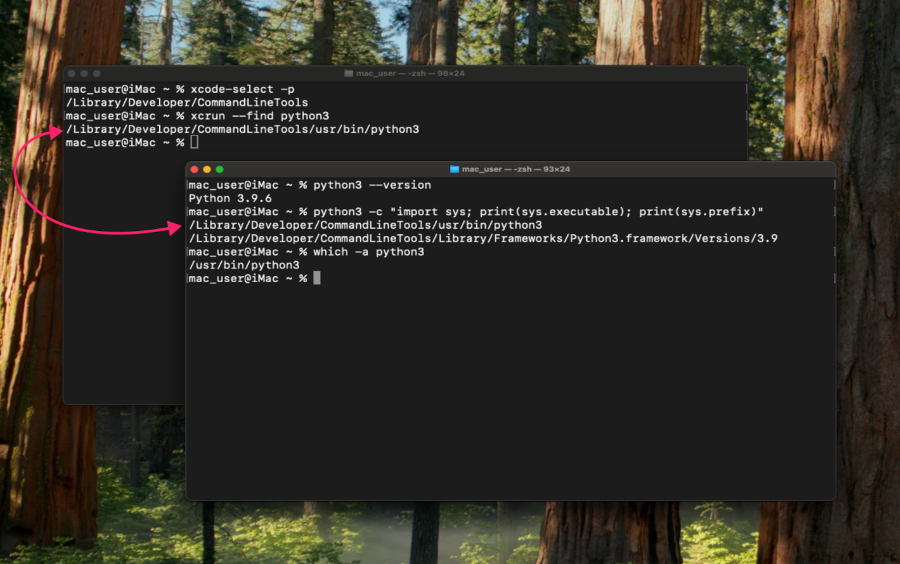
The sys.prefix path tells you which installer each Python came from:
| Source |
|---|---|
| Apple, through the developer tools |
| Homebrew |
| The python.org installer |
| pyenv |
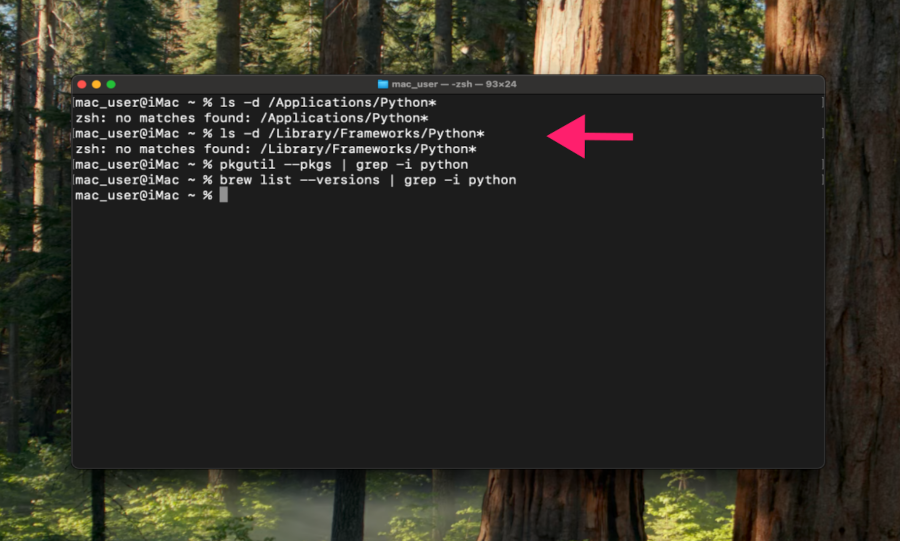
To find Python installs that aren’t on PATH, check the locations each installer uses. A zsh: no matches found result means nothing is installed in that location.
- Run
ls -d /Applications/Python*to find python.org installs’ app folders - Run
ls -d /Library/Frameworks/Python.framework/Versions/*to list python.org framework versions - Run
pkgutil --pkgs | grep -i pythonto find installer package receipts Run
brew list --versions | grep -i pythonto list Homebrew’s Python formulae
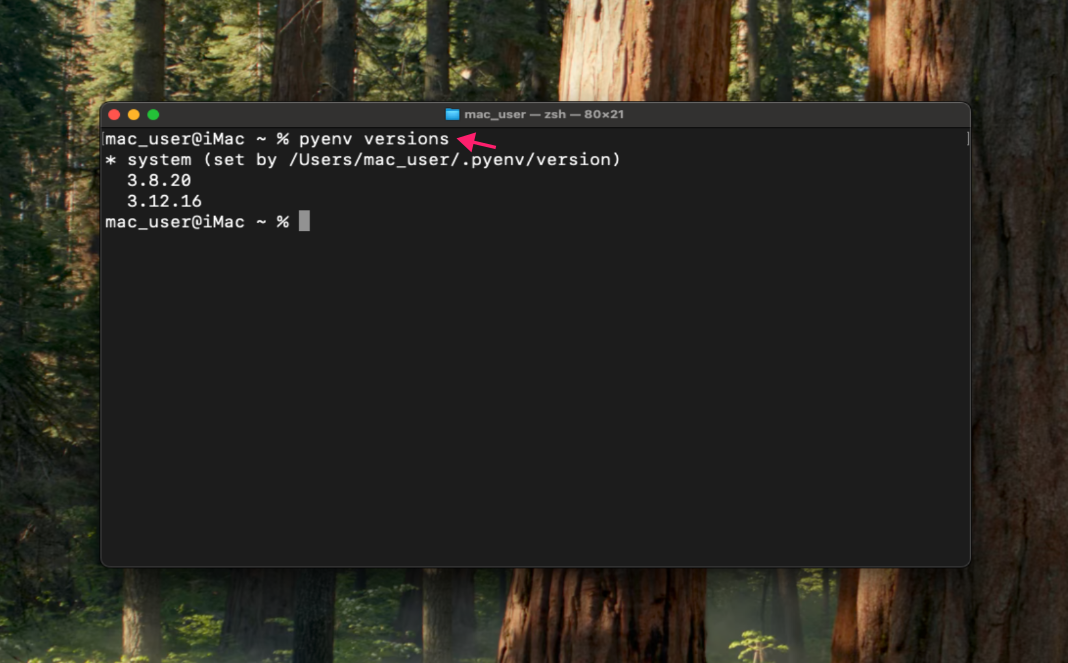
Run
pyenv versionsto list pyenv’s versions. The asterisk marks the active one, and the “set by” note shows whether a project’s.python-versionfile or the global setting chose it. Run it from inside the project folder to see the version that project uses
You can do this at scale as well. RMM and MDM scripts usually run as root, and root can’t see installs in a user’s home folder, such as pyenv. Here’s a script that checks the system-wide locations first, then loops through every user account and lists the pyenv versions in that user’s home folder:
The Script:
Atera does not guarantee the integrity, availability, security, virus-free, safety, lawfulness, non-infringement, rights’ status, or functionality of the scripts. The use of the shared scripts is at your own risk. Scripts are provided “AS IS”. *
#!/bin/bash
ls -1 /Library/Frameworks/Python.framework/Versions /opt/homebrew/Cellar/python@* /usr/local/Cellar/python@* 2>/dev/null
for user in $(dscl . -list /Users UniqueID | awk '$2 >= 501 {print $1}'); do
  home=$(dscl . -read /Users/"$user" NFSHomeDirectory | awk '{print $2}')
  ls -1 "$home/.pyenv/versions" 2>/dev/null | sed "s|^|$user pyenv: |"
doneThe $2 >= 501 filter limits the loop to regular user accounts. It lists version folders instead of running each Python, because running a binary that a user controls with root privileges is a risk you don’t need to take for an inventory.
Before relying on /usr/bin/python3 in a script, check xcode-select -p. If it returns an error, the stub has no Python behind it, and calling it triggers the developer tools install prompt instead of returning a version. In Atera’s RMM platform, you can run this script across selected Macs and read the output for each device. And if you don’t have a script to run, AI Copilot can generate or adapt it from a plain-language description.
With Robin by Atera: When an employee reports that Python is missing or the wrong version, Robin checks the required runtime commands and reports the versions and command paths it finds, so your technician doesn’t need a remote session to run these commands and read the output.
» Here’s how to enable remote management on Mac
How to check your Node.js version on Mac
The Node.js check works the same way: get the version, then confirm the binary behind it.
- Run
node -vto see the active Node.js version - Run
npm -vto see the npm version that came with it Run
which -a node npmto list everynodeandnpmon PATH in search order
Run
node -p "process.execPath + ' ' + process.version"to print the exact executable that runs, with its version. Run it from the project folder to confirm which install that project uses
- A path under
~/.nvm/versions/nodemeans nvm manages that install. A path under/opt/homebrew/binor/usr/local/binusually means a Homebrew install, whichbrew list --versions nodeconfirms. When nvm is in use, two more checks matter: - Run
nvm ls --no-aliasto list installed versions. The->arrow marks the one active in this shell Run
nvm use <version>to switch versions, then runwhich -a nodeagain to confirm the change
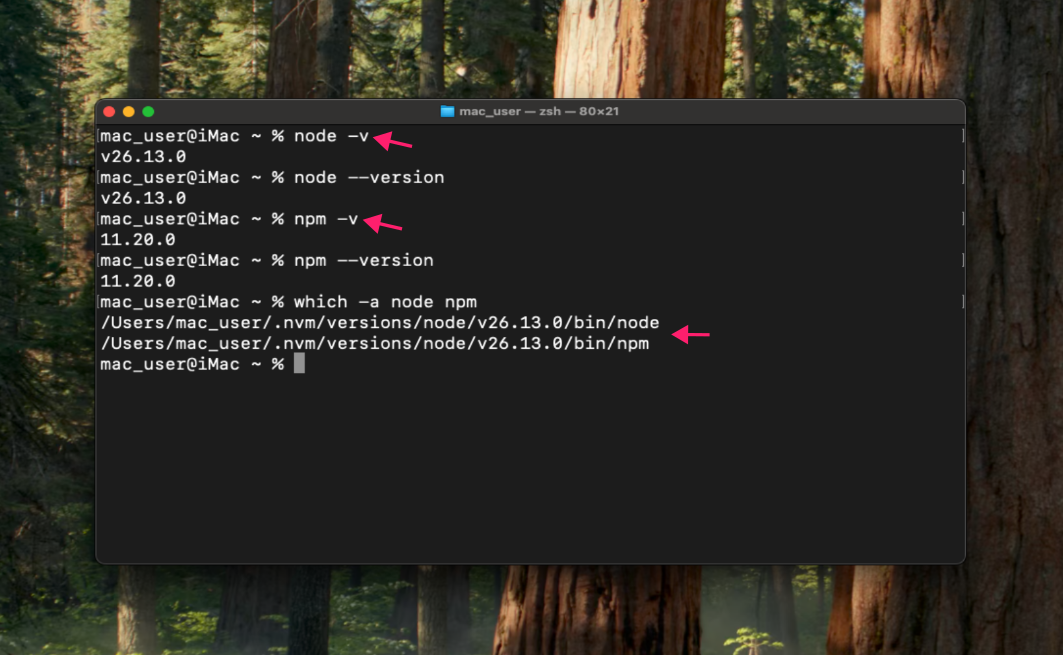
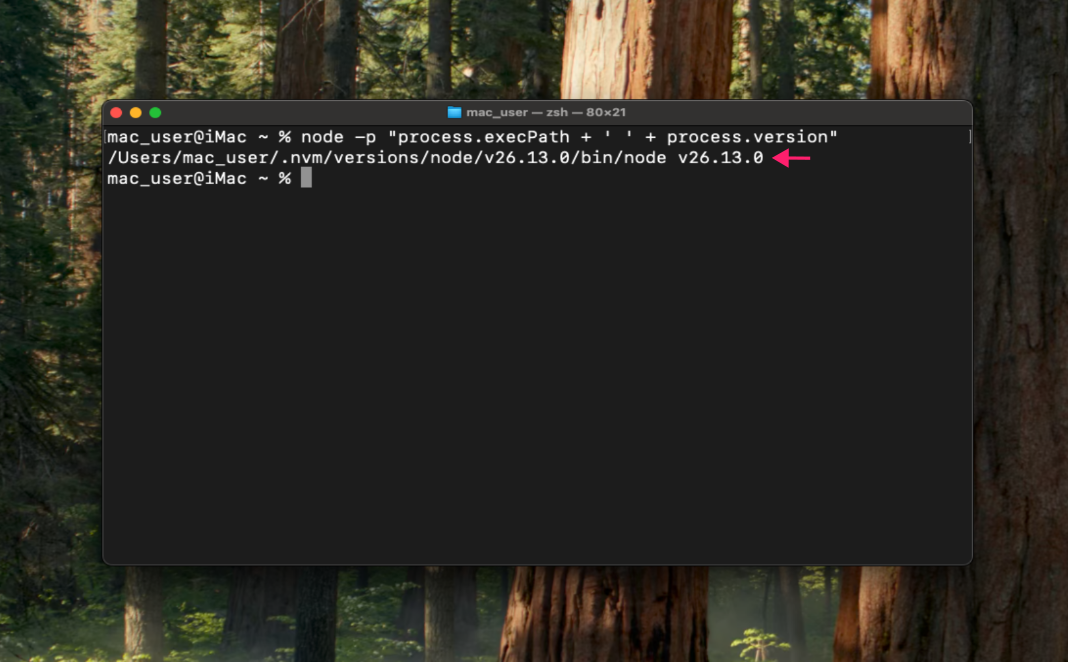
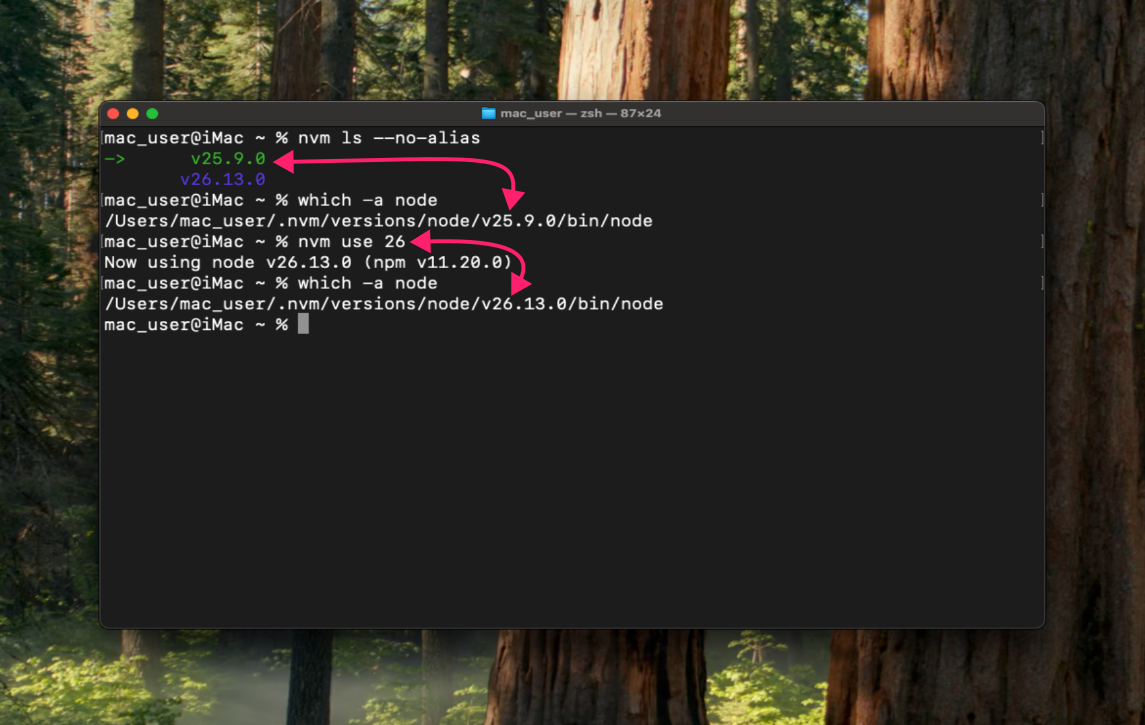
nvm switches the version only for the current shell session. A new Terminal window goes back to nvm’s default version, or to the version in a project’s .nvmrc file when someone runs nvm use in that folder. So the version you see in your remote support session may not be the one the developer’s own terminal runs.
At scale: nvm names each folder after the version it holds, so this script lists Homebrew’s Node.js versions and each user’s nvm versions without running Node.
The Script:
Atera does not guarantee the integrity, availability, security, virus-free, safety, lawfulness, non-infringement, rights’ status, or functionality of the scripts. The use of the shared scripts is at your own risk. Scripts are provided “AS IS”. *
#!/bin/bash
ls -1 /opt/homebrew/Cellar/node /usr/local/Cellar/node 2>/dev/null
for user in $(dscl . -list /Users UniqueID | awk '$2 >= 501 {print $1}'); do
  home=$(dscl . -read /Users/"$user" NFSHomeDirectory | awk '{print $2}')
  ls -1 "$home/.nvm/versions/node" 2>/dev/null | sed "s|^|$user nvm: |"
doneWith Robin: The hard part of a Node.js ticket is usually the path, not the version number. Robin reports the command paths it finds along with the versions, so you can see which install answers to node without working through which -a and nvm yourself.
How to check your Java version on Mac
Java adds two questions the other runtimes don’t have: whether the install is a full JDK or a runtime only, and which vendor built it.
- Run
java -versionto see the version and build. A first line that starts withopenjdkmeans an OpenJDK build.Java(TM) SE Runtime Environmenton the second line means an Oracle build - Run
javac -versionto check for the compiler. Ifjavaworks butjavacdoesn’t, the Mac either has a runtime only or has a JDK that isn’t on PATH - Run
/usr/libexec/java_home -V(capital V) to list every JDK and runtime the system knows about, with its vendor and path. That includes JDKs in/Library/Java/JavaVirtualMachinesand the legacy Java 8 Internet Plug-In - Run
/usr/libexec/java_home -v <version>(lowercase v) to get the path of a specific version, for examplejava_home -v 21 Run
echo $JAVA_HOMEto see whether JAVA_HOME is set in this shell
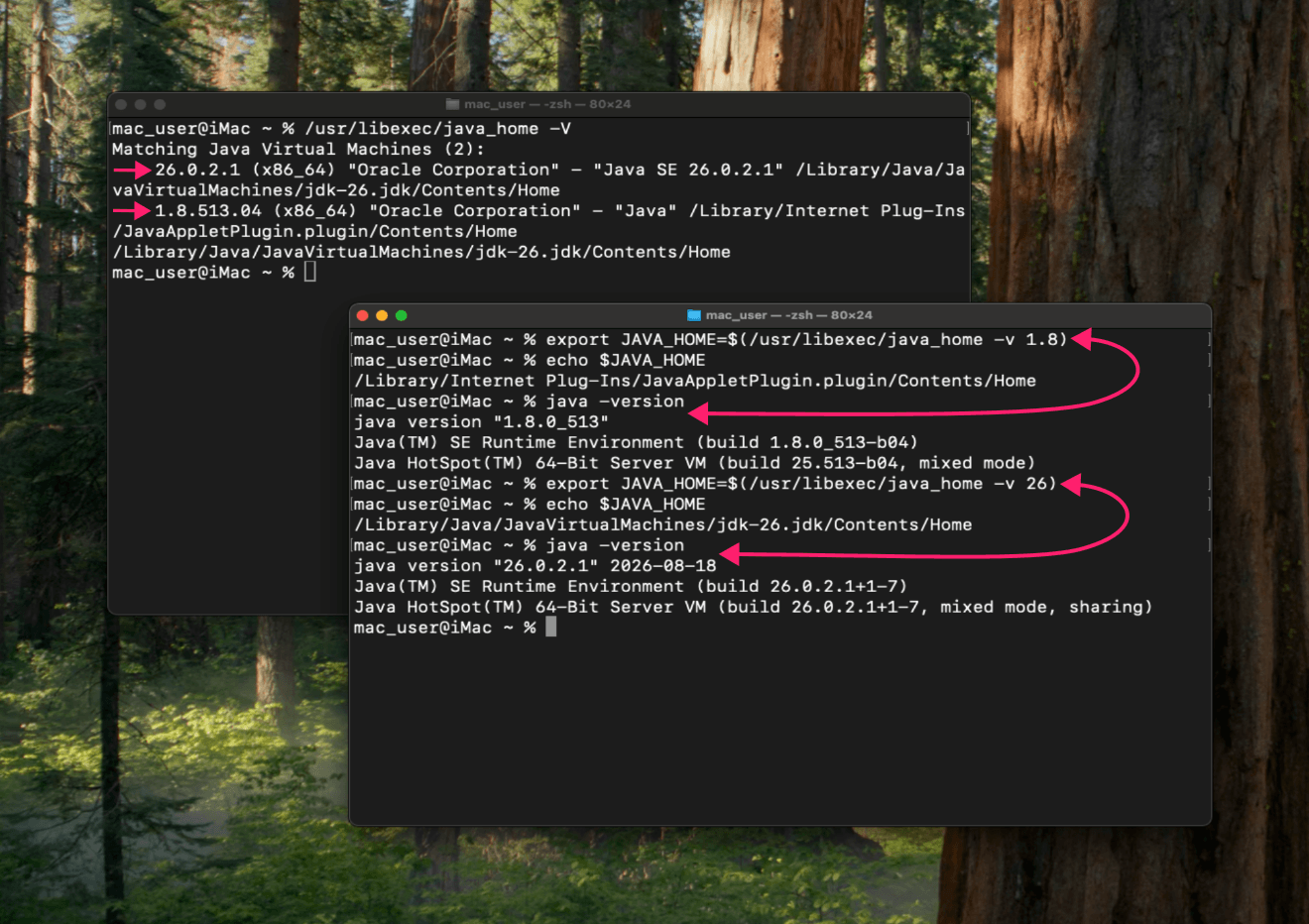
On a Mac, /usr/bin/java is also a stub. It runs the JDK that JAVA_HOME points to. If JAVA_HOME isn’t set, it runs the newest JDK java_home finds. So when java -version doesn’t match the version a developer expects, check JAVA_HOME before anything else.
At scale: Every JDK ships with a release file that states its version. This script lists system-wide JDKs with their vendors, then reads the release file of each JDK in every user’s home folder. Keep the vendor column from java_home -V, since it shows which vendor built each JDK.
The Script:
Atera does not guarantee the integrity, availability, security, virus-free, safety, lawfulness, non-infringement, rights’ status, or functionality of the scripts. The use of the shared scripts is at your own risk. Scripts are provided “AS IS”. *
#!/bin/bash
/usr/libexec/java_home -V
for user in $(dscl . -list /Users UniqueID | awk '$2 >= 501 {print $1}'); do
  home=$(dscl . -read /Users/"$user" NFSHomeDirectory | awk '{print $2}')
  grep -H JAVA_VERSION "$home"/Library/Java/JavaVirtualMachines/*/Contents/Home/release 2>/dev/null
doneHow to fix “command not found” and the wrong version
Most runtime tickets on a Mac come down to one of two things: the shell can’t find the command at all, or it finds a different install than the developer expects. Here are the main problems and how to fix them:
“zsh: command not found” or a developer tools prompt
zsh: command not found means nothing with that name is in any folder on PATH. The cause differs by runtime:
What you see | Likely cause |
|---|---|
| Recent macOS versions don’t include a |
| The nvm lines aren’t in |
|
|
A dialog saying the command requires the command line developer tools | The command ran Apple’s |
| A macOS upgrade removed or broke the developer tools the stub points to |
To fix a command that isn’t on PATH:
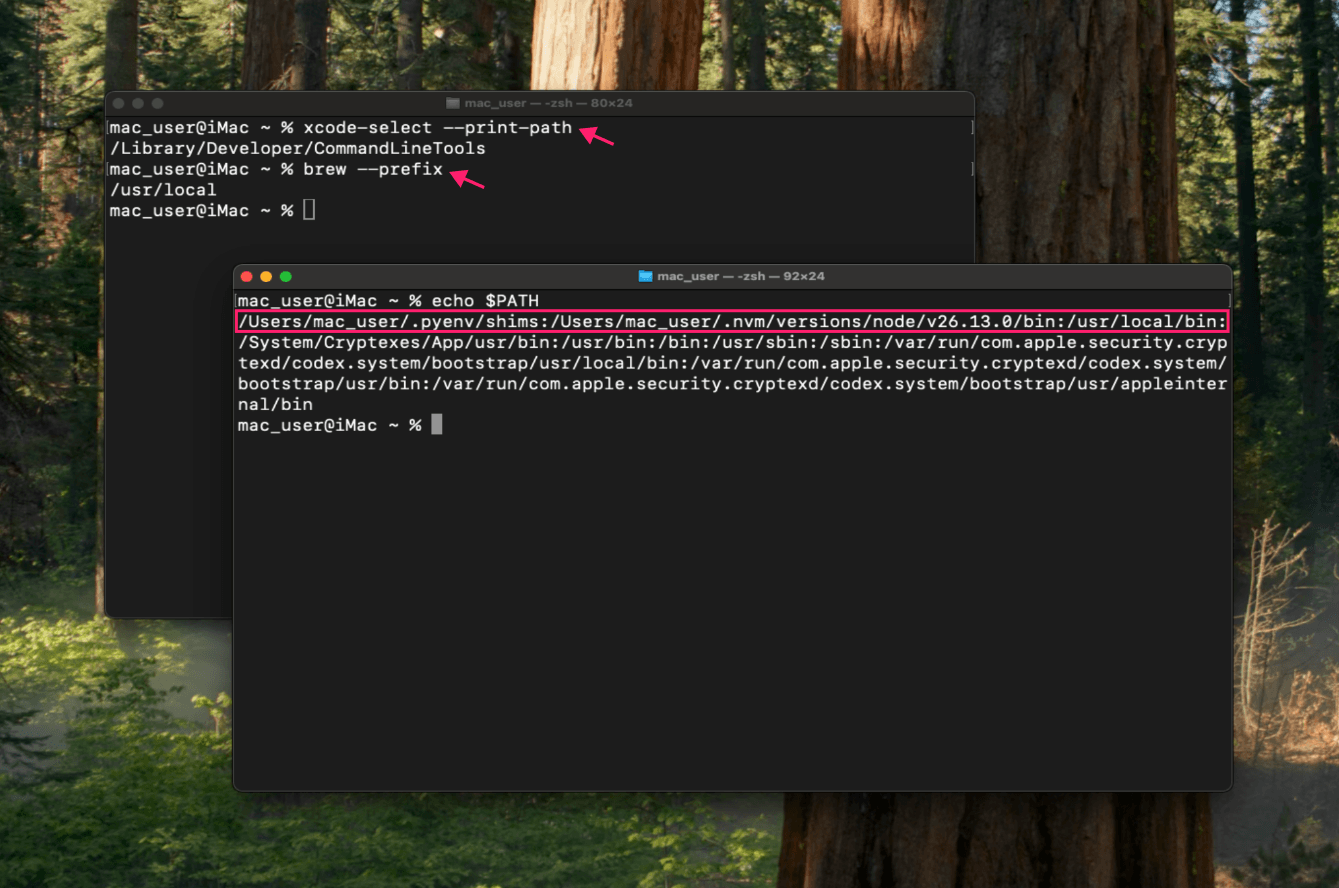
Run
echo $PATHto list the folders on PATH. The shell searches them from left to right, so a version manager’s folder near the start, such as~/.pyenv/shimsor~/.nvm/versions/node/<version>/bin, wins over anything after it.
- Run
brew --prefixto confirm where Homebrew lives on this Mac. It returns/opt/homebrewon Apple Silicon and/usr/localon Intel. On a Mac that was migrated from an Intel machine, an old Homebrew in/usr/localcan still be sitting ahead of the native one - Open
~/.zshrcand add a line at the end that puts the preferred runtime’s folder first, for exampleexport PATH="/opt/homebrew/bin:$PATH" - Run
source ~/.zshrc && rehashto reload the file and clear zsh’s cached command locations To install or repair the Command Line Tools on a Mac you’re sitting at: run xcode-select –install and follow the dialog. If you see the xcrun: error: invalid active developer path error after a macOS upgrade, the same command normally fixes it. - If you’re doing this remotely,
xcode-select --installwaits for the user to click through a dialog, so it won’t finish in an unattended script. Instead, runtouch /tmp/.com.apple.dt.CommandLineTools.installondemand.in-progress - Run
softwareupdate -lto find the Command Line Tools label - Run
softwareupdate -i "<label>"to install it - Delete the file in
/tmp
The wrong Python or Node.js version runs
macOS builds PATH from several startup files in sequence, with ~/.zprofile read before ~/.zshrc in a normal Terminal window. Whichever file adds a folder to the front of PATH last decides which install runs.
- Run
echo $PATH | tr ':' '\n'to list the folders on PATH in search order. A Mac migrated from an Intel machine can still have an old Homebrew in/usr/localsitting ahead of the native one in/opt/homebrew
Then use the PATH steps in the previous section to put the preferred runtime’s folder first, and reload the file.
Version managers change PATH every time a shell starts, so they need their own setting:
- pyenv: Run
pyenv global <version>to set the default, orpyenv local <version>in a project folder to pin that project only. - nvm:
nvm useonly lasts for the current shell. Runnvm alias default <version>to set the version for every new shell, or add a.nvmrcfile to the project folder.
Remote scripts and apps launched from the Dock, including IDEs, don’t read ~/.zshrc. A PATH fix that works in Terminal may not change what they run, so test in the tool that’s failing, not only in Terminal.
Java ignores the version you selected
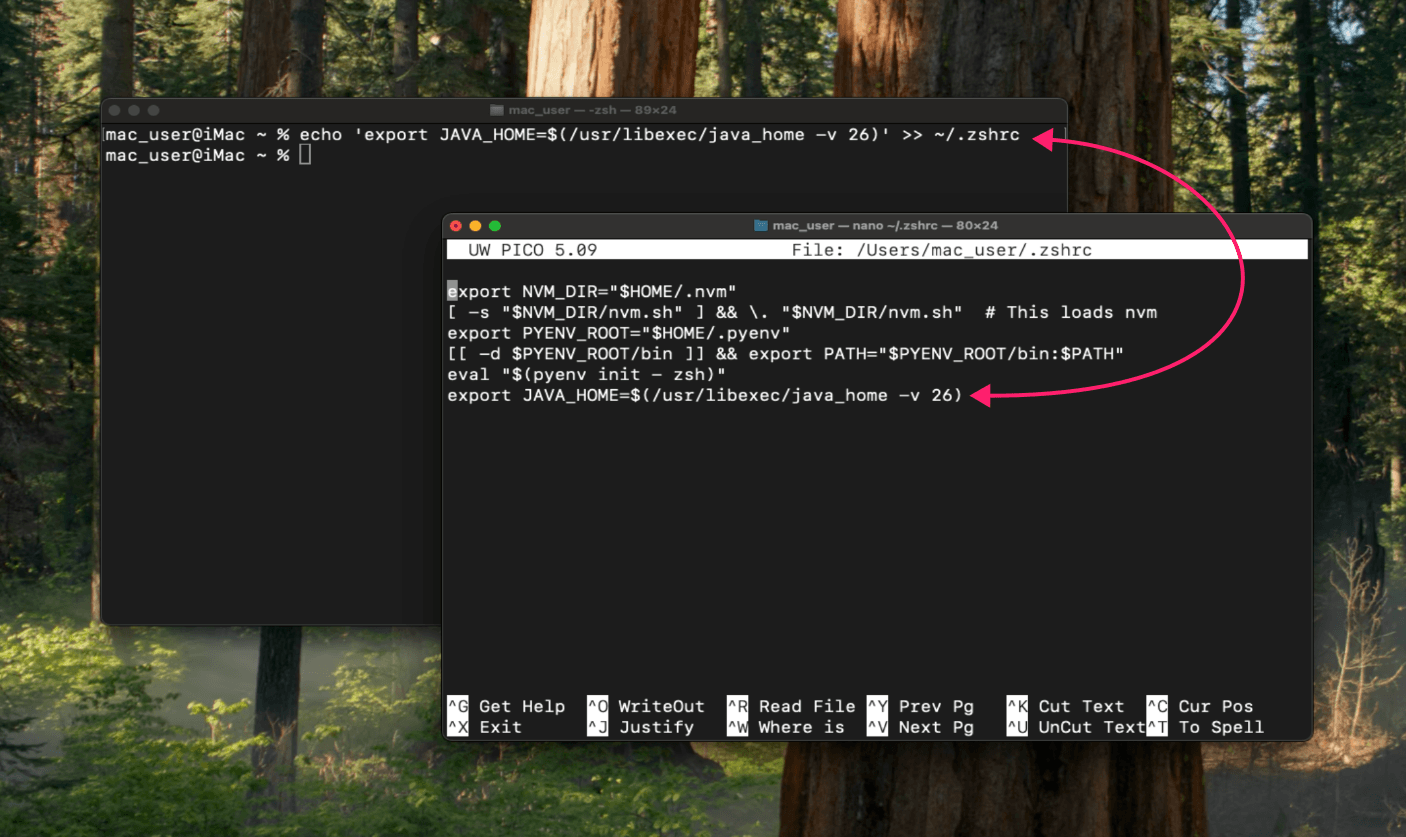
A JAVA_HOME set in one Terminal window is lost when that window closes, and build tools such as Maven and Gradle read JAVA_HOME too. If JAVA_HOME isn’t saved, or is saved for the wrong version, both java and the build tools run the wrong JDK. Confirm the version you need is installed with /usr/libexec/java_home -v <version> before saving it. If that version is missing, java_home prints a warning and falls back to its default JDK.
- Run
echo 'export JAVA_HOME=$(/usr/libexec/java_home -v 21)' >> ~/.zshrc, replacing21with the version the developer needs - Run
source ~/.zshrcto load the setting in the current shell
IDEs such as IntelliJ IDEA keep their own JDK setting and don’t read ~/.zshrc. If the build works in Terminal but fails in the IDE, check the project’s JDK setting inside the IDE.
Where Robin stops and your technicians start:Editing PATH and shell profiles, installing or repointing the developer tools, and setting JAVA_HOME all change how a developer’s environment works, so those changes stay with your technicians. Robin’s runtime use case covers checking the required runtime commands and reporting the versions and command paths it finds. Taking those routine checks off the queue gives your team time for the fixes above.
Take routine runtime checks off the ticket queue
A version number tells you very little until you know which install it came from. Most “wrong version” tickets on a Mac come down to which runtime the shell finds first: Apple’s own python3, a Homebrew build, or a per-user nvm or pyenv copy. Once you can see every install and which one wins, the fix is usually a single change to PATH or JAVA_HOME.
Atera’s Robin takes the checking off your technicians’ plate for routine cases. On Macs with an assigned, reporting Atera Agent, Robin checks the required runtime commands, such as Python, Node.js, or Java, and reports the versions and command paths it finds. Those results help IT spot a missing or mismatched prerequisite before provisioning changes. Your technicians still make the fixes, and Atera’s remote scripting lets them run the checks and fixes from this guide across selected Macs. Robin is sold separately as an add-on to the Atera IT suite.
» See Robin in action or try Atera for free
Frequently Asked Questions
Related Articles

How to fix a USB device not recognized in Windows 11
“USB device not recognized” covers a dead cable, a dock on old firmware, a port Windows powered down to save energy, and a drive your own policy is blocking on purpose. Swapping ports won’t tell them apart. Rule out the hardware, read what Device Manager reports, and fix each cause where you find it, whether that’s one desk or a whole fleet.
Read now
How to fix the Windows search bar not working in Windows 10 and 11
When the Windows search bar won’t open, won’t take typing, or can’t find files, the fix depends on which part of Search has failed. This guide walks IT teams through five tested methods for Windows 10 and 11, from a single frozen search bar to a fleet-wide fix.
Read now
How to fix Google Drive not syncing
The Drive folder is gone from Finder, and the user swears nothing changed. Somewhere between the account, the sync mode, a corporate proxy, and macOS File Provider, something broke, and the quickest reset can wipe edits that never uploaded. Find the real failure first, protect what hasn’t synced, then fix it on one Mac or across the fleet.
Read now
How to fix Bluetooth not working in Windows 11
A Bluetooth ticket could mean a radio switched off in Quick Settings, a headset still connected to someone’s phone, a stopped service, a driver Windows Update swapped overnight, or an adapter that has vanished from Device Manager. Guessing burns the remote session. Work the causes in order, cheapest check first, and fix each one on a single PC or across the fleet.
Read nowEndless IT possibilities
Boost your productivity with Atera’s intuitive, centralized all-in-one platform