Table of contents
Both Robin by Atera and Flow by ServiceNow aim to solve the same issue: Employees expect IT issues fixed fast, inside the tools they already work in. The difference is the layer they work at. Flow resolves requests in the chat thread, while Robin acts directly on the infrastructure.
If you’re a CIO or VP of IT choosing an autonomous IT support tool, this Robin vs. ServiceNow Flow comparison can help you decide.
The AI layer, not the old ITSM debate
This article is entirely AI layer vs. AI layer (Robin vs. Flow). We’ll not compare the core features of Atera and ServiceNow, although you can check this separate article for it.
What is ServiceNow Flow?
Flow is an AI service desk tool that lets employees get help through natural conversation directly on apps like Slack, Teams, Claude, and email. Flow answers instantly and resolves the issue through automation, if available.
While ServiceNow Otto is for enterprises, Flow can be used by both small teams and enterprises looking for an AI service desk.
Where Flow came from
ServiceNow launched Flow on October 1st, 2026, to solve a common problem teams face: answering the same requests, such as password resets and access requests, repeatedly.
Flow is built separately from the ServiceNow platform, so you don’t need to be a ServiceNow user to use it.
What Flow actually does
Flow describes its AI as one system working in four contexts:
- Helper: Employees can open requests directly from Slack, Teams, or email, and the Helper responds instantly.
- Resolver: With access to your knowledge base, Flow helps agents close requests and run an automation when one exists.
- Builder: Describe the automation you want to create, and the Builder builds it for you. Review and adjust each step and run automations in simulation before publishing.
- Service Desk Coach: Flow helps not only employees but also service desk agents. It shows your team how to get more out of Flow and lists the most urgent tasks.
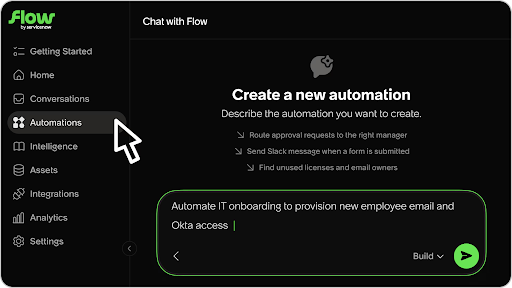
To set up automations, Flow needs to be integrated with third-party tools. See all the available integrations on Flow’s integration page.
Currently, there are 100+ integrations with knowledge, asset, ticketing, and automation platforms.
AI security
Flow’s security page explains the steps it takes to protect your organization’s data and systems. It’s built-in security controls include:
- Permission checks before AI actions
- Isolated automation runs
- Encryption and audit trail
- Prompt screening
- Secure data storage
Flow’s public docs don’t list security certifications.
What is Robin by Atera?
Robin is an AI technician that remediates Tier-1 and complex Tier-2 technical incidents end to end by autonomously taking real actions on devices, servers, mainframes, and networks, without needing a technician in the loop.
How Robin works
Robin resolves technical incidents directly on the device, network, or the cloud, rather than sending them to a technician’s queue.
Here’s the four-step process it follows for autonomous resolution:
- Diagnose: Robin captures requests through Teams, Slack, email, WhatsApp, or the Atera Customer Portal. To find the root cause of issues, it asks follow-up questions.
- Remediate: Robin takes the approved action directly on the device, network, or in the cloud. It only routes for approval when a step requires it.
- Verify: Robin confirms the issue is resolved before closing anything. If it isn’t, it escalates to a technician with the full context.
- Close: Robin updates the ticket with the outcome and next steps, and logs every action for governance and compliance.
Robin runs device fixes through Atera’s own RMM agent, meaning you don’t need a third-party endpoint tool. Robin also integrates with 50+ ITSM, identity, and SaaS apps, so you don’t need to switch tools to use it.
Robin in action: the tasks it resolves
Atera lists all Robin use cases on this page.
We’ve also highlighted a few use cases below.
1. Clear print queue and restore printer
The issue: A print job is stuck in the queue, and nothing else prints.
Robin resolution: Robin clears the stuck jobs, resets the print spooler, and selects the right printer by location, all directly on the device.
2. Wi-Fi and network self-service
The issue: A user can’t connect to the network.
Robin resolution: Robin checks whether the fault sits with the device, the network adapter, DNS, or a proxy, then runs the fix at that exact point.
3. Clear stale Microsoft credentials
The issue: A user keeps getting asked to sign in even after entering the right password.
Robin resolution: Robin removes the cached Office, Outlook, Teams, ADAL, or OneDrive credentials that cause authentication problems.
4. Trigger an Intune sync
The issue: A device hasn’t received a required app or company policy from Intune.
Robin resolution: Robin forces an Intune check-in on the device so it picks up pending policies and apps.
5. Audio, camera, and Bluetooth failures in video calls
The issue: A user’s mic, camera, or Bluetooth headset stops working right before a meeting.
Robin resolution: Robin detects mic, camera, and Bluetooth headset problems and gets them resolved before a meeting.
6. Repair corrupted Windows system files
The issue: Windows starts crashing because system files are damaged.
Robin resolution: Robin runs Windows’ supported system file repair on the device and reports whether the corruption was fixed.
Guardrails and enterprise trust
Autonomous IT only makes sense when it’s properly governed. These are the standards Atera’s AI security has set for Robin:
- Guardrails are admin-defined: IT admins write the custom instructions, playbooks, and knowledge base articles, which set the scope for what Robin can execute.
- High-risk actions still need human approval: Before Robin can execute high-risk actions, it requires a human sign-off.
- Each action is logged: Each Robin action is logged under its own ID, just like a human technician’s work.
- Robin is ITSM agnostic: Robin integrates with the ITSM platforms your team already runs, so you don’t need to switch tools to use it.
You can learn more about how your data is managed on the Robin security & compliance FAQ page.
Robin vs Flow: the core difference
Now that we’ve reviewed both Robin and Flow separately, let’s compare each side by side, starting with this overview table.
Dimension | ServiceNow Flow | Robin by Atera |
Primary function | Conversational AI that answers, automates, or escalates requests in chat | AI technician, diagnoses and remediates directly |
Scope | IT first, plus HR, Legal, and other request-handling teams | IT-specific (Tier-1 and complex Tier-2 incidents) |
Where it executes | In the chat thread and through 100+ connected apps, via automations | On the device, server, mainframe, or network, for example, resetting a password with MFA, installing approved software, or restarting a hung service |
Governance | Admin-set limits, simulation/subprod testing, two-way ServiceNow sync for auditability | Configurable guardrails, approval workflows, audit trails |
Time / productivity impact | ServiceNow expects a 40% ticket volume cut (stated as expectations during controlled availability) | Up to 92% autonomous resolution rate, 120-second average resolution time with 0.1-second first-response time (Atera published proof points) |
Strength | Speed to deploy: live in a day Works for IT, HR, legal, and other teams | Patented agents that detect, diagnose, resolve, and verify technical incidents end to end, acting directly on devices, servers, networks, and mainframes. |
In market since | October 2026 (controlled availability; GA expected Q4 2026) | May 2025 (as IT Autopilot first) |
Why Robin has the edge
1. Device fixes come built in
Flow can take actions directly on devices, but only through a separate endpoint tool. Its automation integrations include Kandji, Jamf Pro, and JumpCloud. Through these tools, you can execute actions like restarting a device, doing a computer search, or running a command set up in JumpCloud.
Robin’s device actions are part of the product. Since Robin works with Atera’s built-in RMM and PSA, you don’t need separate tools to execute actions like flushing a DNS cache or clearing a print queue.
2. Ready-made actions versus automations you build
Building automations with Flow always follows the same cycle: you describe it, review the draft, connect the integrations, run validations, and publish. That gives you control, but building each automation by hand is time-consuming.
Atera provides hundreds of built-in actions for Robin, developed, maintained, and tested by its engineering team. Admins can further adjust Robin’s behavior through custom instructions and playbooks.
You can see Robin use cases here. Flow doesn’t have a similar “all-in-one list” for the actions it can take.
3. A measured resolution rate vs. an estimated one
Flow briefly mentions on its comparison page that “Teams can cut repetitive requests up to 40%.” And even this figure, ServiceNow has clarified, is an “expectation” while the product is in controlled availability. Other than that, Flow publishes no resolution rate.
In comparison, Robin resolves up to 92% of Tier-1 and complex Tier-2 technical incidents, with a 120-second average resolution time. A Forrester Total Economic Impact TM study commissioned by Atera modeled a 321% ROI, driving $7.3 million in total benefits against $1.7 million in costs.
4. About 17 months longer in production
Robin’s underlying technology launched as IT Autopilot in May 2025. Flow launched on October 1, 2026, with general availability expected in Q4 2026.
Why this distinction matters for IT leaders
Flow and Robin both work on tools employees already use: Slack, Teams, and email. The difference is how long the setup takes, and how much ticket backlog each one can solve.
- Many IT incidents happen on the device, not in an app. Device issues, such as a stuck print spooler or corrupted system files, need fixes on the device itself. Flow reaches a device only through connected third-party MDM software. Robin uses Atera’s RMM to execute the fix directly on the device, under one platform.
- Automations need to be set up before they work. Flow can resolve issues only after automation workflows are built. Robin’s built-in automations cover the most common device, network, and cloud fixes, meaning you don’t have to build them from scratch.
- The math works in your favor at scale. Industry benchmarks put manual ticket resolution at 63 minutes of active technician work (Endsight 2024) and 21.96 hours of full lifecycle time from ticket opened to resolved (Freshworks 2025). Robin’s up to 92% autonomous resolution rate at a 120-second average means your team gets most of those hours back.
The bottom line
Flow’s appeal is easy to see. It lets employees submit workplace requests directly on the apps they already work in, and admins can build automations. But each automation has to be built by hand, and device fixes rely on third-party MDM tools.
Robin has been resolving incidents in production since May 2025, roughly 17 months before Flow existed, and does so with a named, measured resolution rate. It resolves up to 92% of technical incidents end-to-end, all without a technician having to get involved.
If you’re looking for a ServiceNow Flow alternative, request a Robin demo here to see it in action.
Frequently Asked Questions
Related Articles

Atera vs. Automox: A full comparison for IT decision-makers in 2026
Compare Atera vs. Automox across all key categories: Agentic AI, features, pricing, user interface, customer support, and user feedback. Choose the best one for your organization.
Read now
Robin vs Request Resolver (Former Rovo)
Robin and Atlassian's Request Resolver (Former Rovo) both bring Autonomous IT into ITSM, but they operate at different levels. This full comparison breaks down where each one's autonomy actually reaches.
Read now
Robin vs Kaseya Intelligence
Robin by Atera and Kaseya Intelligence both talk about autonomous IT, but structure their AI technologies differently. See where each one's autonomy actually reaches and which works for your org.
Read now
Robin Atera vs. Ivanti Neurons: comparing two very different approaches to autonomous IT
In this article, we'll compare Robin vs. Ivanti Neurons: one AI agent that resolves IT incidents end to end, and one platform that splits autonomy across two separate AI capabilities.
Read nowEndless IT possibilities
Boost your productivity with Atera’s intuitive, centralized all-in-one platform