
Table of contents
Table of contents
- The problems with staying on legacy models
- Preparation steps for delegated access
- How to build an efficient delegation model in Microsoft 365
- How to align Azure and Microsoft 365 delegation models
- How to navigate the Google Workspace ecosystem
- How to structure temporary access in AWS
- How Atera helps you stay in control
Generate summary with AI

Delegated access has shifted from a convenience into a security decision you can’t afford to overlook. The way you grant external access today directly impacts how exposed your clients really are and it’s now a core part of how you approach IT management. Modern environments no longer tolerate permanent, broad permissions that sit unchecked in the background. Instead, access is becoming temporary, task-specific, and tightly controlled from start to finish.
In this blog, we’ll show you how delegated access works and how to set it up the right way
» Here’s how to increase IT efficiency in your organization
The problems with staying on legacy models
Failing to modernize your access strategy leads to a buildup of security, compliance, and operational debt that puts both your agency and your clients at risk.
- Increased attack surface is the most immediate danger, as permanent admin rights create standing targets for threat actors. Microsoft Security documented how attackers like NOBELIUM specifically exploit delegated administrative privileges to facilitate breaches, demonstrating that “always-on” access provides exploitable entry points into client environments.
- Compliance and IT audit failures happen because modern regulatory standards require you to prove who had access to what and why, which is nearly impossible with broad, permanent privileges.
- Lateral movement risk allows an attacker who breaches a service provider to jump from one customer to another with ease, potentially leading to a multi-client ransomware event.
- Lack of visibility makes it difficult to track specific actions, meaning that if a security breach does occur, your team will struggle to identify exactly how the intruder got in or what they touched.
- Technical debt builds up over time, making the eventual move to a secure model much more difficult and expensive as your team becomes reliant on outdated and insecure workflows.
» Learn more about the hidden costs of legacy IT
The evolution of access design
The move away from legacy delegated patterns marks a significant change in how service providers approach security.
Previously: Broad and permanent access
In the past, “Delegated Admin Privileges” (DAP) were the standard, which essentially gave a partner permanent, broad “Global Admin” rights to a client’s environment. This created a massive security hole because a single compromised partner account could provide a shortcut into hundreds of different customer tenants.
Today: The zero trust lifecycle
The industry has moved toward an approach where no access is permanent. Service providers now have to think of access as a temporary lifecycle rather than a one-time setup. This means designing systems where roles are scoped to the specific job at hand and permissions expire automatically. This shift forces providers to be more organized with their identity management, but it ultimately protects both the provider and the customer from the devastating effects of lateral movement during a cyberattack.
» Take a closer look at the zero trust network access approach
Modern delegated access models
Delegated access serves as the primary framework for how service providers support their clients, yet the strategies for granting those permissions have evolved to meet higher security standards.
Today, organizations select from specific delegation models to ensure technicians can perform necessary tasks without leaving the environment vulnerable to unauthorized entry.
- Granular Delegated Admin Privileges (GDAP) focuses on the principle of least privilege by allowing partners to request only the specific roles they need for a customer’s workload rather than full control. This means better security because access is time-bound and restricted to certain tasks, though it requires more frequent management and clearer governance than older methods.
- Just-in-Time (JIT) Access ensures that administrative rights are only granted the moment a task needs to be performed and are revoked immediately after completion. This model drastically shrinks the window of opportunity for an attacker to exploit an account, but it can occasionally create minor delays if a technician has to wait for an automated or manual approval before they can start working.
- Break-Glass Access involves using highly privileged emergency accounts that stay inactive until a primary access method fails or a major crisis occurs. While these accounts are vital for business continuity during a lockout, they represent a significant risk if they aren’t heavily monitored and kept under strict physical or digital “lock and key.”
» Make sure you know how to define IT support tiers
Preparation steps for delegated access
Before granting any external access to a client tenant, it’s vital to establish a clear framework that prioritizes security and accountability.
- Business justification and scope involves documenting the exact purpose of the access, the specific resources needed, and the minimum privileges required to get the job done.
- Least-privilege role mapping ensures you define specific roles and the exact duration they are needed, purposefully avoiding broad administrator rights.
- Formal approvals and contract terms are necessary to obtain client sign-off and update service level agreements with clear liability and revocation clauses.
- Identity controls must be established by enforcing multi-factor authentication (MFA) and setting up conditional access policies from the start.
- Service account hygiene requires using dedicated, time-boxed service principals instead of using or sharing standard user credentials.
- Logging and monitoring should be enabled immediately to capture detailed audit logs and telemetry for future forensic reviews or troubleshooting.
- Onboarding checklists provide a clear runbook that includes test scenarios, escalation paths, and emergency break-glass procedures.
- Attestation and review schedules help maintain security by setting up automated reminders to revalidate access permissions on a regular basis.
- Revocation and offboarding plans ensure you have a predefined exit strategy to remove access and preserve evidence once the work is complete.
» Learn more: Autonomous vs. automated
How to build an efficient delegation model in Microsoft 365
Designing a delegation model in the Microsoft 365 ecosystem requires balancing security requirements with the need for your support team to work quickly. Follow these implementation steps to build a model that works:
Group-based mapping
Instead of assigning roles to individuals, assign permissions to specific Security Groups within your partner tenant. This allows you to manage access centrally; when a technician joins or leaves your team, you simply update your internal group, and their access across all client tenants updates automatically.
JIT activation
Implement Privileged Identity Management (PIM) so that technicians don’t have active permissions by default. When a support ticket is opened, the technician “checks out” the necessary role for a limited window of 4 to 8 hours, which removes the risk of standing access that could be exploited by an attacker.
Centralized monitoring
Use tools like Atera’s RMM platform to view alerts and system health across all your clients from a single dashboard. This eliminates the need to constantly sign in and out of different customer tenants, allowing your team to stay productive while maintaining a high security posture.
By combining these task-specific roles with time-limited access, you protect your clients from major breaches while keeping your support team’s workflow fast and auditable. -Odinke Ukomadu
» Don’t miss these benefits of ticketing systems
How to align Azure and Microsoft 365 delegation models
While they often overlap, Azure and Microsoft 365 use different engines for delegation.
Azure vs. Microsoft 365: The technical split
Azure delegation, managed via Azure Lighthouse, focuses on infrastructure resources like virtual machines, networks, and databases using granular Azure RBAC at the subscription or resource group level.
In contrast, Microsoft 365 delegation, managed via GDAP, focuses on identity and SaaS services like users, mailboxes, and Teams using Entra ID roles. While Lighthouse provides a cross-tenant management plane for technical resources, GDAP creates a secure, time-bound identity bridge for administrative tasks within the client’s tenant.
» Make sure you understand the differences between Azure AD and Active Directory
How to align the models
To keep things efficient, you should view these as a “Joint Force” rather than competing models. You can align them by following these steps:
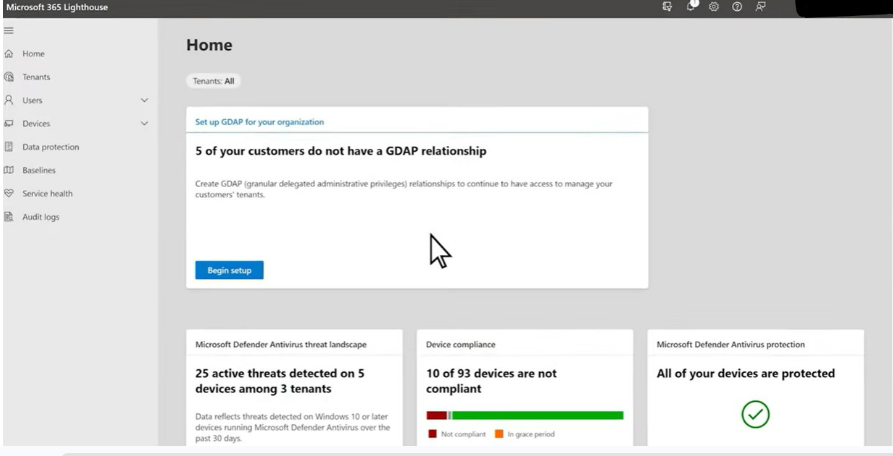
1. Centralized identity: Create specific Security Groups in your provider tenant based on job function, such as “Tier 2 Network Engineers.”
2. GDAP mapping: Map that internal group to M365 roles (like Exchange Administrator) for SaaS-level management.
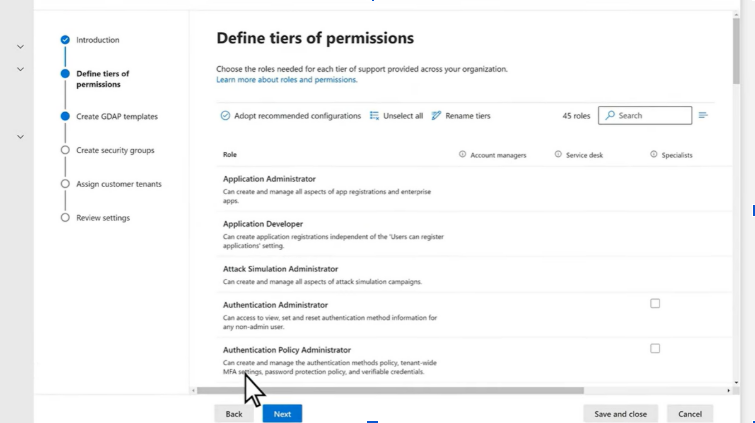
3. Lighthouse mapping: Assign that same group to Azure RBAC roles (like Network Contributor) for infrastructure-level management.
When to keep them separate
There are critical scenarios where isolation is safer than alignment:
- Financial boundaries: Keep billing and subscription management separate from technical support. A “Billing Admin” should have a GDAP relationship for license management but should never be in a Lighthouse group with access to production SQL databases.
- Compliance isolation: If a client has high-security infrastructure (such as PCI or HIPAA environments) alongside standard office mailboxes, you should separate the access structure accordingly. Use tighter groups for Azure resources while keeping Microsoft 365 support roles standard to limit exposure.
How to navigate the Google Workspace ecosystem
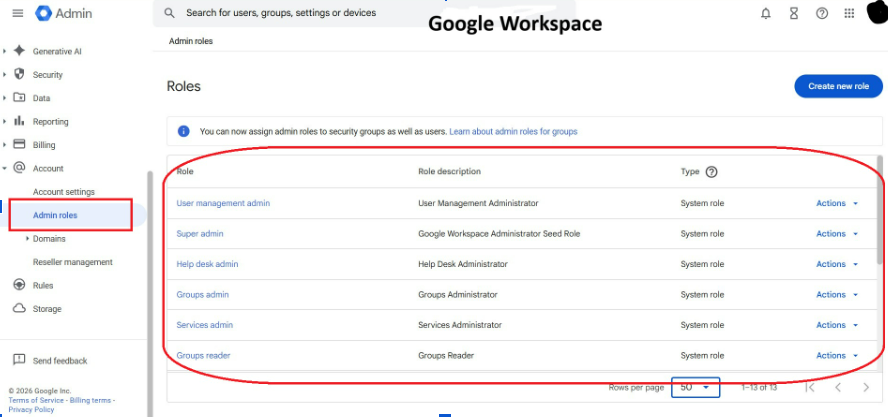
If you’re moving from a Microsoft environment to Google Workspace, you can’t assume the mechanics are the same. Google’s approach to delegation is built on a different logic. Key differences in Google Workspace include:
- Organizational Units (OUs) scoping: Administrative power in Google is often restricted by OUs. This is like giving someone the keys to a specific floor of a building rather than the whole property.
- Standing access: Unlike the native JIT/PIM features in Microsoft, Google roles are typically permanent. Without third-party tools, you must perform manual audits to close access windows.
- Domain-Wide Delegation (DWD): This allows powerful service-account access. It requires very precise limiting of “OAuth scopes” to avoid exposing the entire tenant to a single integration.
Assumptions to discard
When moving from Microsoft to Google Workspace, discard these core assumptions:
- Native JIT/PIM: Unlike Entra ID, Google lacks a native Just-in-Time (PIM) feature for administrative roles. Access is “standing” or permanent by default unless you implement third-party governance tools to manage the lifecycle.
- GDAP group mapping: You can’t map your internal partner Security Groups to client roles as seamlessly as you can with Microsoft. Google’s partner delegation is flatter and significantly less granular than the mapping found in Microsoft’s GDAP.
- Role logic: While Microsoft uses flat, attribute-based roles, Google is OU-centric. In this environment, an admin role might only apply to a specific organizational unit rather than the entire tenant, requiring a different approach to scoping permissions.
» Learn about the different IT department roles and responsibilities
How to structure temporary access in AWS
In the AWS ecosystem, the goal is to avoid long-lived trust relationships that can become stale and vulnerable over time. Access should be structured around temporary, role-based credentials that expire automatically.
Instead of creating permanent IAM users with static keys in a client’s account, you should set up IAM roles in the target account, as shown in the screenshot below.
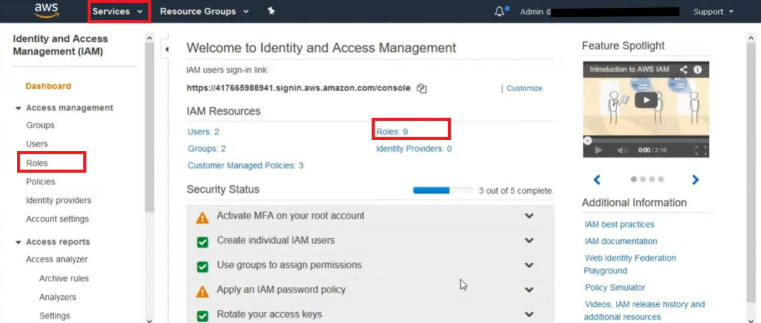
You then allow trusted accounts to “assume” those roles using the AssumeRole API. This ensures that access is only granted when a specific task is active, and the credentials provided will automatically expire once the session ends.
Best practices for secure AWS delegation:
- Use short-lived session tokens instead of long-term access keys to reduce the window of exposure.
- Apply least privilege by granting only the permissions required for specific tasks to prevent privilege creep.
- Define clear trust policies between accounts, purposefully avoiding overly broad or permanent trust paths.
- Regularly review and prune unused roles or permissions to keep the environment clean and secure.
This approach minimizes risk by ensuring cross-account access is temporary, auditable, and tightly controlled, reducing the overall exposure from stale credentials.
How Atera helps you stay in control
When delegated access starts spanning multiple clients, tools, and environments, things can slip through the cracks faster than you expect. That’s where Atera’s RMM platform makes a difference. With everything managed from a single dashboard, you get full visibility over devices, access activity, and system health without jumping between platforms. This kind of centralized control supports modern delegation models where access needs to be monitored, time-bound, and easy to track.
Features like remote monitoring, patch management, and network discovery help you maintain oversight of every connected device, while built-in helpdesk and ticketing keep access tied to real, documented tasks. That structure aligns naturally with Just-in-Time workflows, where permissions are granted based on actual support needs.
When everything runs through one platform, you reduce blind spots, improve accountability, and keep delegated access aligned with how security is expected to work.
» Ready to try it out? You can see how Atera works for free
Frequently Asked Questions
Related Articles

How to reduce alert fatigue across your IT team
Your technicians aren't ignoring alerts because they're careless. They're ignoring them because most alerts have taught them to. Once the stream stops being trustworthy, real failures slip past with the noise. Fixing it means deciding what deserves an interruption, tuning out transient spikes, collapsing alert storms, and automating the fixes you've run a hundred times.
Read now
How to close the IT skills gap on your team
Course completions don't close skills gaps. Technicians finish the training, then hand the first unfamiliar failure straight back to a senior engineer. Real capability gets built on live tickets, incidents, and maintenance windows, with guidance that fades as competence grows.
Read now
How to calculate cost per ticket (and why most teams get it wrong)
Most cost-per-ticket figures are wrong before anyone reads them. Missing overhead, tickets that were opened but never closed, spam and duplicates padding the count, and one month's costs divided by another month's tickets all make support look cheaper than it is. Fix both sides of the division and the number finally shows where technician time and money actually go.
Read now
How to prepare for a software license audit
A vendor audit notice doesn't wait for you to get organized. It demands proof, right now, that every install matches every entitlement you've paid for, and most IT teams find out the hard way how much they don't actually know about their own environment. Getting audit-ready before the letter arrives is the difference between negotiating from strength and paying for months of scrambling.
Read nowEndless IT possibilities
Boost your productivity with Atera’s intuitive, centralized all-in-one platform









