Table of contents
Table of contents
- What is Pulseway?
- Is Pulseway worth it for your organization?
Generate summary with AI

Pulseway is liked by many teams for IT management. Although it offers the key IT management functions and is easy to use, users report declining customer support, and it lacks the advanced AI capabilities that many would need.
If you’re unsure about investing in Pulseway, our article can help. Below, we have reviewed Pulseway’s key features, pricing, interface, security, and Agentic AI technology.
We’ll also look at what other users say about the platform, and where Pulseway alternatives like Atera may be a better choice.
What is Pulseway?
Pulseway is an IT management platform that helps IT teams remotely monitor and manage their workstations, servers, switches, and other network devices. With features like PSA, RMM, patch management, and remote access, it competes in the all-in-one IT management product space.
#1: Key features of Pulseway
Let’s start with an important one: the key features of Pulseway.
Pulseway aims to combine all the key IT management functions into one platform, and these features are:
- Remote monitoring and alerting to stay ahead of issues on your workstations
- PSA to handle tickets, create customer profiles, handle contracts and billing, and more
- Patch management to keep your Windows, Mac, and Linux workstations up-to-date
- Automation to run scripts automatically and fix issues when alerts occur
- Remote access to connect to your devices for troubleshooting
- Back up to protect files in case of data loss or system failure
While the feature set is impressive, most of it is what you’d expect from the best RMM software.
For example, Atera has the same core IT management features as Pulseway, plus Agentic AI at the core of its product. Robin by Atera (one of Atera’s AI agents) resolves IT issues on its own, such as troubleshooting devices and installing approved software.
#2: Agentic AI technology
Pulseway has updated its AI offerings, with two AI features now available:
- Pulseway Assist in the PSA: This includes ticket summaries, a writing assistant, and resolution summaries.
- AI workflow generator: With the workflow generator, a technician can describe what they want to achieve, and Pulseway builds an automation workflow.
Pulseway’s AI is truly useful for ticketing and workflow automation, but what it lacks is autonomous action. It doesn’t interact with end-users or resolve their issues.
At Atera, we’ve taken AI further. Instead of just assisting, Robin by Atera is an AI technician that resolves Tier-1 and complex Tier-2 technical incidents end to end, all without a technician in the loop.
Here’s how Robin works:
- Diagnose: Robin captures requests through Teams, Slack, email, the Customer Portal, or third-party ITSM tools. It asks follow-up questions and gathers full context for issue resolution.
- Remediate: Robin takes the approved action directly on the device, network, or in the cloud. You can see all Robin use cases here.
- Verify: Robin confirms the issue is actually resolved before closing anything, and escalates to a technician with full context if it isn’t.
- Close: Once resolved, Robin updates the ticket with the outcome and logs every action for compliance.
For tasks that require a human technician, Atera’s AI Copilot helps. It helps technicians get more done with fewer resources by running health checks, generating scripts, summarizing tickets, and answering any questions you have about your IT environment.
Due to the impact our AI agents are having on organizations, G2 named Atera the #1 Agentic AI software in its Summer 2026 indices for both Results and Usability.
At Connect Service Solutions (CSS), ticket volume has doubled since the team started using Robin, but its technician headcount has stayed the same.
Reece Brown, IT Technician at CSS, commented
- “I believe last month we had over 600 tickets created, and all of those tickets interfaced with Robin before they came to us. I honestly don’t see a world where we’d be able to keep up with our ticket load if it weren’t for Robin doing so much of that legwork upfront for us,” said Reece Brown.
#3: Interface and usability
Pulseway offers an intuitive user interface that makes it easy to complete core IT management tasks.
Here’s an overview of Pulseway’s admin dashboard:
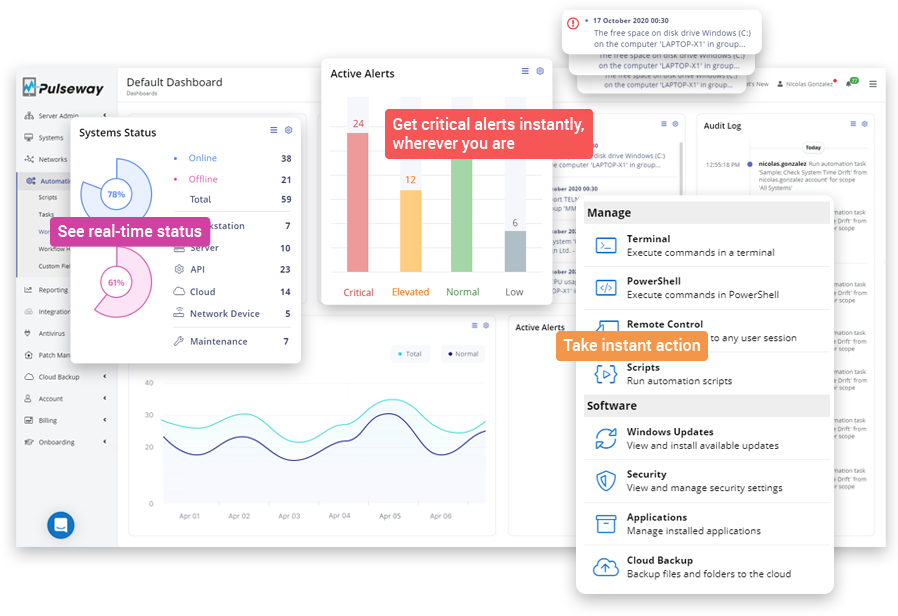
In addition, Pulseway has a mobile app for remotely monitoring and managing devices on the go.
At Atera, we’re also well known for our intuitive interfaces, which are built to be easy to use from the ground up. Key IT management tasks, such as patching, ticketing, running scripts, or accessing our AI agents, can be done in just a few clicks.
Here’s a look at Atera’s admin dashboard:
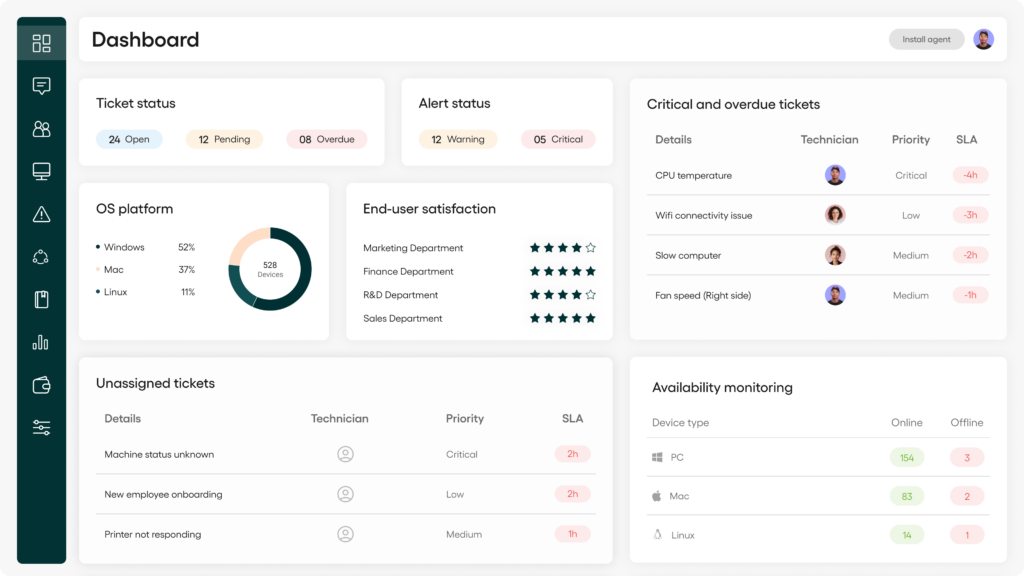
One clear advantage of Atera is our 24/7 customer support, which is available to all customers via email and live chat. We also offer an extensive knowledge base and an active IT community, where you can troubleshoot issues with other IT professionals.
While Pulseway has an intuitive user interface, users report slow support.
#4: Security and compliance
Pulseway’s pricing plans include standard security features, such as real-time monitoring and alerting. It also complies with industry security standards like GDPR and HIPAA, supports two-factor authentication, and is SOC II certified.
Unfortunately, third-party patching, ransomware detection, and mobile device management are only available as add-ons.
In comparison, Atera offers the same security features and more. Robin adds an extra layer of security by resolving issues on devices as soon as they come up, before they cause bigger problems in your IT environment.
In addition, we offer autonomous patch management for Windows, macOS, and Linux devices, as well as for third-party applications, at no extra cost.
Atera’s security integrations are also helpful for enterprises relying on third-party tools. These include Cynet, Keeper, ESET, Bitdefender, Webroot, ThreatDown, Emsisoft, and much more. Atera also has an added benefit of 50+ integrations for Robin, meaning it works wherever your IT already lives in.
Pulseway’s integration list is shorter and focused on MSP tools. It integrates with four cybersecurity and IT operations tools: ScalePad, PagerDuty, Webroot, and Alumio.
#5: Pricing and plans
Like most RMM pricing plans, Pulseway’s pricing is based on pay-per-endpoint, which means you pay for the number of endpoints you manage.
Pulseway earlier had a pricing calculator on its website, but it has since removed it. The pricing is now based on a custom quotation, meaning you need to contact their sales team for pricing.
Security features like third-party patching and ransomware detection are priced as add-ons. Plus, some users find Pulseway’s price high.
One G2 user commented on Pulseway’s pricing, saying, “Its pricing is very high compared to other comparable RMMs.”

At Atera, we have a different approach. Instead of charging per endpoint, our pricing is based on pay-per-technician. This means you can manage unlimited devices without skyrocketing your monthly cost.
Per-technician pricing makes more sense for most IT teams, as the pricing stays predictable and you can scale without increasing your bottom line.
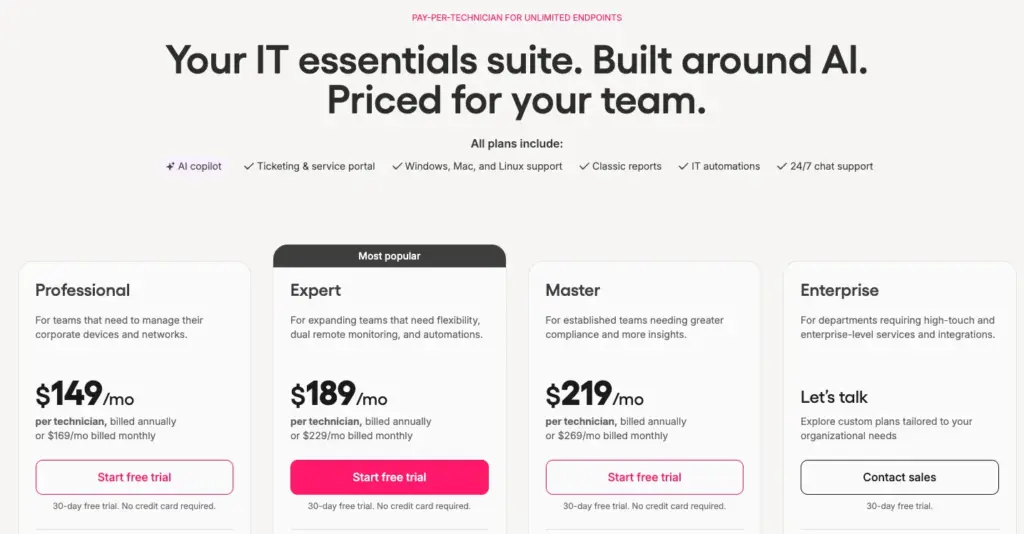
One G2 user, Emil C., commented on the benefits of Atera’s pricing and said:
- “Another strong point is the pricing model and ROI. Because Atera is priced per technician rather than per device, it makes a lot of sense for growing IT teams and MSPs.”

#6: User feedback and reviews
To get an honest picture of Pulseway, we looked at reviews from platforms like Reddit, G2, and Capterra. With this in mind, we collected the main pros and cons of Pulseway below:
Overall Pulseway G2 Rating | 4.6 out of 5.0 stars (120+ reviews) |
Overall Pulseway Capterra Rating | 4.7 out of 5.0 stars (310+ reviews) |
Pulseway pros: What real users like about the platform
Let’s start with the pros, aka what users like about Pulseway.
Easy to use:
This came up often in reviews; most users find Pulseway easy to use. In fact, “Ease of Use” is the main pro of Pulseway on G2.
One G2 user, Giovanni C., said, “I like the clear and intuitive interface shared between PSA and RMM.”
Pulseway alternatives, like Atera, also offer intuitive user interfaces that make it possible to have a clear picture of your IT infrastructure within hours.
Responsive mobile app:
Pulseway’s mobile app is well-received by its users, and it’s available for both Apple and Android users. One Capterra user, Swetha C., said, “The mobile access was especially convenient for checking alerts and system status.”
Atera also offers a mobile app that helps with monitoring alerts, remotely accessing devices, handling tickets, and more.
Pulseway cons: What real users find limiting
These are the areas where users said Pulseway is limiting:
Changes since the Kaseya acquisition:
Kaseya started by acquiring a part of Pulseway, and now owns it fully, and some users say the sales experience has changed.
One Capterra user, John L., said that Pulseway’s salespeople kept pushing add-ons and that it “cost me $2000.00 USD and months of headaches to get out of some weird contract they supposedly had me sign.”
This is what other IT professionals said about the topic on a Reddit thread:

And this is what another user said about incorrect charges by Pulseway:

At Atera, we offer annual and monthly subscriptions, which you can cancel anytime.
All of our pricing plans are fully transparent, and we don’t lock you into multi-year contracts that are hard to cancel. Plus, with per-technician pricing, you can play around and add new endpoints to the platform without skyrocketing your cost.
Customer support can be hard to reach:
Pulseway offers support for Windows, Mac, and Linux devices, which you can contact through phone and email.
Support reviews are mixed. Some users praise it; others say it’s hard to get real help. One Capterra user said:
- “Every time I called for support, they directed me to the sales guy who tried to sell me something instead of helping me.”
Another G2 user also said, “There’s no support on the weekends, which has caused issues in the past.”
To prevent similar issues, Atera offers 24/7 live chat and email support. This means you’ll always have access to tech support, no matter what day or time it is.
Limited AI advancements:
Agentic AI is changing the way IT operations are managed, helping IT teams manage tasks fully autonomously. Pulseway’s AI is truly helpful for ticketing and automation workflows, but isn’t capable of resolving end-user issues on its own.
In comparison, Atera’s Robin resolves up to 92% of Tier-1 and complex Tier-2 technical incidents end to end. Whether there’s a printer issue, a Wi-Fi problem, or a password needs to be reset, Robin is always ready to help.
Is Pulseway worth it for your organization?
If you’re still not sure whether Pulseway is worth it for you (or one of it’s alternatives), this section is for you.
Below, we’ve concluded when it makes sense to select Pulseway and when its alternative Atera, is a better option:
Choose Pulseway if:
- You want access to basic IT management functions, such as RMM and PSA
- You don’t mind per-endpoint pricing and are managing a smaller number of devices
- You’re okay with advanced features (like third-party patching or MDM) being available as paid add-ons
- You value a mobile app for managing devices on the go
Choose Atera if:
- You want Robin by Atera, an AI technician that resolves up to 92% of Tier-1 and complex Tier-2 technical incidents
- You want to equip your technicians with AI Copilot for generating scripts, troubleshooting issues, and handling other complex tasks fully autonomously
- You value transparent per-technician pricing that includes unlimited endpoints
- You need an IT management platform with RMM, ticketing, patch management, remote access, and more
- You need broad security integrations (e.g., Cynet, Keeper, Bitdefender, Webtoor, and ThreatDown)
- You prefer an intuitive interface that’s easy to use
Interested in seeing Atera in action? Start a 30-day free trial today; no credit card required!
Or, get in touch with our sales team to discuss your needs further.
Related Articles
Rev.io Review: A review of its PSA, billing, and CRM tools
Find out Rev.io’s key features, AI, and pricing in this Rev.io review. See what its pros and cons are, what actual users think of it, and what the best alternatives are.
Read now
Microsoft Intune Review: What IT teams really think of it
In this article, we’ll provide an in-depth review of Microsoft Intune, its key features, pricing, pros and cons, and more. Read on to learn more.
Read now
Datto Review: A full look at its RMM, PSA, & backup tools
Explore the pros, cons, pricing, and real user feedback in our detailed Datto review. See when one of Datto’s alternatives is a better fit.
Read now
ServiceNow Review: A full look at the platform for IT teams
Find the strengths and limitations of ServiceNow with our review. See what actual users think of the features, pricing, Agentic AI, and user interface of ServiceNow.
Read nowEndless IT possibilities
Boost your productivity with Atera’s intuitive, centralized all-in-one platform