Table of contents
Generate summary with AI

If you’re in the process of deciding whether Intune is worth it for your organization, our Microsoft Intune review can come in handy.
While Intune can be great for the Windows environment, the capabilities aren’t as robust for Mac and Linux environments. Plus, users say the add-ons can skyrocket the cost, and the base pricing plans lack key IT management features.
In this article, we’ve reviewed Microsoft Intune, its key features, Agentic AI technology, interface, pricing, and pros and cons. We’ll also compare it to other Microsoft Intune alternatives, so you can better choose the right option for your organization.
What is Microsoft Intune?
Microsoft Intune is an MDM solution that organizations can use to manage their devices and applications across Windows, Android, macOS, and iOS. It offers features for deploying app updates, creating policies for apps and device configuration, remotely accessing devices for troubleshooting, and more.
#1: Key features of Microsoft Intune
Let’s start with a brief review of Microsoft Intune’s key features, which are:
User and device management
Intune supports managing desktops, laptops, tablets, and mobile phones across Android, iOS/iPadOS, Linux, macOS, and Windows operating systems. For each device, you can create compliance rules, create security baselines, and push configuration profiles.
App management
Intune includes a built-in app management system, which makes it easy to deploy, update, and retire applications on your devices. You can:
- Enable Microsoft 365 apps, including Teams, Outlook, and OneDrive
- Create and push app protection policies to protect corporate data
- Distribute apps directly from your private or public app stores
- Deploy Win32 and custom LOB applications
- Control access to apps
Policy deployment
You can create policies for apps, device configuration, compliance, and security to make sure all devices in your environment meet organizational standards.
For example, you can:
- Set password and encryption requirements
- Configure wifi, VPN, and email settings
- Restrict access to data on specific devices
Endpoint management and security
Intune also has “more standard” RMM features, such as remote help, endpoint privilege management, analytics, and patch management.
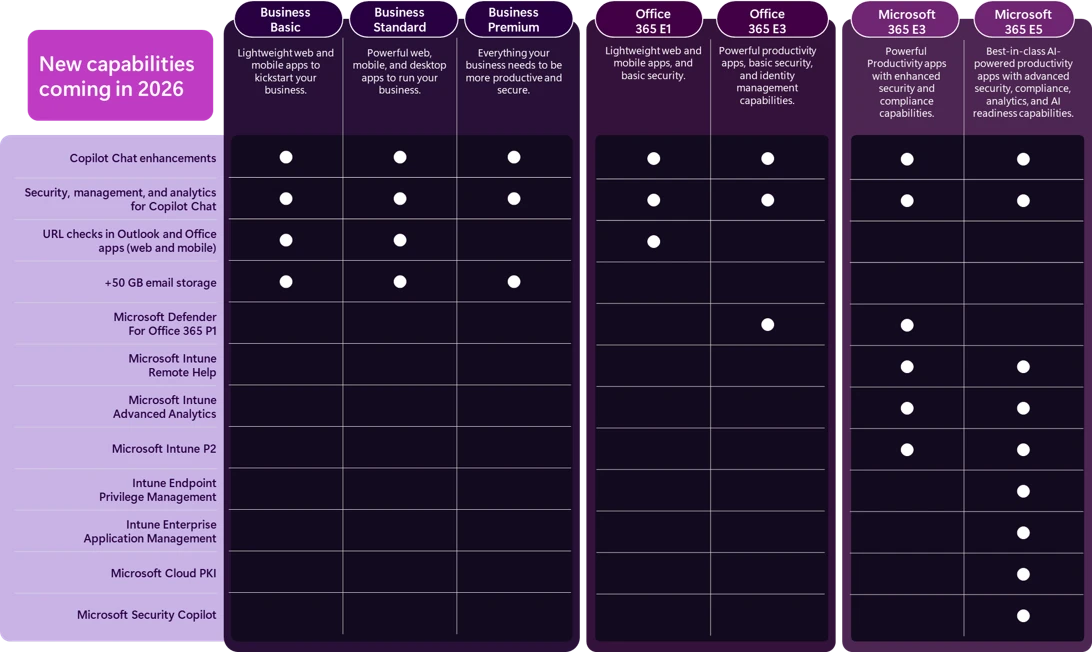
However, many of these features depend on which Microsoft license you have. Since July 2026, Microsoft has bundled them into its enterprise plans.
For example, Microsoft 365 E3 includes Remote Help and Advanced Analytics, while Endpoint Privilege Management and Cloud PKI require Microsoft 365 E5.
(Source)
If you have a standard Microsoft plan, like Business Premium or Intune Plan 1, you need to buy the Intune Suite add-on to get these security features.
At Atera, we understand that features like remote access and patch management are standard IT management features. They’re included in all of our standard pricing plans.
All of our pricing plans include access to our RMM software, remote access, patch management, ticketing, automation, and various third-party integrations. We also have the added benefit of our two AI agents, which tackle manual and repetitive tasks autonomously, just like technicians would. We’ll discuss this more next.
#2: Agentic AI technology
Since we last wrote this article, both Atera and Intune have updated their AI technologies.
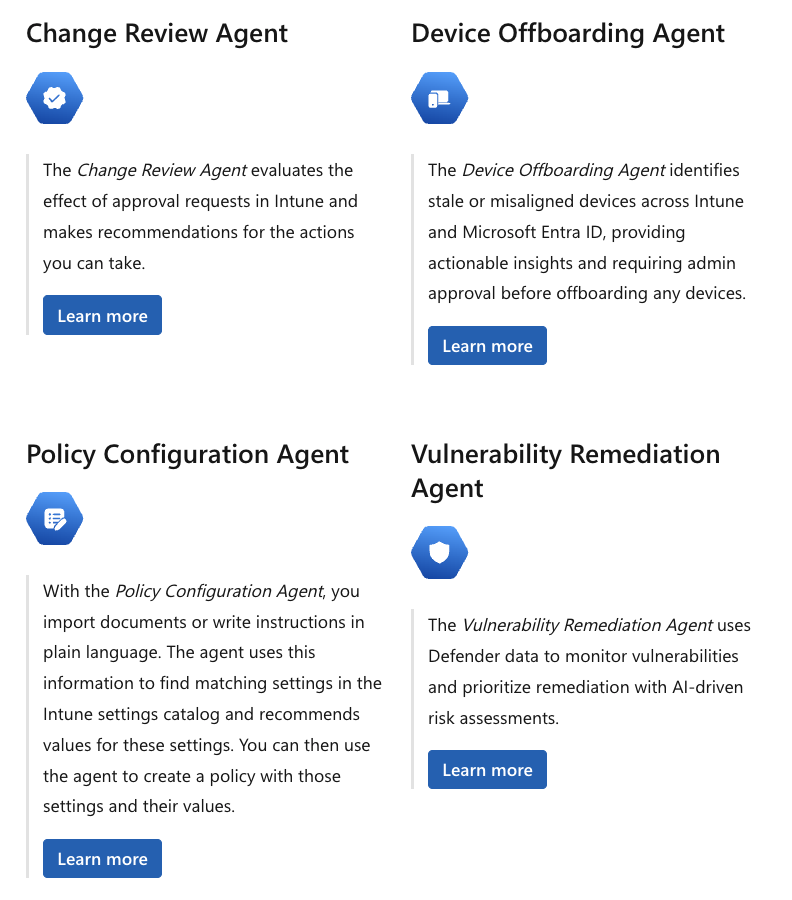
Intune’s Security Copilot agents are now available, each designed for a specific security scenario. These agents include:
- Change Review agent: Evaluates the effect of approval requests and makes recommendations for actions you can take
- Device Offboarding agent: Identifies misaligned or stale devices on Intune and helps to offboard them
- Policy Configuration Agent: Turns imported docs and instructions into policies by matching them to recommended values
- Vulnerability Remediation agent: Uses Defender data to monitor vulnerabilities and prioritize remediation
In addition to Security Copilot agents, Copilot in Intune is now available to all users, which helps to query Intune data in natural language.
Intune’s AI agents are extremely useful for configuring policies and security work, but they stop at recommendations. IT admins still need to review and apply each change.
In comparison, Agentic AI technology is woven into the core of Atera’s platform, and it assists with all parts of IT management.
Robin by Atera is an autonomous IT agent that takes care of up to 92% of your Tier-1 and complex Tier-2 support requests by interacting with users on the channels they already live in (e.g., Slack, email, Teams, and your Customer Portal).
Robin works by following a four-step resolution process:
- Diagnose: Robin receives the request through Teams, Slack, email, or the Customer Portal, verifies the user, and asks follow-up questions to gather the context it needs.
- Remediate: Robin takes the approved action directly on the device, network, or in the cloud. These involve actions like resetting a password, installing approved software, or fixing a network adapter. See all Robin use cases here.
- Verify: Robin confirms the issue is actually resolved before closing anything, and escalates to a technician with full context if it isn’t.
- Close: Robin updates the ticket with the outcome and logs every action for governance and compliance.
Unlike Intune Copilot agents, Robin doesn’t just respond to queries; it solves actual issues, installs pre-approved software, and taps into your knowledge base for step-by-step instructions.
For tasks that require a human technician, Atera’s AI Copilot helps. AI Copilot learns about your IT environment in real-time, and you can ask it account-specific questions, such as “Which devices are out of compliance?” or “Show me all laptops that missed the latest patch update.”
Together, Atera’s AI agents enable higher-end user satisfaction and unprecedented organizational efficiency.
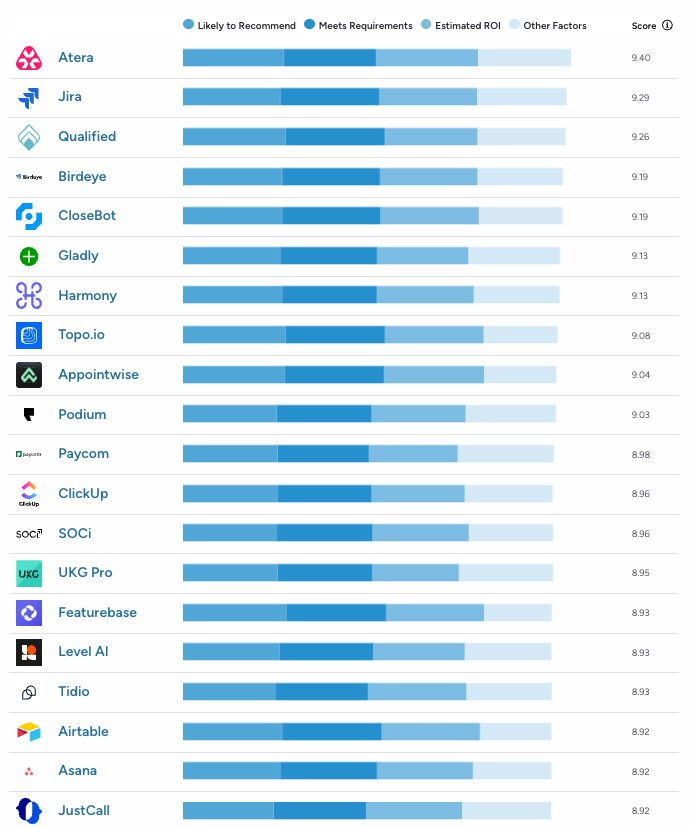
Due to the impact our AI agents already have on organizations, G2 selected Atera as the #1 Agentic AI tool in the Summer 2026 report. The report features known companies with their AI agents, such as Microsoft Copilot, Jira, Asana, Hubspot or Freshdesk.
#3: Interface and usability
Intune’s admin dashboards have mostly received positive feedback, although some users say there’s a learning curve initially.
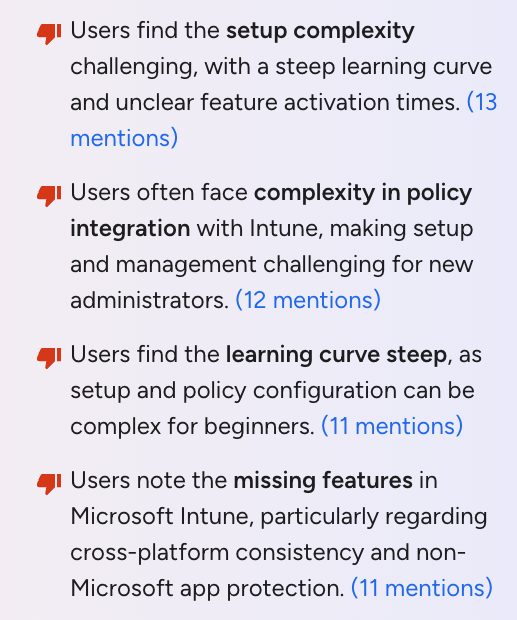
In fact, “setup complexity,” “complexity in policy integration,” and “steep learning curve” are some of the main cons of Intune on G2:
Here’s a look at Intune’s admin dashboard:
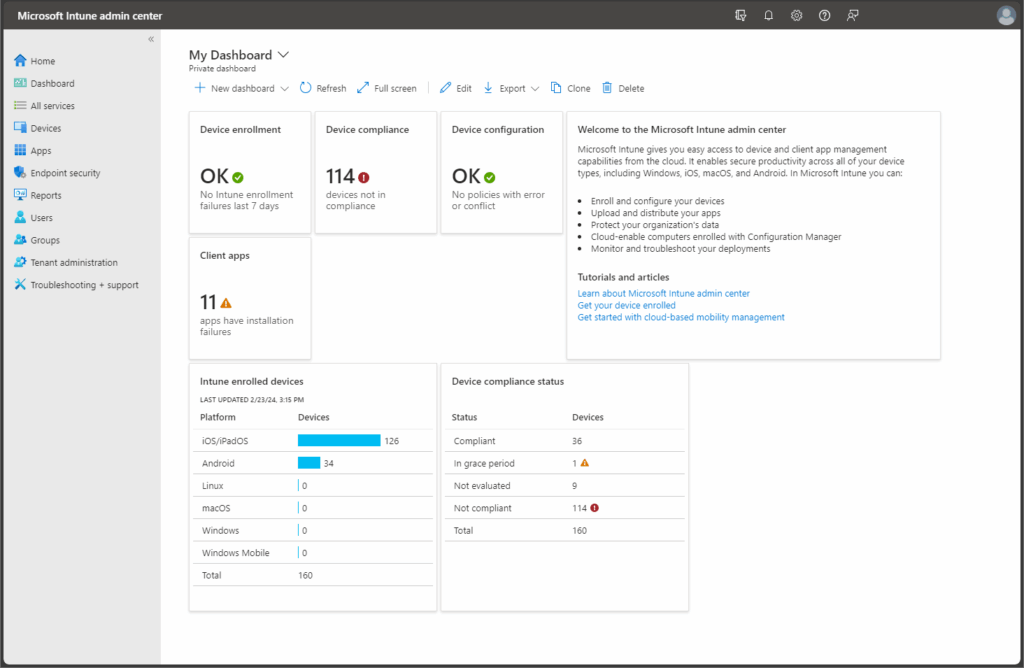
Microsoft Intune admin dashboard (via Microsoft)
Since platform usability is directly connected to ease of use, we also looked at Intune’s ease of use score on G2. Not only that, we compared it to some of its main competitors:
Platform | |
1. Atera | 9.2 (1,100+ reviews) |
2. Microsoft Intune | 8.6 (190+ reviews) |
8.6 (1,000+ reviews) | |
4. Kaseya VSA | 7.7 (300+ reviews) |
As you can see, Atera is leading the pack by a good margin. We’ve worked hard to create dashboards that are easy to navigate and require minimal training. Onboarding new technicians is quick and easy, regardless of how big your team is.
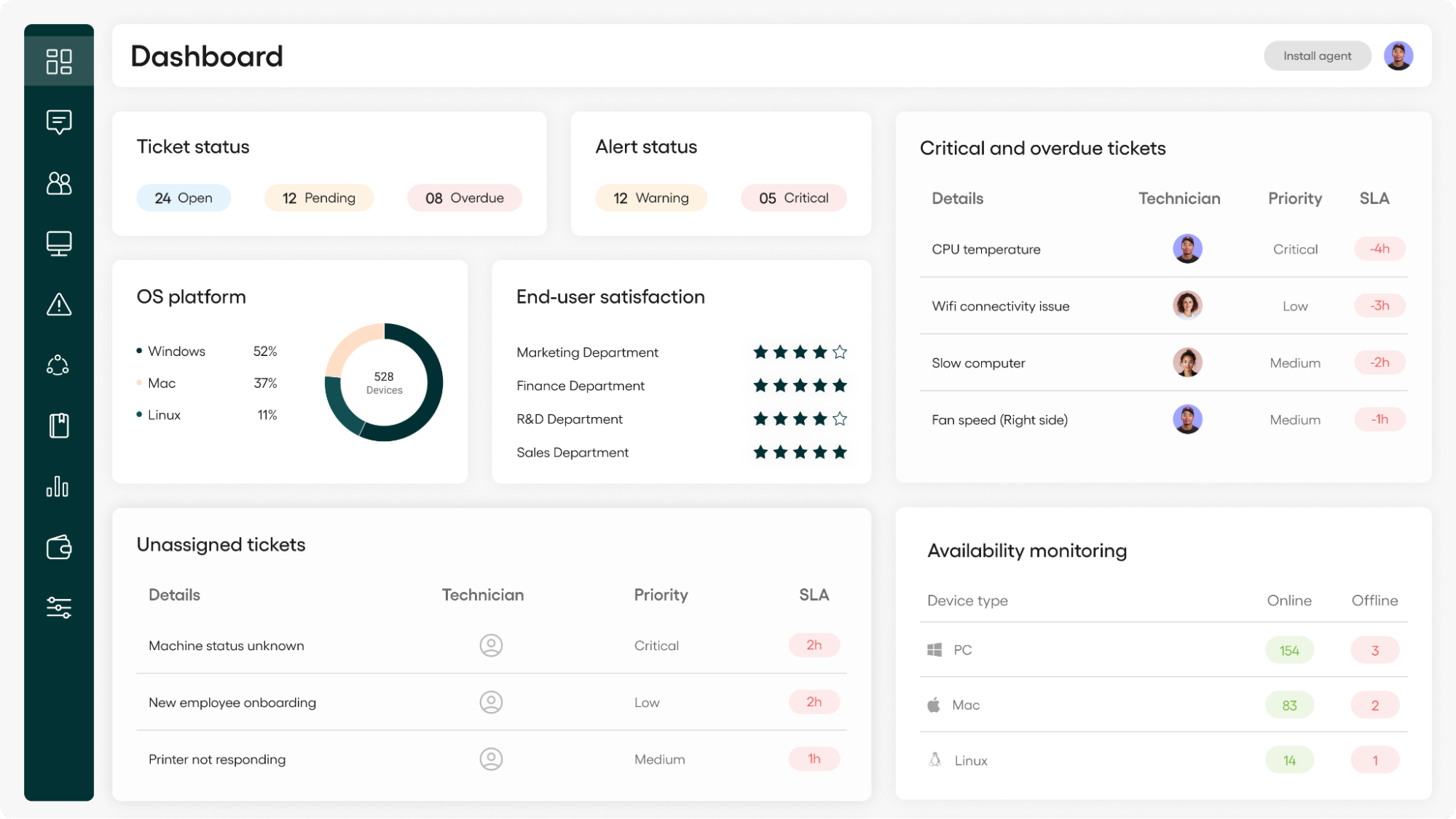
Atera’s admin dashboard
#4: Security and compliance
Intune is well-known for its focus on security and compliance within the Microsoft ecosystem. Intune’s dashboard lets you see device compliance at a high level and drill down to specific devices if they don’t meet compliance policies.
You can create policies for apps, security, device configuration, and compliance, and deploy these policies to your user and device groups.
For additional security, Intune integrates with Microsoft Defender for Endpoint and other third-party tools. Microsoft has also added AI to its security workflows with the new Security Copilot agents, explained in the Agentic AI section.
If your priority is policy-driven compliance across a Microsoft-based environment, Intune is a strong fit. Atera approaches security from the incident side. Robin resolves Tier-1 and complex Tier-2 technical incidents autonomously, within your rules, so routine issues don’t sit in a queue.
Robin can also install pre-approved software, and every action it takes is logged for governance and compliance. If an incident falls outside what Robin should resolve on its own, it escalates to a technician with full context. On the platform side, Atera’s RMM lets you monitor devices and automate software updates across Windows, Mac, and Linux, so your patching doesn’t stop at one operating system.
#5: Pricing and plans
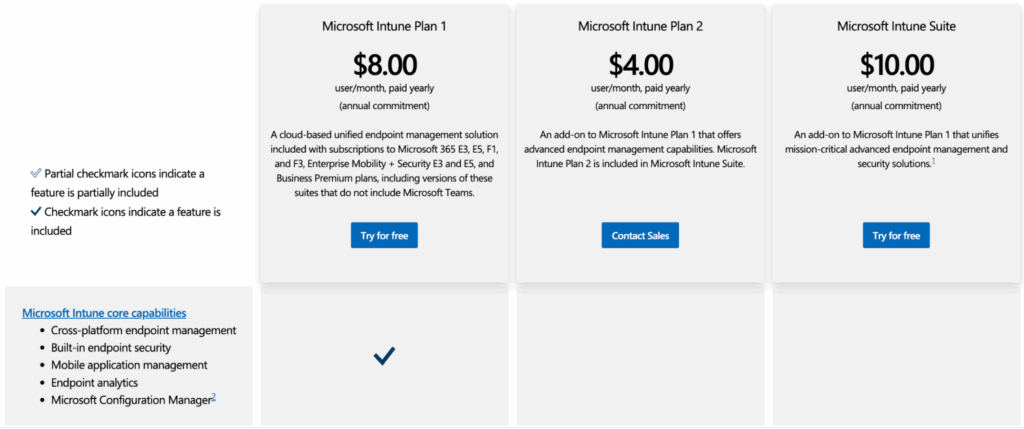
Intune’s standalone pricing is built around one base plan and two add-ons:
- Microsoft Intune Plan 1 ($8/user/month)
- Microsoft Intune Plan 2 add-on ($4/user/month)
- Microsoft Intune Suite add-on ($10/user/month)
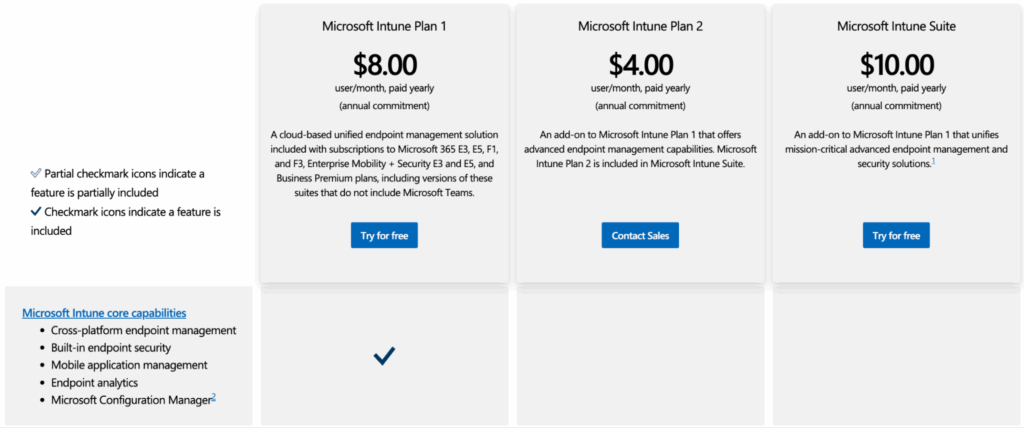
Plan 1 is the base package, and it’s also included in Microsoft 365 E3, E5, and Business Premium.
Since July 1, 2026, what you pay on top of Plan 1 depends on your Microsoft 365 license. Microsoft 365 E3 now includes Remote Help, Advanced Analytics, and Intune Plan 2 capabilities at no separate add-on cost. Microsoft 365 E5 includes all of those, plus Endpoint Privilege Management, Cloud PKI, and Enterprise Application Management. Microsoft rolled these out alongside a list price increase across its Microsoft 365 suites, so the savings depend on what you were already paying for. Source: Microsoft Intune Blog
If you’re on Business Premium or standalone Plan 1, the bundle doesn’t apply. You still need the Intune Suite add-on to get advanced endpoint management features (e.g., Remote Help, analytics, and firmware updates), which brings the total cost to around $18/user/month. Stacking add-ons can inflate costs quickly.
Intune is also licensed per user, so you pay for every employee whose devices you manage, not just the people running IT. A 500-person company needs 500 licenses, even if only a few people administer the environment.
By contrast, we keep pricing simple at Atera. All of our pricing plans let you manage unlimited devices/endpoints at no extra cost.
You only pay for the number of technicians using the platform, whether you’re managing five or 5,000+ endpoints.
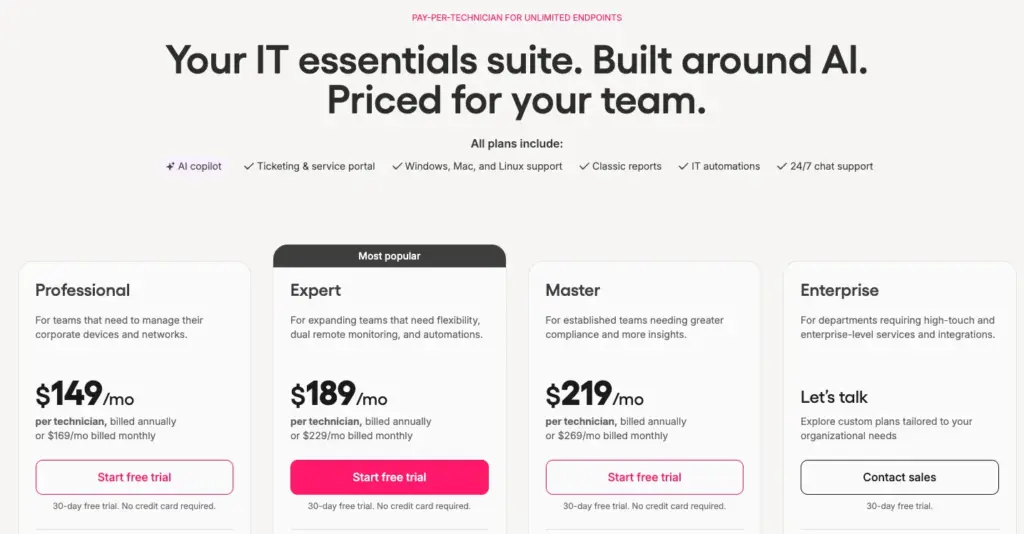
This is how one user, Emil C., commented on the benefits of Atera’s pricing for IT teams:
- “Another strong point is the pricing model and ROI. Because Atera is priced per technician rather than per device, it makes a lot of sense for growing IT teams and MSPs. It lets us manage more endpoints without driving up costs too much, which is a real advantage.”

#6: User feedback and reviews
Let’s move on to the user feedback and reviews of Intune. We scoured Reddit, G2, Capterra, and Gartner and found the main pros and cons users report on Microsoft Intune.
Overall G2 Microsoft Intune Rating | 4.5 out of 5.0 stars (270+ reviews) |
Overall Capterra Microsoft Intune Rating | 4.5 out of 5.0 stars (40+ reviews) |
Microsoft Intune pros: What real users like
Let’s start with the pros of Microsoft Intune.
Works well within the Microsoft 365 environment:
If you’re already operating in the Microsoft environment and your devices are solely Windows-based, Intune can be a suitable addition to your tech stack.
One G2 user, Lokesh G., said, “It’s deeply integrated with Microsoft 365 apps, which are consistently updated and well-documented, leading to better use of the platform.”
At Atera, we not only support Windows-based devices, but also Mac and Linux. You can easily monitor and secure your devices and automate software updates across all OS, ensuring your systems are protected from vulnerabilities.
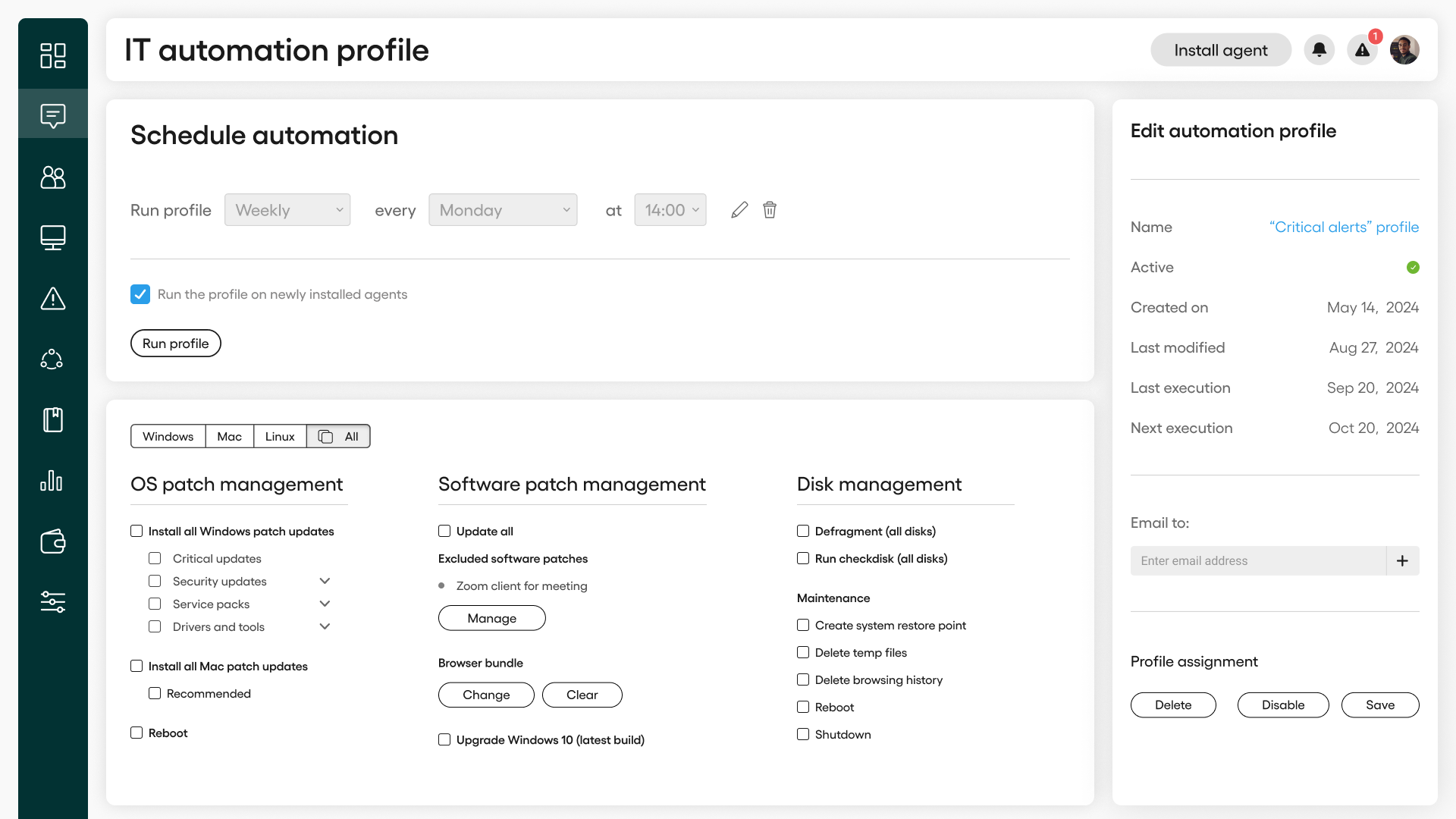
Setting up an IT automation profile with Atera
Device management features:
Users appreciate Microsoft Intune’s MDM capabilities, which allow them to manage and secure devices, applications, and data.
One G2 user, Eligijus R., mentioned liking it for application deployment and updates on devices:
- “What I like best about Microsoft Intune Enterprise Application Management is its centralized control over application deployment and updates across devices.”
Microsoft Intune cons: What real users find limiting
Let’s now move on to the cons of Microsoft Intune:
Steep learning curve:
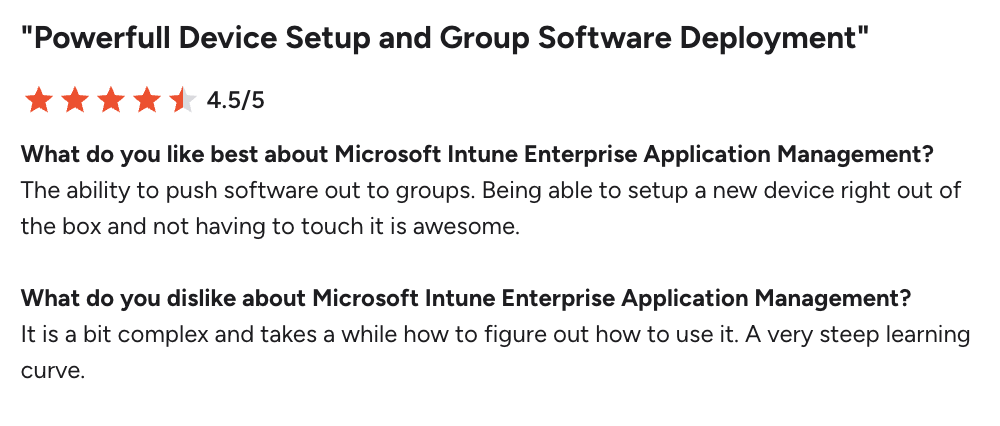
This was the main con of Intune, reported by users on G2. According to many users, Intune takes a long time to learn.
For example, one IT admin, Dirk V., said: “It is a bit complex and takes a while how to figure out how to use it. A very steep learning curve.”
Less compatibility with non-Windows devices:
While Intune offers good support for Windows devices, users say the compatibility for Apple and Linux devices isn’t as good.
For example, Intune’s patch management and remote access tools are add-ons designed exclusively for Windows devices, which is a drawback for multi-OS users.
This is what Intune users said about this topic on Reddit:
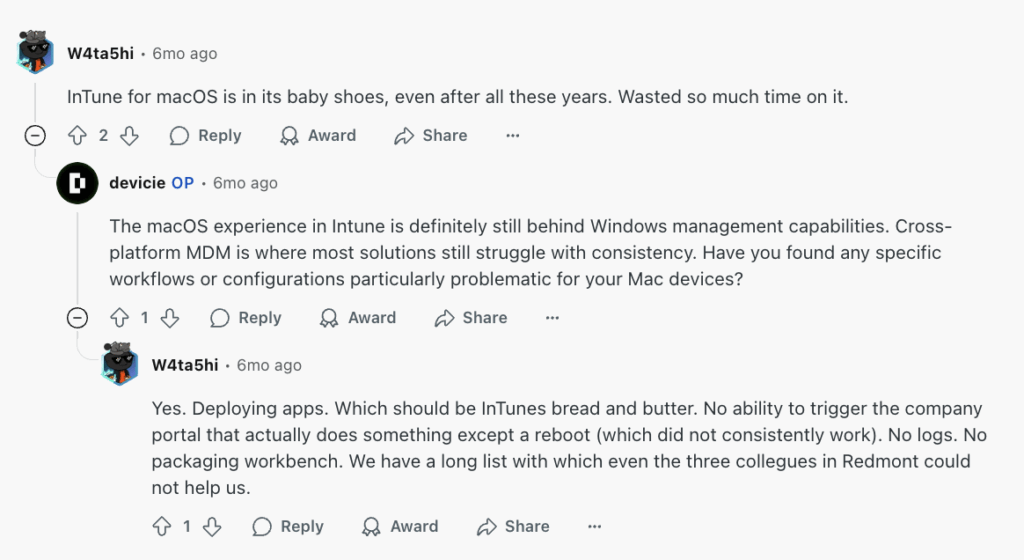
One G2 user, Amit G., mentioned facing compatibility issues with Mac and Linux OS:

Atera users don’t have this problem, as we support all OS and offer cross-platform customer support for Windows, Mac, and Linux devices.
Extra cost for add-ons:
Microsoft Intune’s base pricing plans may seem cheap at first, but the add-on costs can quickly skyrocket.
In a Reddit thread, a user asked about Intune’s adoption roadblock, and many agreed that the add-on costs are excessive:
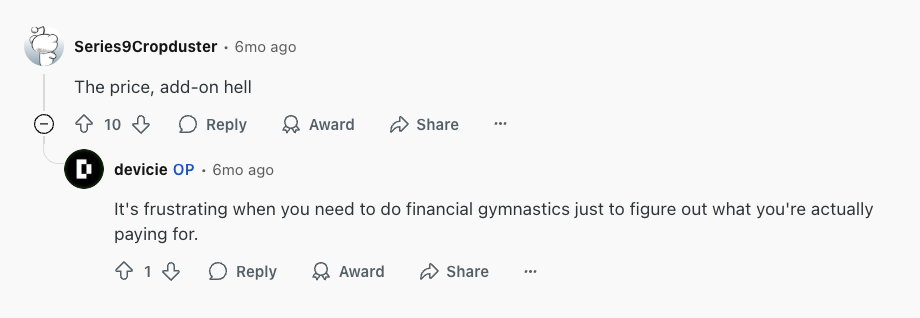
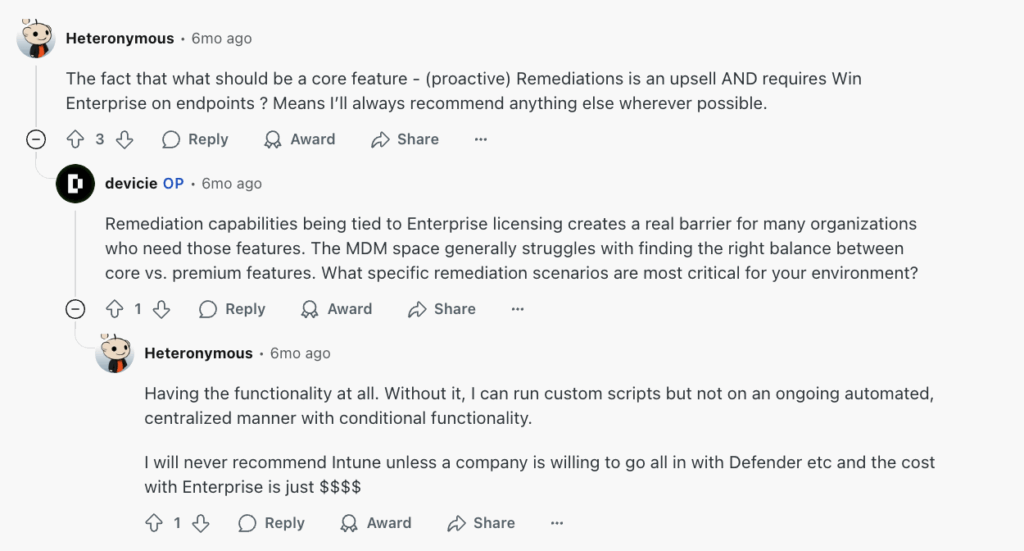
Users also say many of the core features, such as remediation, are upsells.
One user said, “Remediation capabilities being tied to enterprise licensing creates a real barrier for many organizations that need those features.”
Intune’s licensing structure can also be complex. A Capterra user said, “The licensing structure (per device vs. per user) is sometimes a bit complex to follow.”

At Atera, pricing transparency is one of our main principles. All of our standard pricing plans are publicly listed on our website. This ensures that you can easily calculate your actual monthly cost without getting stuck on complex add-on bundles or hidden fees.
Plus, instead of having a complex pricing structure, we offer a simple pay-per-technician pricing model, where you simply pay for the number of technicians using the platform.
Lack of key IT management features:
Microsoft Intune is an MDM solution, and the fact is, RMM can often replace MDM, but not the other way around.
Users discuss on Reddit that, for RMM software purposes, Intune is not an ideal solution.
The user continued, “Anyone who has used both (RMM and MDM) before understands the major functionality differences; they don’t even need to be explained.”
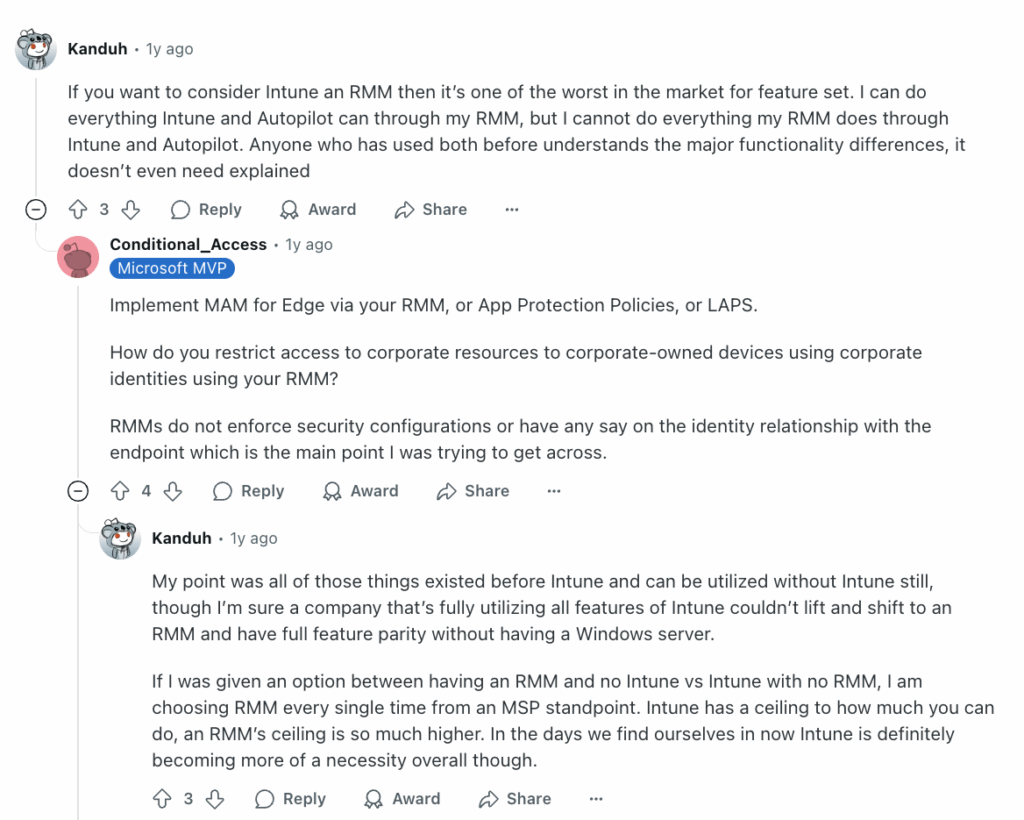
For example, Atera’s RMM has clear benefits over Intune, such as an automated patch management system, detailed reporting, and autonomous IT agents that resolve IT issues around the clock.
The only Microsoft Intune alternative with autonomous IT agents
Comparing Atera vs Intune, Atera has one clear advantage: its autonomous IT agents. Atera’s Robin takes care of your end-user support by interacting with end-users directly, resolving up to 92% of their Tier-1 and complex Tier-2 technical incidents.
While Intune has expanded its AI, with Copilot in Intune now available and Security Copilot agents, their agents are only built for admins. They don’t interact with end-users or resolve their tickets.
Atera’s Robin doesn’t just assist; it tackles real-world issues fully autonomously, completely transforming how IT operations are managed.
Ready to get started? Contact Atera’s sales team to learn more about Robin, or sign up for Atera’s 30-day free trial today; no credit card required!
Related Articles
Rev.io Review: A review of its PSA, billing, and CRM tools
Find out Rev.io’s key features, AI, and pricing in this Rev.io review. See what its pros and cons are, what actual users think of it, and what the best alternatives are.
Read now
Datto Review: A full look at its RMM, PSA, & backup tools
Explore the pros, cons, pricing, and real user feedback in our detailed Datto review. See when one of Datto’s alternatives is a better fit.
Read now
Pulseway Review: A full look at its IT management features
Discover user feedback, pros and cons, features, and pricing of Pulseway in our detailed review. Find out if it’s the right fit for your team or if another Pulseway alternative suits you better.
Read now
ServiceNow Review: A full look at the platform for IT teams
Find the strengths and limitations of ServiceNow with our review. See what actual users think of the features, pricing, Agentic AI, and user interface of ServiceNow.
Read nowEndless IT possibilities
Boost your productivity with Atera’s intuitive, centralized all-in-one platform