
Table of contents
Table of contents
- Atera vs. Autotask: An overview
- Who should you try: Atera or Autotask?
Generate summary with AI

Are you looking for the right PSA and/or RMM software for an IT department or managed service provider (MSP)? Look no further. You may have heard of Atera and Datto Autotask PSA (known as Autotask), two major players in SaaS IT.
While these two IT SaaS players might seem tomato-tomato (please sound out two different pronunciations of tomato to get the full effect), they each have a lot of differences that make them better in different contexts.
So, without further ado, let’s look at what sets these two platforms apart so that you can make the best decision for your organization’s unique needs. To do this, we have reviewed each platform’s key features, security, customer support, and other key factors.
Note: If you want to see how Atera and Datto compare as a whole, read our Atera vs. Datto comparison guide here.
Atera vs. Autotask: An overview
For a quick look into the differences between Atera and Autotask, we’ve created an overview table below:
| Atera Features | Autotask Features | ||
| – Autonomous IT tool with built-in RMM, remote access, network discovery, and documentation – Patch management for Windows, macOS, and Linux devices – Asset management to track the lifecycle of IT assets – Agentic AI (Includes Robin, AI Copilot, AI-powered troubleshooting, scripting, ticketing, and more) – PSA for MSPs to track contracts, billing, SLAs, and more | – Service desk (ticket management) – AI assistant (ticket summaries & replies) – Kaseya Intelligence – Contracts, billing, & time tracking – Customer portal (knowledge base articles) – Incident reports- Mobile app | ||
| Customer support | Customer support | ||
| – 24/7 email and live chat support for all customers – An extensive knowledge base, IT community, and tutorials | – 24/7 phone and email support – Fully transparent product roadmap not available – IT community as part of Kaseya’s community | ||
| Integrations | Integrations | ||
| – Integrations with 25+ cybersecurity, automation, backup, remote access, and network monitoring software – Access to 5,000+ apps through Zapier | – Integration with Datto RMM for remote monitoring capabilities – Third-party integrations with network security, accounting, automation, and CRM software | ||
| Pricing | Pricing | ||
| – Transparent pay-per-technician pricing, starting from $129/month – 30-day free trial available | – Pricing is based on a custom quotation – Free trial not available |
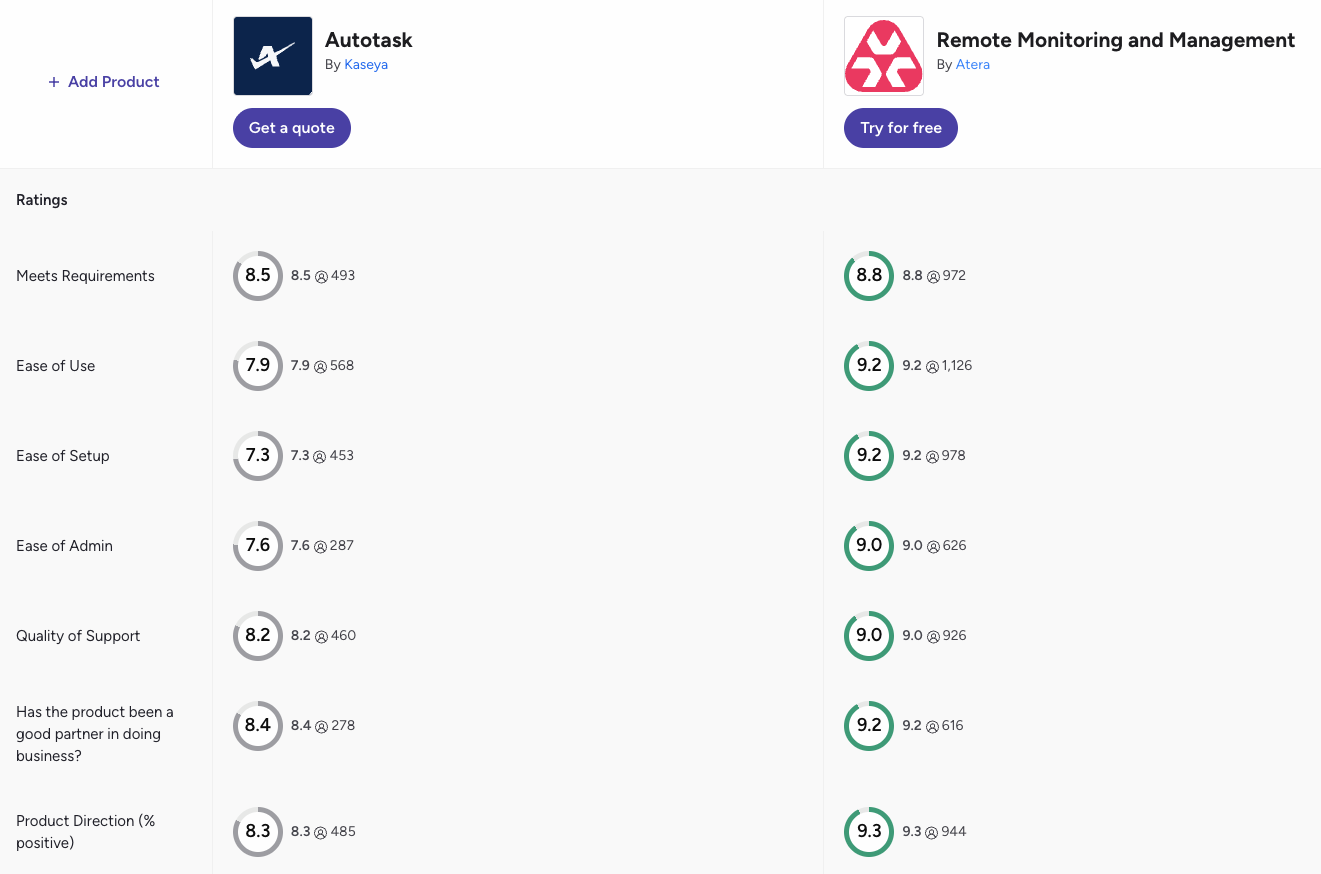
For a more detailed comparison, read G2’s Atera and Autotask comparison and see how users rate each platform.
According to the comparison, Atera outperforms Autotask in nearly all categories, including ones like ease of use, how well the platform meets user requirements, and the quality of available features.
#1: Features and Capabilities
Atera and Autotask each offer PSA services for managed service providers (MSPs) and IT departments.
Autotask is a PSA software at its core, though Kaseya now sells it within its Kaseya 365 Ops bundle. Atera combines PSA with RMM, network discovery, patch management, and AI agents on one platform.
Autotask’s PSA features include service desk, knowledge base management, contracts, time tracking and billing, project management, CRM, workflow automation, and reporting. Kaseya has also started adding AI to Autotask.
Autotask integrates with Datto RMM and Kaseya VSA for unified RMM/PSA, but RMM remains a separate product with its own cost. Teams that want all the key IT functions under one platform often prefer solutions like Atera.
In comparison to Autotask’s PSA capabilities, Atera’s key features include:
- RMM – for monitoring and managing Windows, Mac, and Linux devices, generating scripts, remotely accessing devices, and resolving device issues.
- PSA – for managing tickets, generating knowledge base articles, handling contracts and billing, and preparing reports. Our IT ticketing system is better than ever, with AI enhancements that allow you to work smarter, not harder.
- Network discovery – so you always have the full picture of your digital and physical IT assets.
- Patch management – to make sure your devices and third-party applications are always up-to-date.
- AI agents – AI Copilot supports technicians, while Robin, available as an add-on, resolves employee issues autonomously.
Atera’s holistic approach means IT teams don’t have to invest in multiple IT management tools to manage IT operations.
#2: Agentic AI development
Autotask launched its first AI product in 2024. It was Cooper Copilot, which added ticket summaries and a writing assistant to Autotask.
In 2026, Kaseya launched its ‘Kaseya Intelligence,’ and within Autotask PSA, it introduced a Ticket Triage Digital Specialist, which classifies ticket priority, identifies the skillset required, and routes each ticket to the best-fit technician.
While Kaseya describes its platform as agentic (which is true for its RMM), the AI features within Autotask work on the ticket itself: summarizing, triaging, and routing it. Autotask’s AI doesn’t reach into the infrastructure itself.
In contrast, that’s what Robin by Atera was built for. Robin was launched as IT Autopilot in May 2025, and in March 2026, it was rebranded to Robin. This was nearly a year before Kaseya announced Kaseya Intelligence.
Robin follows a four-step process to autonomously resolve issues:
- Diagnose: receives the request via Slack, Teams, email, or the Customer Portal, verifies the user, and gathers full context for issue resolution.
- Remediate: takes approved actions on the device, network, or cloud, such as password resets, pre-approved software installs, and network adapter resets.
- Verify: confirms the issue is resolved, or escalates to a technician with full context.
- Close: updates the ticket and logs every action for audit.
Atera reports an autonomous resolution rate of up to 92% for Tier-1 and complex Tier-2 technical incidents, a 120-second average resolution time, and a 0.1-second first response.
Autotask’s only performance figure is a single customer quote: “We believe the Ticket Triage Digital Specialist will eliminate up to 80% of ticket triage errors.”
Our second AI agent, Atera’s AI Copilot, is your go-to IT companion for running health checks, executing actionable solutions, and providing instant remedies to fix device issues.
Copilot is like having access to another team member. It learns about your IT environment in real-time, and you can give it account-specific questions/tasks, such as:
- “Which devices are running on outdated software?”
- “Show me devices with critical security vulnerabilities.”
- “Restart the print server for the marketing department.”
- “List all endpoints with antivirus turned off.”

AI Copilot is similar to what Autotask offers with Cooper Copilot, which helps to summarize tickets and generate knowledge base articles:
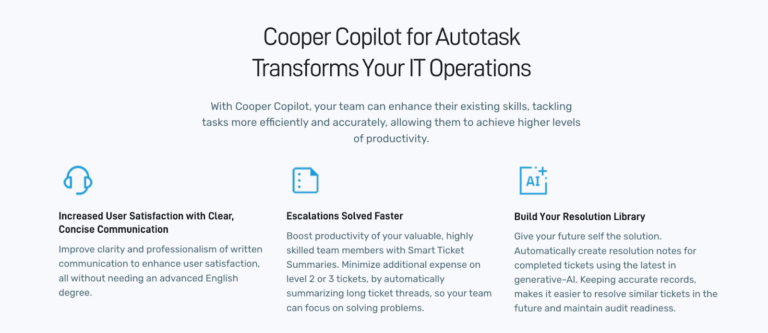
Autotask Cooper Copilot
Though AI in ticketing is great, most IT teams will benefit more from a platform that has AI not only in ticketing but throughout all aspects of IT management.
This is precisely what Atera’s autonomous IT tool is: the world’s first IT management platform that expands Agentic AI technology to all areas of IT.
Note: Read more about Robin vs. Kaseya Intelligence here.
#3: User Interface and Usability
When it comes to user interface and usability, Atera’s integrated dashboards simply cannot be topped.
According to G2’s ease of use scores, this is how actual users have rated the usability of Atera and Autotask:
| G2’s Ease of Use Category | 1. Atera | 2. Autotask |
| 1. Ease of Use | 9.2 stars (1,100+ reviews) | 7.9 stars (560+ reviews) |
| 2. Ease of Setup | 9.2 stars (970+ reviews) | 7.3 stars (450+ reviews) |
| 3. Ease of Admin | 9.0 stars (620+ reviews) | 7.6 stars (280+ reviews) |
Atera arguably has a clear edge in all of the ease of use categories.
From the main screen, you’ll see a quick overview of all of the essential information while still being able to do a deep dive into any given area with just one (or maybe two clicks) of a button.
To give you a visual idea of what we mean – here’s what our comprehensive dashboard looks like:

From the main dashboard, you get an easy overview of the health of your IT environment. To perform key IT management tasks, such as ticket management, you can navigate to the Tickets tab in the left-hand menu:
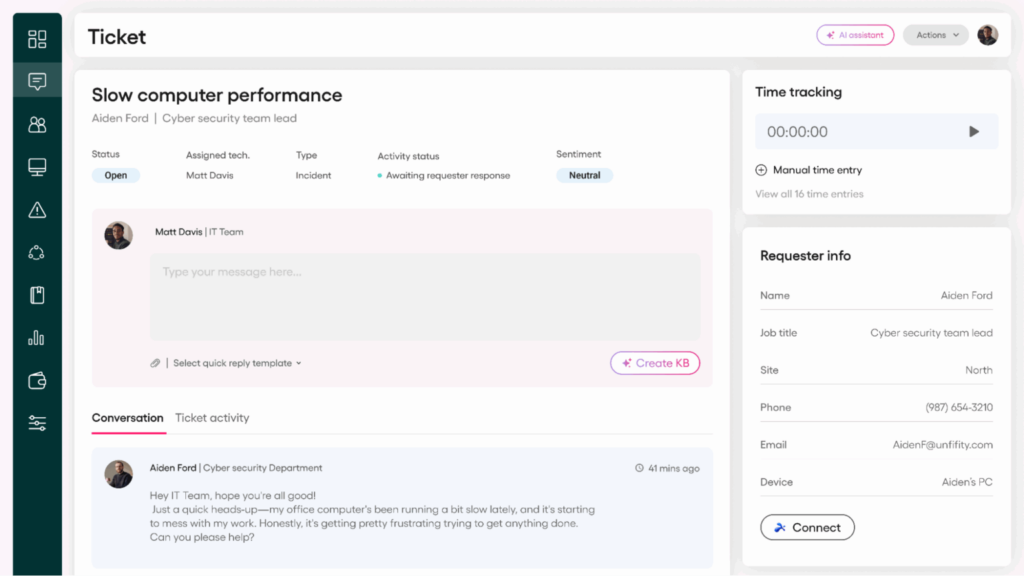
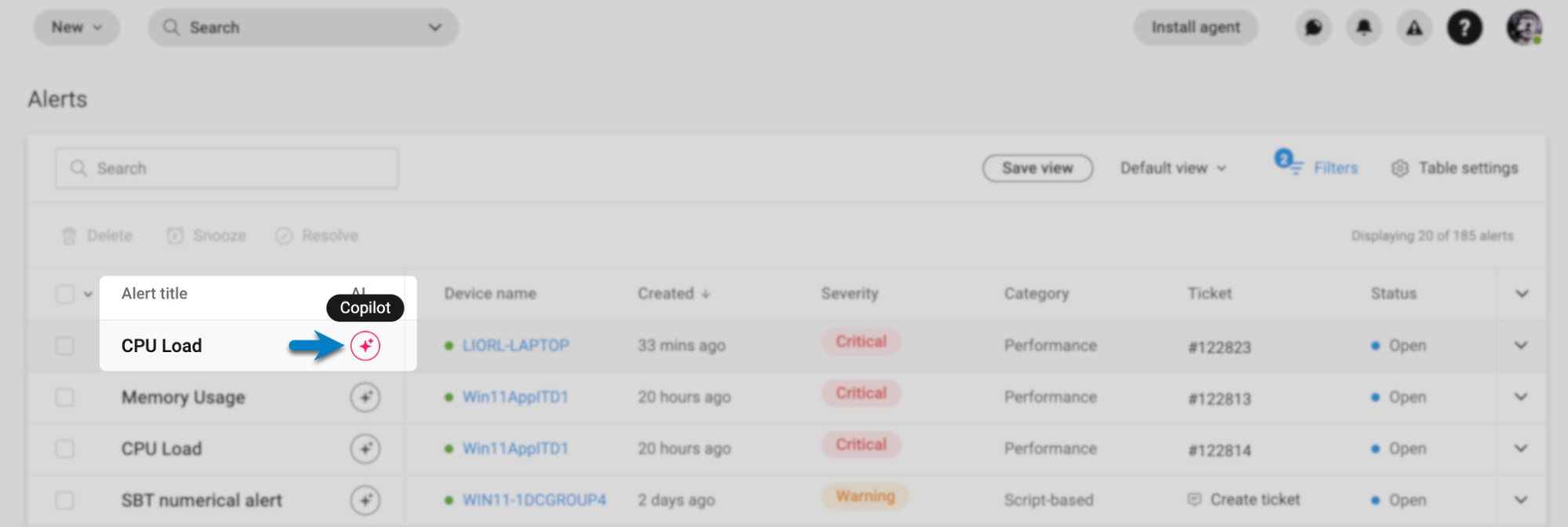
To access AI Copilot, you can click on the bottom-right corner or access them directly from the device, ticket, or alerts page.
So, how does this stack up against Autotask? To give you a better idea of the user interface differences, this is what Autotask’s admin dashboard looks like:
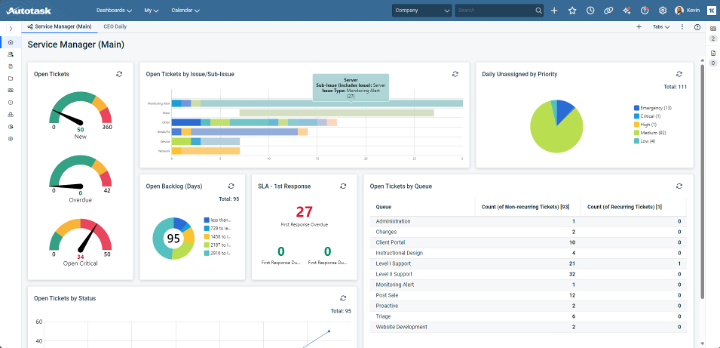
Just in January 2025, Autotask made updates to its user interface, which it announced on Reddit. While some users were happy to see long-awaited improvements to Datto’s interface, others said it made their workflow even more difficult:
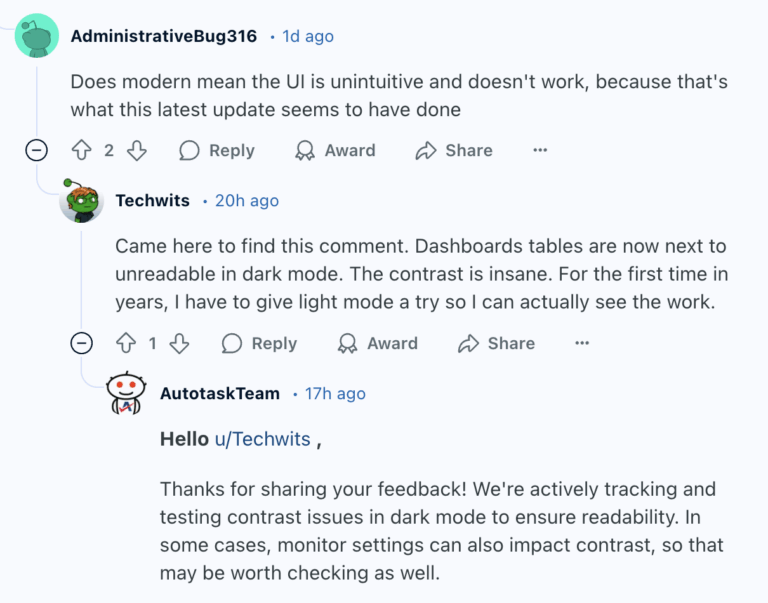
Autotask review via Reddit
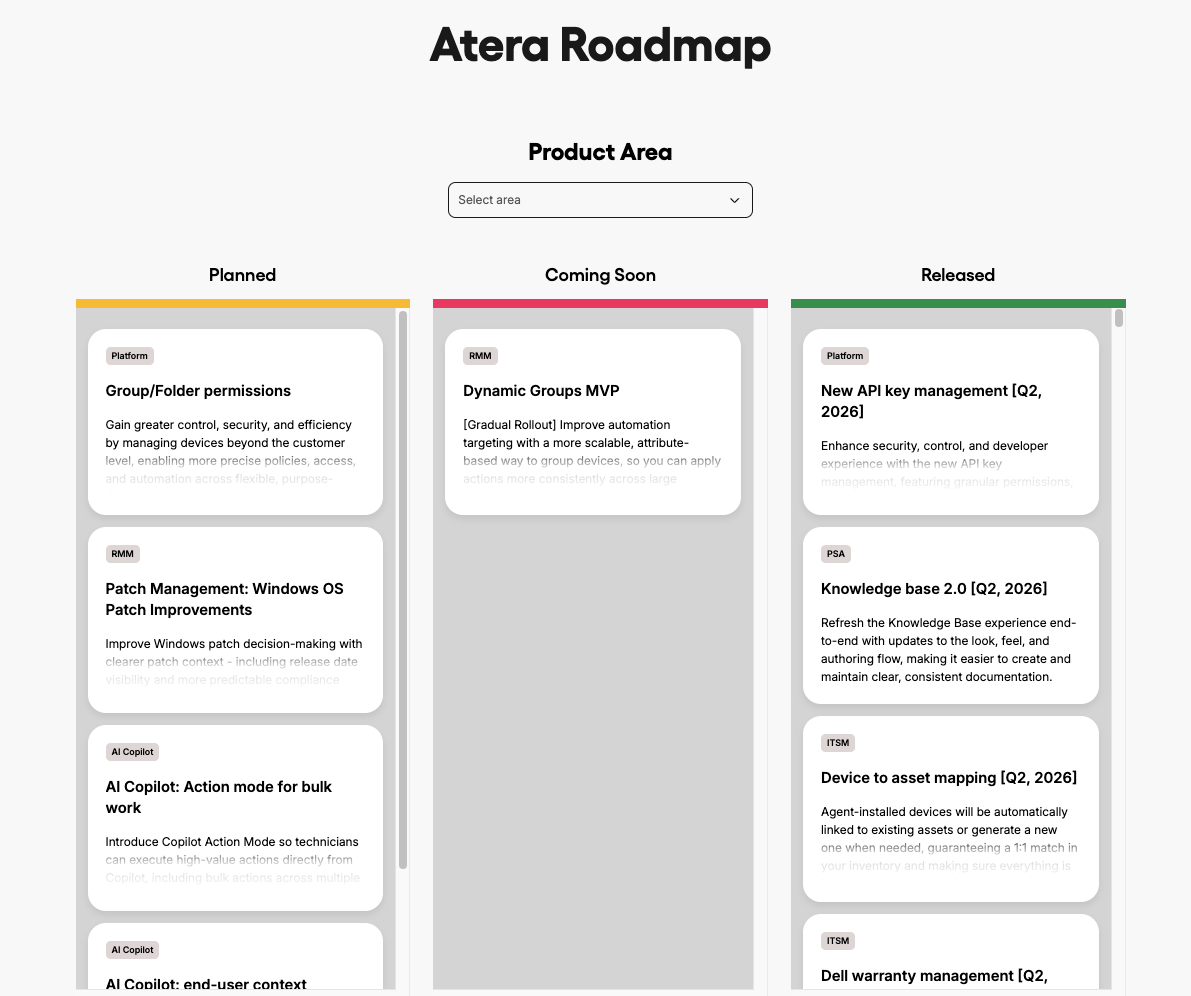
At Atera, we constantly improve and innovate our dashboards and user interfaces to improve usability. Customer feedback is part of the development process, and you can always track the upcoming enhancements from the product roadmap page:
#4: Performance and Reliability
Atera has built a strong reputation as a product you can count on. We are always working to minimize downtime and allow you to get the most out of our product.
For our team, consistency and reliability are two top priorities. Plus, should anything go wrong, you can count on our 24/7 live support, which is available in several different languages. Or do you prefer an at-your-leisure support experience? If so, we offer a collection of digital resources, including a blog, an online community, and an extensive knowledge base.
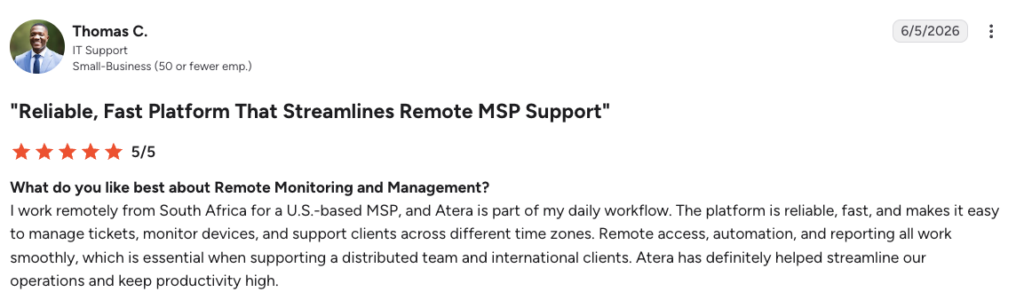
Many users, such as Thomas C., agree that Atera is reliable and exceeds in capabilities:
- “The platform is reliable, fast, and makes it easy to manage tickets, monitor devices, and support clients across different time zones.”
In comparison, Datto Autotask is a Kaseya company that has received mixed feedback regarding performance and reliability. For instance, in the following Reddit thread, users discuss their experiences after the Kaseya acquisition:
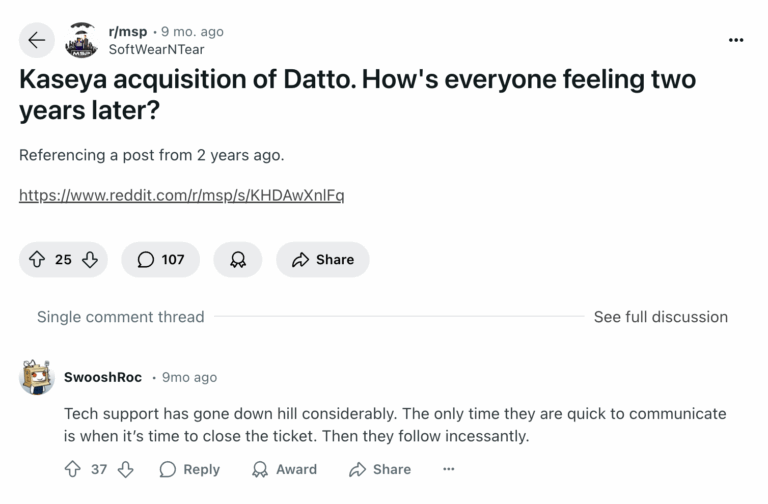
Customer support is a key part of platform reliability, so Datto’s declining customer support is a notable drawback.
#5: Pricing and Value for Money
There’s no way around it; pricing is a big factor whenever you’re considering a new product for your IT team.
That’s why Atera is committed to transparent pricing. We’ll never leave you in the dark, allowing you to budget effectively and make informed decisions about how much your investment is compared to what you are getting for your money.
Our pay-per-technician pricing structure is like nothing else on the market. Atera’s pricing plans for MSPs start at $129 per month, and pricing plans for IT departments start at $149 per month per technician. Key integrations like Splashtop and Azure are included at no additional cost.
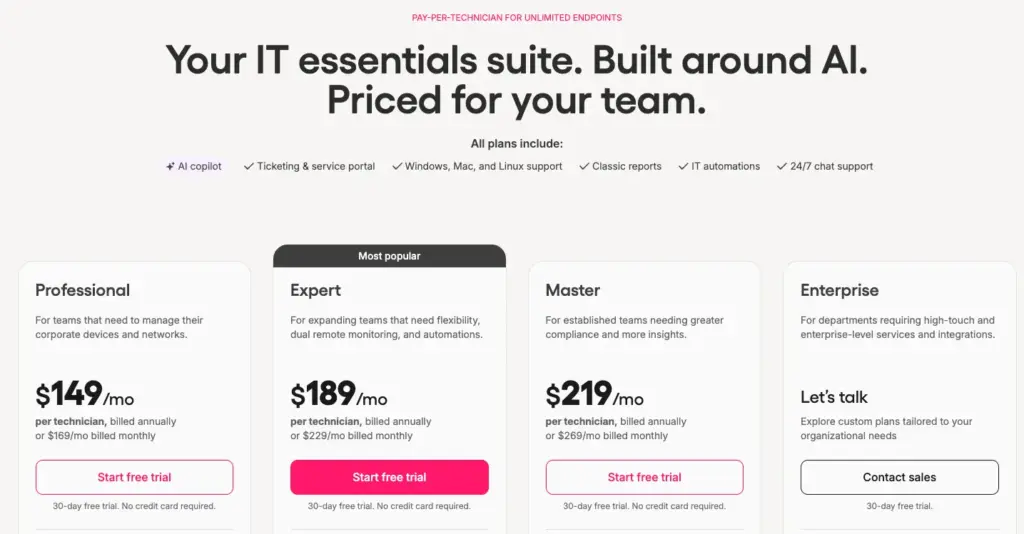
Atera’s IT department pricing
Unfortunately, Autotask does not share our commitment to transparency. Nowhere on the Autotask website will you find clear information about pricing… and if you think that sounds like a red flag, you are right.
Atera’s unique pay-per-technician model is perfect for both enterprises and start-up customers (and everyone in between), as it allows for easy growth and scaling without additional upcharges every time you add an endpoint.
#6: Customer Support and Community
When you become an Atera client, you’ll feel our sense of community immediately – all of our users are invited and encouraged to become a part of our online community, which is nicknamed the “Ateraverse.” Our IT community is a great place to connect with other Atera users, troubleshoot common problems, or simply have a laugh with your fellow IT pros.
We also have live agents available 24/7 so that we can offer you the support you need at any time of day (or night)! Plus, our site is fully stocked with countless online resources that you can read at your leisure. Find recorded webinars, a rich knowledge base, and a veritable library of blog articles to broaden your know-how and get the support you need… whenever you need it.
Sun K. shared his experience with Atera’s support and said:
- “Customer support has been good on the few occasions we needed to talk to them. They are fast and able to answer all of our questions.”
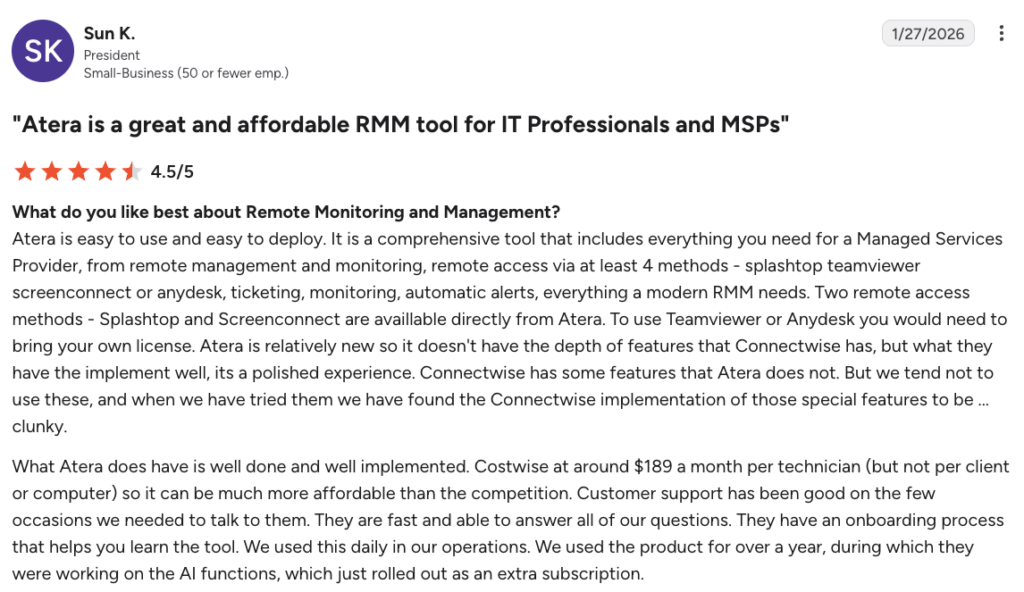
Can Autotask meet the same standard? While the product’s website does offer some resources, such as blogs and case studies, many customers note that the customer support level has gone down after the Kaseya acquisition.
#7: Security and Compliance
RMM security (and PSA security) and compliance are essential features of any IT product – but you wouldn’t know that by looking at Autotask’s website. Although the product’s available integrations with Datto RMM expand its offerings to include security-related features, these options are not native to Autotask and will cost you extra.
At Atera, we know that IT professionals are tired of constant upcharges and upsells to get a fully functioning product. That’s why Atera is equipped with everything you need for productivity, protection, and so much more.
How do we prioritize security? Our smart logging and reporting capabilities, as well as strict adherence to all industry security standards, give our customers unmatched peace of mind. You can sleep at ease knowing that your organization is safe from the threat of malevolent actors.
Our real-time monitoring and alerts, powered by AI agents, detect and address potential issues before they impact your workflow. Plus, Robin automatically installs and updates pre-approved software, removing one of the most commonly exploited vulnerabilities: outdated applications. You can read more about Atera’s AI security here.
We believe in proactive IT rather than reactive IT – and that means equipping you with the tools to keep your IT ecosystem safe and secure.
We are proud to have earned HIPAA, GDPR, and SOC2 compliance. We have also gained numerous ISO certifications (27001, 27017, 27018, and 27032, to be exact) and have expanded our security-related integration selections so that you can easily use Atera in tandem with your other favorite cybersecurity products.
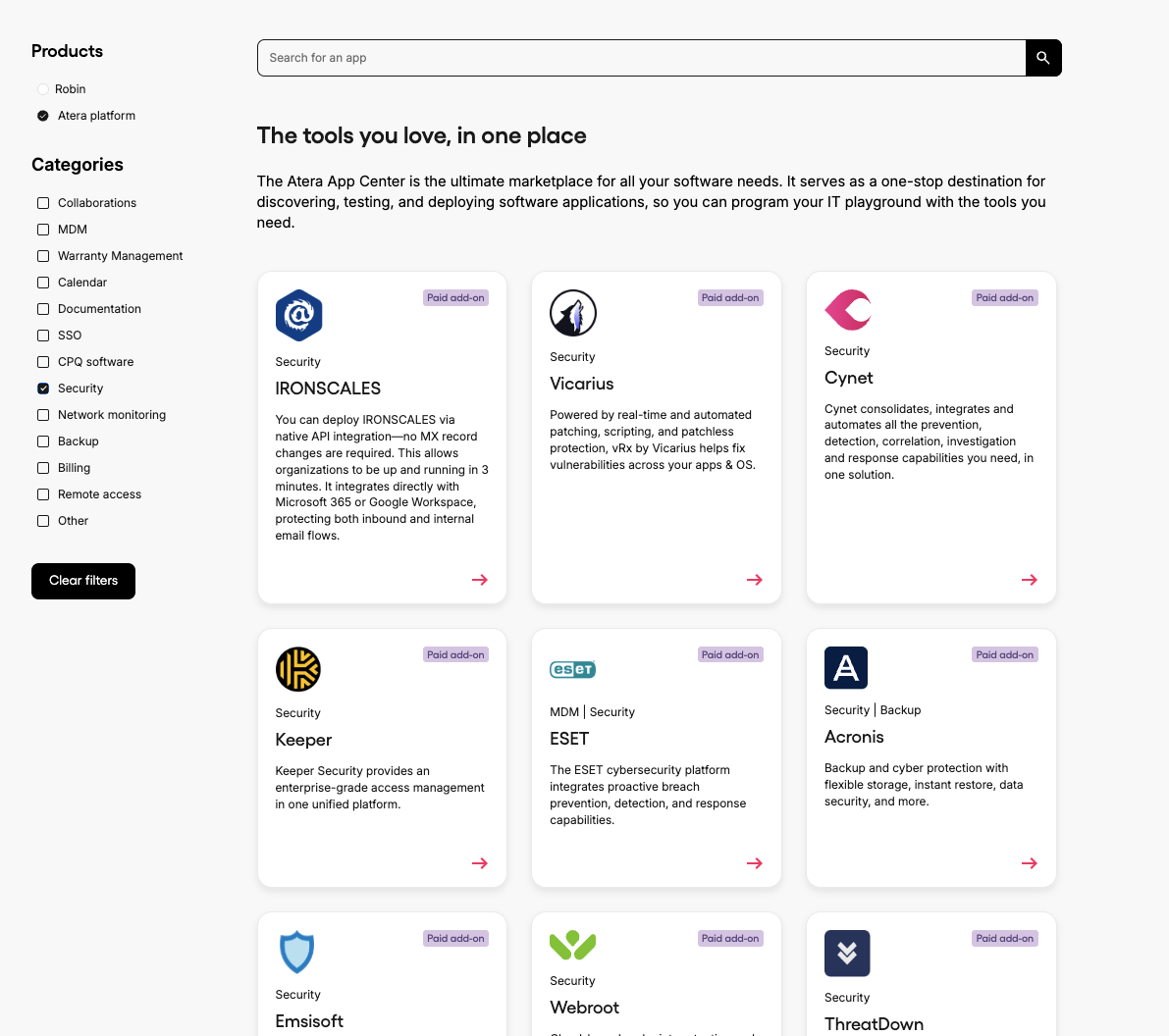
In addition, Atera offers native integrations with security products, including Cynet, Keeper, ESET, Emsisoft, Webroot, ThreatDown, Bitdefender, and Ironscales. Atera also has 50+ integrations for Robin, so it works within the ITSM, identity, and business tools your team already uses. This means you don’t need to replace your existing stack to achieve autonomous resolution.
#8: User Feedback and Reviews
Here’s the thing: we spend all of our time working on and perfecting our incredible product.
So of course we’re proud of it, but we don’t want you to just take our word for it.
In total, Atera has received nearly 1,200+ reviews across G2 and Capterra, with an average rating of 4.6 out of 5.0 stars. In comparison, Autotask PSA has 500+ reviews with an average rating of 4.2 out of 5.0 stars. Plus, according to a G2 comparison, Atera beats Autotask PSA in nearly all categories.
No matter where you look, Atera has garnered consistently positive reviews. With Agentic AI that helps IT teams move from automated to fully autonomous IT management and fair per-technician pricing, our solutions are a great fit for both start-up and enterprise customers.
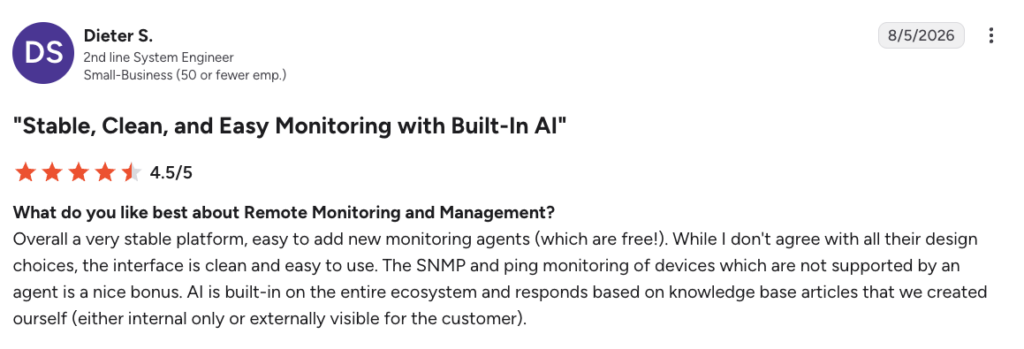
For instance, Dieter S. shared his compliment on Atera’s AI and said,
- “AI is built-in on the entire ecosystem and responds based on knowledge base articles that we created ourselves (either internal only or externally visible for the customer).”
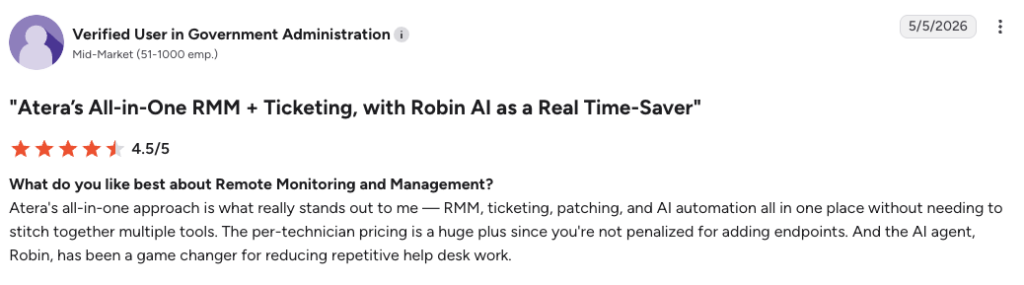
Another G2 user mentioned: “The AI agent, Robin, has been a game changer for reducing repetitive help desk work.”
Now, let’s talk about the reviews for Autotask.
While some users find it perfectly fits their niche needs, others take issue with its limited capabilities and clunky integrations.
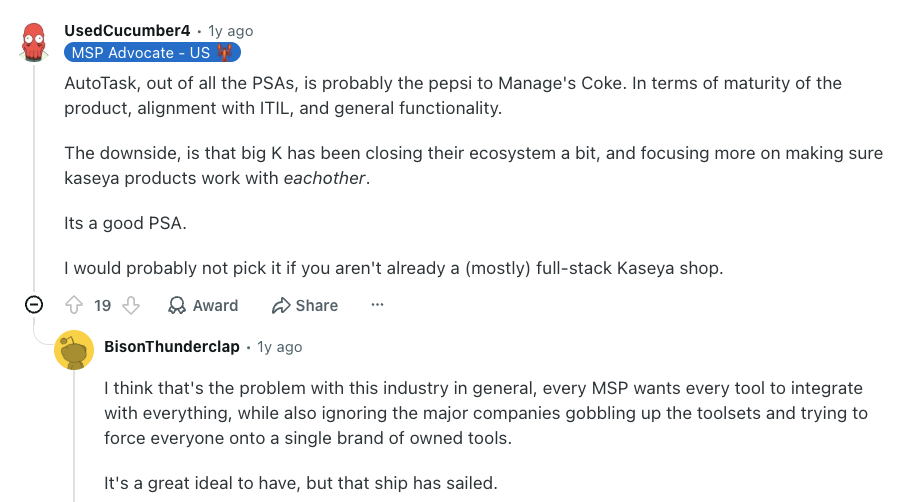
Autotask PSA can be a good fit for companies that use Datto RMM, but do not expect it to mesh well with other programs. As this Reddit user said, it might not be the best pick if you aren’t already mostly a full-stack Kaseya shop.
Who should you try: Atera or Autotask?
So, which platform should you choose for your organization, Atera or Autotask? While we might be a bit biased, we really believe that most IT teams and MSPs benefit more from Atera’s autonomous IT platform.
Atera has a complete suite of features under a single subscription, 24/7 customer support, the industry’s first built-in Agentic AI technology, and a transparent pricing model that Autotask can’t match. However, we encourage you to conduct thorough research before you make a decision.
It’s a good idea to reach out to each product’s sales team to receive a demo. At Atera, we make things even easier with a free 30-day trial – no credit card required.
Get in touch with us today to experience the Atera difference for yourself.
Frequently Asked Questions
Related Articles
Robin vs Request Resolver (Former Rovo)
Robin and Atlassian's Request Resolver (Former Rovo) both bring Autonomous IT into ITSM, but they operate at different levels. This full comparison breaks down where each one's autonomy actually reaches.
Read now
Robin vs Kaseya Intelligence
Robin by Atera and Kaseya Intelligence both talk about autonomous IT, but structure their AI technologies differently. See where each one's autonomy actually reaches and which works for your org.
Read now
Robin by Atera vs. Ivanti Neurons: comparing two very different approaches to autonomous IT
In this article, we'll compare Robin vs. Ivanti Neurons: one AI agent that resolves IT incidents end to end, and one platform that splits autonomy across two separate AI capabilities.
Read now
Robin vs Freddy AI Agent Studio
Not all agentic ITSM starts from the same place. See how Robin's deploy-ready model compares to Freddy AI Agent Studio's no-code, build-it-yourself approach.
Read nowEndless IT possibilities
Boost your productivity with Atera’s intuitive, centralized all-in-one platform










