Table of contents
Generate summary with AI

IT leaders frequently compare Atera vs. Jamf side by side for IT management. While the two platforms share similar core features (e.g., device monitoring, patch management, and remote access), their focus and scope are different.
Jamf is purpose-built for managing Apple devices, while Atera offers an Agentic AI, IT management platform that supports Windows, macOS, and Linux operating systems.
But the differences between the two go deeper than this, which is why we created this article comparing the two platforms. Below, we’ve compared the features, Agentic AI, pricing, interface, and user feedback of Atera vs. Jamf.
Why should you trust our reviews? 💡
Not only do we look at the features of Atera and Jamf, but we also take into account feedback from our community and reviews on platforms such as G2, Reddit, and TrustRadius. These insights help you understand the strengths and weaknesses of each solution.
In addition, we aim to make our content transparent and objective so that you can make informed decisions for your business. Your trust in our reviews is important to us because we know how critical choosing the right IT management platform is to the success of your IT department.
Atera vs. Jamf: An overview
To begin with, let’s go through a brief overview of Atera vs. Jamf:
| Atera Features | Jamf Features | ||
| – Autonomous IT tool with built-in RMM, remote access, network discovery, and documentation – Device management for Windows, Linux, and macOS – Robin for managing tier-1 support fully autonomously – AI Copilot for AI-powered troubleshooting, scripting, ticketing, and more – Ticketing system for summarizing and resolving issues instantly – Scripting engine powered by AI Copilot – Asset management to track the lifecycle of IT assets, with automated device discovery – Patch management to keep Windows, macOS, Linux, and third-party apps up-to-date – PSA for MSPs to track contracts, billing, SLAs, and more | – Device management for Apple devices (macOS, iPadOS, iOS, and tvOS) – Automatic deployment through the Apple Business Manager integration – Self-service portal for end-users to install and update approved apps – Security enforcement through configuration profiles and patch management – Endpoint security through Jamf Protect – Jamf’s AI assistant (helps answer questions and explain issues) | ||
| Customer support | Customer support | ||
| – 24/7 email and live chat support for all customers – An extensive knowledge base, IT community, and tutorials | – Support available through email and live chat – Jamf Nation community available | ||
| Integrations | Integrations | ||
| – Integrations with 25+ cybersecurity, automation, backup, remote access, and network monitoring software – Integrations with 50+ more third-party tools for Robin – Access to 5,000+ apps through Zapier | – Integrations with identity and security platforms (e.g., Microsoft Entra, Google Workspace, & Okta) – Apple-specific integrations (Apple Business Manager, etc.) | ||
| Pricing | Pricing | ||
| – Transparent pay-per-technician pricing, starting from $129/technician/month – 30-day free trial available | – Pricing is based on the number of devices you manage, starting from $4/month per device – 14-day free trial available |
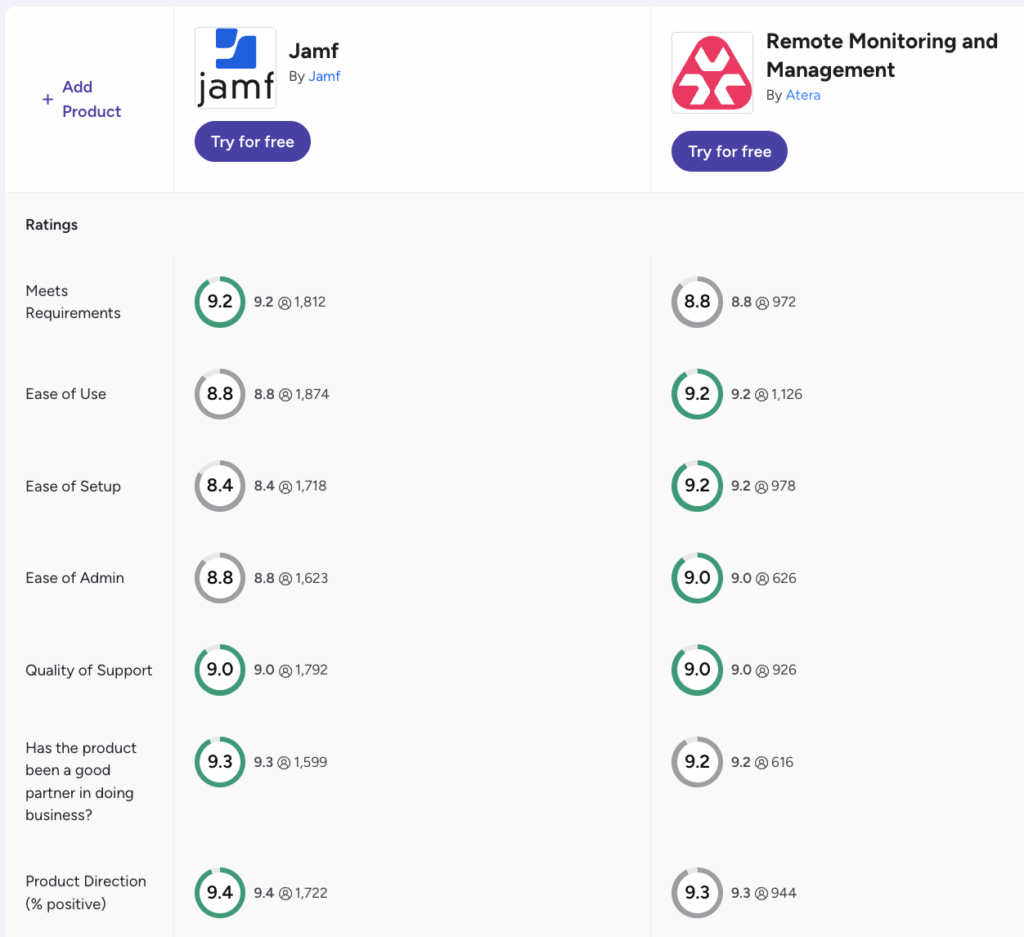
Here’s also G2’s comparison of Atera and Jamf:
#1: Features and capabilities
Atera and Jamf are both used by enterprises for managing organizations’ devices, but the two platforms have key differences.
While Jamf is designed entirely for the Apple environment, Atera expands beyond that and supports the management of Mac, Windows, and Linux operating systems.
Jamf’s key features include automatic enrollment of Apple devices, centralized app and patch management, real-time device monitoring, and a self-service portal that end-users can use to install apps independently.
Atera offers the same and much more:
- RMM to proactively monitor and secure your Windows, Linux, and Mac workstations, servers, switches, and other devices
- AI agents to tackle manual and repetitive device management tasks fully autonomously
- Network Discovery to automatically discover new devices and run scheduled health checks on devices
- Asset management to track and manage the entire lifecycle of your IT assets
- Helpdesk and ticketing to automatically categorize, summarize, and respond to tickets, with the help of Atera’s AI Copilot
- Remote access to securely connect and troubleshoot endpoints remotely
- Patch management to keep your devices up-to-date
While Jamf is an MDM solution, Atera is an RMM software. And the truth is, RMM can often replace MDM, but not the other way around.
Since Jamf is only capable of monitoring Apple devices, many organizations are forced to look for Jamf alternatives, such as Atera.
Another key difference between the two platforms? Agentic AI, which can only be found in Atera’s platform. Let’s discuss this next.
#2: Agentic AI development
Agentic AI is changing how organizations’ endpoints are managed, so it’s important to compare Atera and Jamf here.
Jamf has made AI innovations, but unfortunately, these are limited to assistive features. Jamf launched its AI Assistant in March 2026, and according to Jamf’s own docs, it helps to:
- Answer technical questions about Jamf products and services
- Explain why a device is out of compliance
- Read and explain configuration profiles
- Analyze security alerts and explain their severity
- Search blueprints and surface inventory insights
- Walk you through compliance benchmark adherence
Jamf describes its AI as read-only by design: it can read, analyze, explain, and give information, but it cannot modify configurations, push policies, or take actions autonomously. This means a technician still does the fixing.
In comparison, Robin by Atera not only assists but resolves real-world IT issues autonomously directly on the device, server, mainframe, or the network.
Robin does this by following a four-step resolution process:
- Diagnose: Robin verifies the user and gathers context to figure out the right resolution path.
- Remediate: It takes approved actions on the device, network, or in the cloud, only routing for approval when needed.
- Verify: Before closing anything, Robin confirms the issue is actually resolved.
- Close: Once resolved, Robin updates the ticket in your ITSM and logs every action for compliance and governance.
For example, if an end-user is facing a printer issue, Robin is capable of diagnosing the issue and executing the right actions to fix it (e.g., clearing the print queue or restarting the printer), just like a technician would.
Robin can resolve up to 92% of Tier-1 and complex Tier-2 technical issues autonomously, without a technician in the loop. Jamf doesn’t have a resolution rate for its AI assistant, as it doesn’t resolve issues on its own.
While Robin handles first-tier support, Atera’s AI Copilot assists technicians in running health checks, summarizing tickets, generating scripts, and accessing key information across your entire account.
Copilot’s Search with AI comes especially handy for enterprises. You can search for devices by simply describing what you need, and Copilot will interpret your request, apply the right filters, and display the right devices.

Atera users, like Heifer International, already implemented Robin for end-user support and have been able to free technicians for more strategic work.
Cedric Lambert, the CIO from Heifer International, commented:
“Robin is not just telling someone how to open the ticket. It’s actually opening the ticket for them. The agent takes care of all the back and forth with the user, analyzing the computer for the issue, and solving that problem directly, without a technician.”
Due to the impact our AI agents already have on many organizations, Atera was selected by G2 as the best AIOps tool for 2026.
#3: Pricing and value for money
Pricing is another area where Jamf and Atera differ. While Jamf’s pricing is based on pay-per-device, Atera offers pay-per-technician pricing, which is different from most RMM pricing plans, including Jamf. Atera’s IT department pricing plans start from $149/month, while MSP pricing plans start from $129/month.
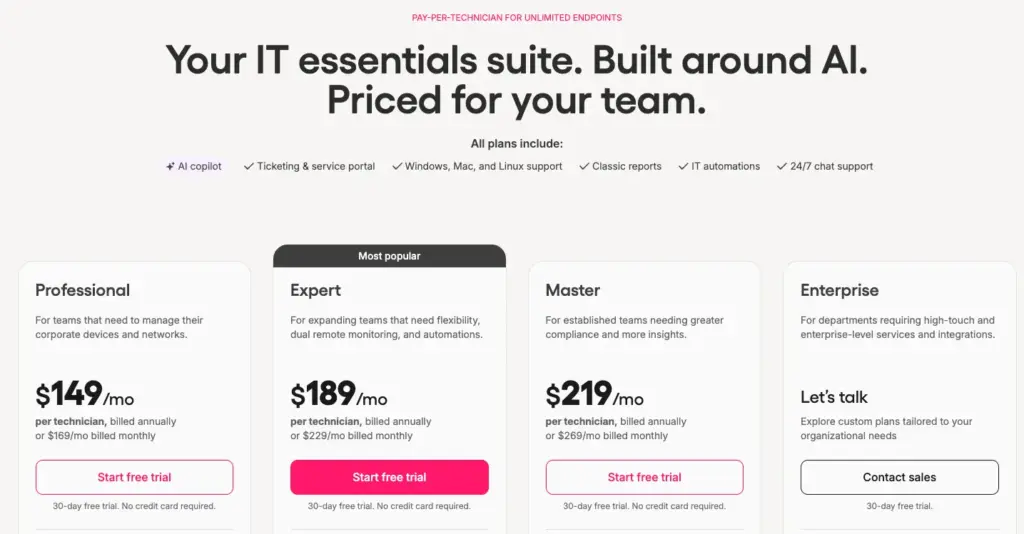
Atera’s pricing plans
For Jamf, there are three pricing plans available: Jamf for Mac, Jamf for Mobile, and Jamf Now.
Since we last updated this article, the cost of Jamf for Mac has gone up from $10/month to $12.50/month per device.
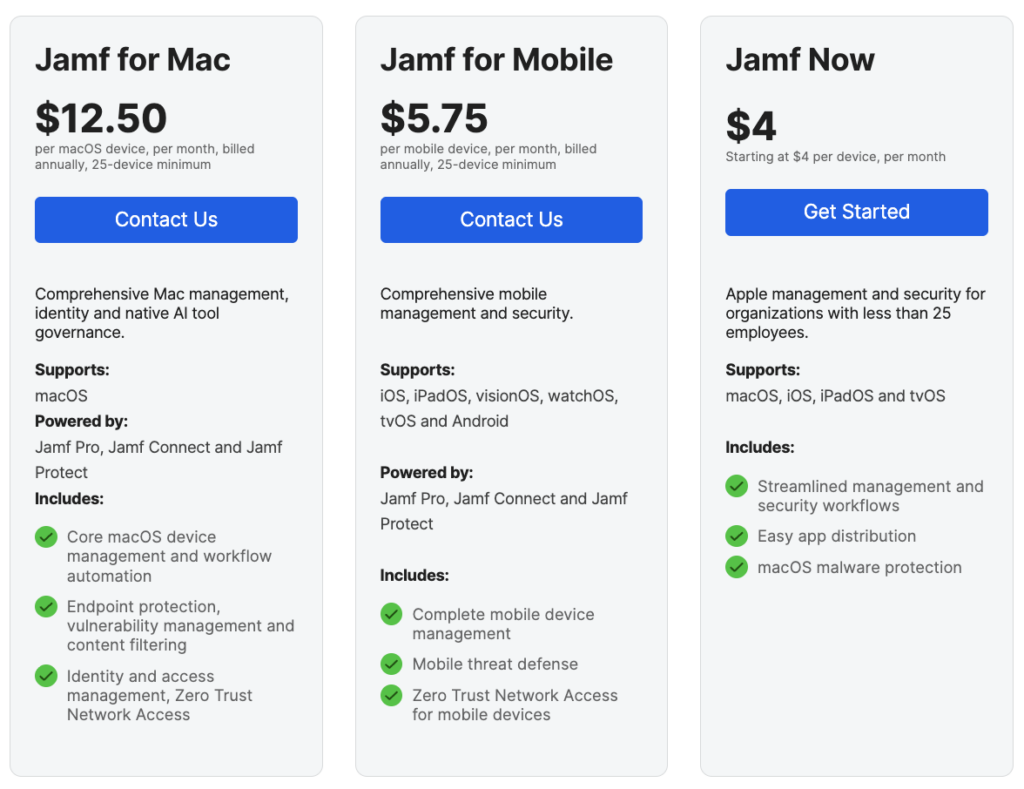
With all of Atera’s pricing plans, you can manage unlimited endpoints at no additional cost, making scaling predictable and arguably more cost-effective than with Jamf.
Another thing to consider is how efficient the available features make you. After all, this can lead to higher expenses, or further cost savings.
With Atera’s AI agents, your technicians are more efficient than ever. Robin helps to resolve common end-user issues autonomously, increasing employee productivity (worth $2.9 million according to a Forrester report) and freeing technicians for higher-value work.
One G2 user commented on this aspect and said, “Together with Atera’s AI agents such as Copilot and Robin, they are saving a lot of time by merely automating the routine part of the work and also the troubleshooting.”

#4: User interface and usability
Let’s also look at how the admin dashboards of Atera and Jamf look and how users rate them.
To begin with, here’s a look at Atera’s admin dashboard:

Atera admin dashboard
In comparison, this is how Jamf’s admin dashboard looks:

Jamf admin dashboard (via G2)
Since ease of use is directly linked to how intuitive the user interfaces are, let’s compare how Atera and Jamf are rated on G2’s ease of use categories.
According to G2’s comparison, this is how users rate Atera vs. Jamf’s ease of use:
| Category | 1. Atera | 2. Jamf |
| Ease of Use | 9.2 (790+ reviews) | 8.8 (1,600+ reviews) |
| Ease of Setup | 9.1 (650+ reviews) | 8.4 (1,500+ reviews) |
| Ease of Admin | 9.0 (740+ reviews) | 8.8 (1,560+ reviews) |
As you can see, Atera has a slight advantage over Jamf across all ease-of-use categories, which is thanks to our intuitive user interfaces.
From the ground up, Atera was built to be easy to navigate, and onboarding new technicians can be done in a matter of minutes, not days or weeks.
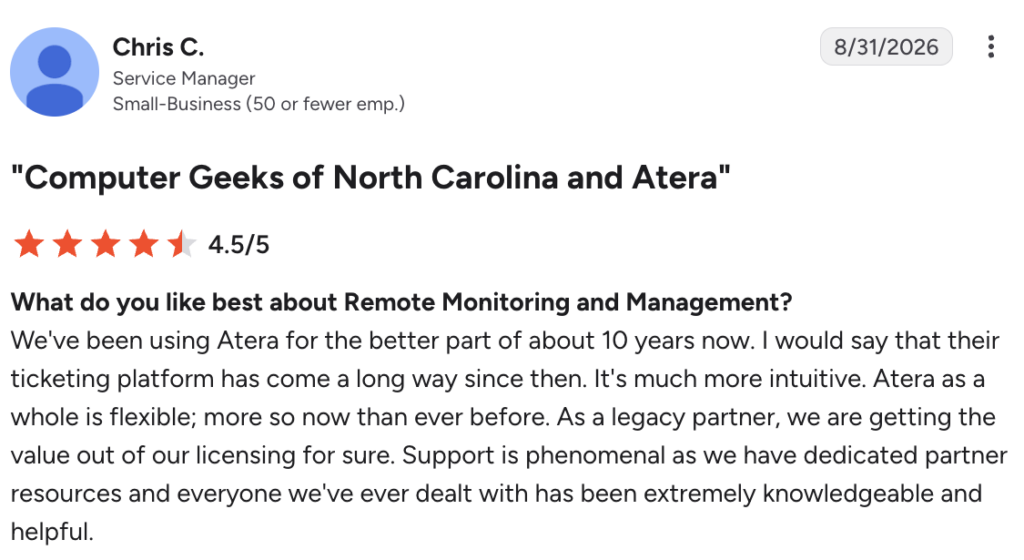
One long-time Atera user, Chris C., described his experience with the platform and said:
“We’ve been using Atera for the better part of about 10 years now. I would say that their ticketing platform has come a long way since then. It’s much more intuitive. Atera as a whole is flexible; more so now than ever before.”
#5: Customer support and community
When it comes to support, Atera has a slight advantage over Jamf with its 24/7 live chat and email support. No matter your Atera plan, you can always get in touch with our support team to get your problems resolved.

For Jamf, most users have access to the “Standard Support.” With it, you can get in touch with Jamf’s support team during business hours.

If you’re willing to pay extra, Jamf has three Premium Support tiers:
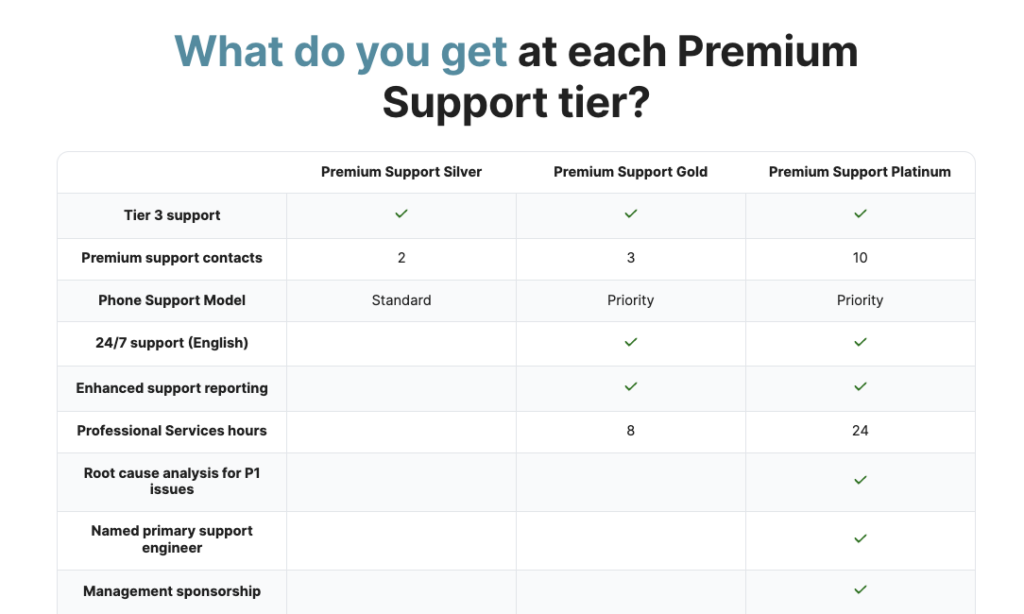
The cost for the premium support plans is also listed on the same page, and it’s clear that they’re out of reach for most IT teams:

Both Atera and Jamf also offer IT communities, where users can troubleshoot issues and learn about new features with other IT administrators.
#6: User feedback and reviews
Both Atera and Jamf are highly rated on the major review platforms. On G2 alone, Atera has gathered 860+ reviews with a 4.6 out of 5.0 rating, while Jamf has 1,000+ reviews with a 4.8 out of 5.0 stars rating.
One IT leader on G2 described Atera’s pros and said, “We have a dedicated Atera rep who checks in with us every several months to see if our needs are met, and discuss new features rolled out and in the pipeline. Atera is incredibly easy to set up automation policies and create scripts/installation packages for rolling out software and keeping devices updated.”

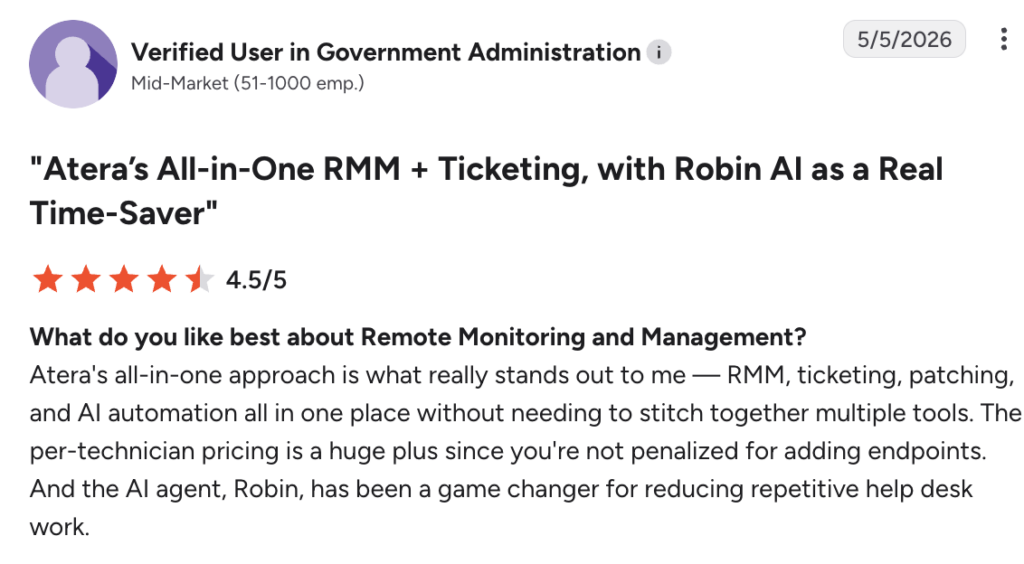
Another G2 user appreciated Atera’s AI agents and said:
In comparison, Jamf’s positive feedback is mainly related to its Apple device management capabilities. This is how one user described it:
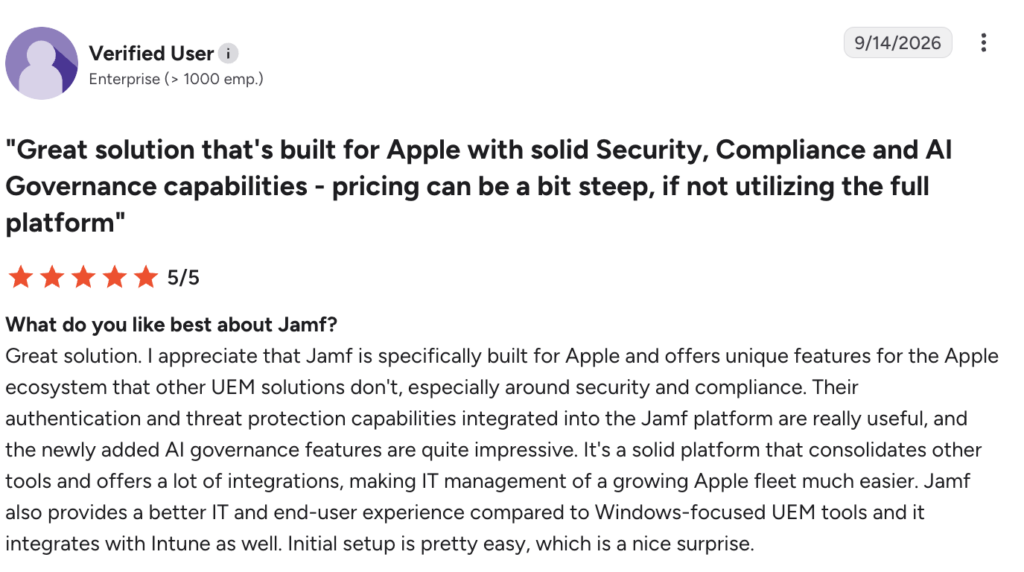
As a drawback, the same user mentioned that “the pricing is a bit steep and it’s hard to see the value if you’re not using the full platform.” And this is even more true after the recent price increase.
Plus, Jamf doesn’t have Agentic AI capabilities, unlike Atera, which prevents users from handling IT management tasks more efficiently.
Wrapping up: Atera vs. Jamf for your organization?
Of all Jamf alternatives, Atera is the only one with AI agents that resolve up to 92% of Tier-1 and complex Tier-2 incidents autonomously, without a technician in the loop.
This is the main advantage of Atera over Jamf. Atera is pioneering IT management and helping organizations move from automated to fully autonomous IT.
We’re not offering another AI chatbot; our Agentic AI technology represents a shift in how IT operations are managed. If you want to be part of this shift, an easy step you can take is to sign up for Atera’s 30-day free trial.
Or, you can get in touch with our sales team to discuss your needs further.
Frequently Asked Questions
Related Articles
Robin vs Request Resolver (Former Rovo)
Robin and Atlassian's Request Resolver (Former Rovo) both bring Autonomous IT into ITSM, but they operate at different levels. This full comparison breaks down where each one's autonomy actually reaches.
Read now
Robin vs Kaseya Intelligence
Robin by Atera and Kaseya Intelligence both talk about autonomous IT, but structure their AI technologies differently. See where each one's autonomy actually reaches and which works for your org.
Read now
Robin by Atera vs. Ivanti Neurons: comparing two very different approaches to autonomous IT
In this article, we'll compare Robin vs. Ivanti Neurons: one AI agent that resolves IT incidents end to end, and one platform that splits autonomy across two separate AI capabilities.
Read now
Robin vs Freddy AI Agent Studio
Not all agentic ITSM starts from the same place. See how Robin's deploy-ready model compares to Freddy AI Agent Studio's no-code, build-it-yourself approach.
Read nowEndless IT possibilities
Boost your productivity with Atera’s intuitive, centralized all-in-one platform









