Table of contents
Table of contents
- Atera vs. Thread: an overview
- Atera vs. Thread for autonomous IT support
Are you in the process of selecting an autonomous IT support tool? If yes, Atera and Thread are two competing options.
Atera and Thread both offer AI agents, but each works at a different layer of IT support. Thread works at the ticket layer, where its agents answer and route client requests. Robin by Atera works at the execution layer. It not only responds to support requests, but fixes the issues directly on the device, server, or network.
Below is a full Atera vs. Thread comparison for 2026.
Atera vs. Thread: an overview
For a quick comparison, see this overview table:
Atera Features | Thread Features |
Autonomous IT platform with RMM, remote access, network discovery, and patch management Robin: 92% autonomous resolution of Tier-1 and complex Tier-2 technical incidents AI Copilot for AI-powered troubleshooting, scripting, ticketing, and more Ticketing system with AI ticket summarization for technicians and autonomous incident resolution by Robin Scripting engine powered by AI Copilot Asset management to track the lifecycle of IT assets Autonomous patch management for keeping Windows, macOS, Linux, and third-party apps up-to-date PSA for MSPs to track contracts, billing, SLAs, and more | AI service desk that sits on top of your existing PSA (ConnectWise, Autotask, or HaloPSA) Voice AI Agent to answer calls around the clock Triage Agent to classify, prioritize, and summarize every ticket Dispatch Agent to assign and schedule work by skill, availability, and client Automagically to build automations from plain-language descriptions Inbox for technicians |
Customer support | Customer support |
24/7 email and live chat support for all customers An extensive knowledge base, IT community, and tutorials | Email support with replies typically within 24 hours, and live chat during US business hours A help center, feedback portal, live training webinars, and the Thread Crew community |
Integrations | Integrations |
Integrations with 25+ cybersecurity, automation, backup, remote access, and network monitoring software Integrations with 50+ more third-party tools for Robin Access to 5,000+ apps through Zapier | Two-way sync with ConnectWise Manage, Autotask, and HaloPSA Integrations with RMM and documentation tools (IT Glue, Hudu, Liongard, Auvik, and more) |
Pricing | Pricing |
Transparent pay-per-technician pricing, starting from $129/technician/month 30-day free trial available | Pay-per-managed-customer pricing, starting from $19/customer/month No free trial available |
Let’s now compare the two in detail across different categories.
#1: Features and capabilities
The main difference between Atera and Thread? Atera is a broader IT management platform (with RMM, PSA, patch management, and more) and offers built-in AI through Robin by Atera. In comparison, Thread is an AI service desk that sits on top of a PSA you already pay for.
Here’s what that means in practice:
- Atera: A dedicated RMM and PSA platform with remote access, patch management, Network Discovery, AI help desk, and AI agents. With Atera, you don’t need more third-party tools; Atera’s RMM and PSA handle IT management, while Robin autonomously resolves Tier-1 and complex Tier-2 technical incidents.
- Thread: No PSA or RMM of its own. It needs to be bundled with a PSA platform, like ConnectWise PSA, HaloPSA, or Autotask. Thread works as an AI service desk layer on top of that PSA, meaning you need to pay for both the PSA platform and Thread.
Thread’s real strength is that if your current PSA doesn’t support AI service desk workflows, you can add them without switching platforms. But this also means higher costs, plus you still need a separate RMM to monitor your or your clients’ IT environments.
In comparison, with one Atera subscription, you get access to:
- RMM for real-time monitoring of endpoints
- Atera’s remote access for troubleshooting devices directly
- Atera’s PSA for handling tickets, contracts, billing, SLAs, and setting up customer portals
- Network Discovery (add-on) to map unmanaged devices
- Asset management to track the lifecycle of IT assets
- Patch management for Windows, macOS, and Linux, plus third-party apps
Like Thread, Atera has third-party app integrations. There are 25+ integrations for Atera’s platform, and 50+ integrations for Robin, meaning it also works on platforms your IT already lives in.
#2: Agentic AI development
Both Atera and Thread use AI agents. The difference is where those agents do their work.
Thread’s AI works at the ticket layer. It reads, sorts, and responds to service requests. Robin by Atera works at the execution layer. It diagnoses the issue and fixes it directly on the device, server, or network.
Thread: AI built around the ticket
Thread describes its AI as “a crew of AI agents” that triage, troubleshoot, and resolve routine requests across Teams, Slack, email, and phone. Here’s what’s available:
- Voice AI Agent: Answers support calls around the clock. Resolves routine requests and logs each ticket to your PSA.
- Triage Agent: Classifies, prioritizes, and summarizes every ticket. Writes entries and notes back to your PSA software.
- Dispatch Agent: Automatically assigns and schedules work by skill and client.
- Automagically: Helps to turn plain language requests into an automation, freeing technicians from manual work.
Thread’s public materials don’t describe AI actions on the device itself. Device-level work runs through connected RMMs.
Robin by Atera: AI built around the fix
Robin is an AI technician that remediates Tier-1 and complex Tier-2 technical incidents end to end by autonomously taking real actions on devices, servers, mainframes, and networks, without needing a technician in the loop.
Every incident Robin resolves follows the same four-step (Diagnose, Remediate, Verify, Close) resolution process. Robin is available to end users via Slack, email, Teams, the Customer Portal, or third-party ITSM tools.
Robin covers many use cases; here are a few highlighted:
- Reset passwords and recover credentials, including MFA
- Change Azure AD group memberships
- Install pre-approved software
- Restart hung services and run scripts
- Fix Outlook, Wi-Fi, and printer issues
Because Atera’s RMM and PSA are built-in, Robin doesn’t need a third-party tool to reach an endpoint for a fix.
Atera reports that Robin resolves up to 92% of Tier-1 and complex Tier-2 technical incidents, an average resolution time of under 120 seconds.
While Robin is for end-user support, Atera also includes AI Copilot for technicians.
#3: Pricing and value for money
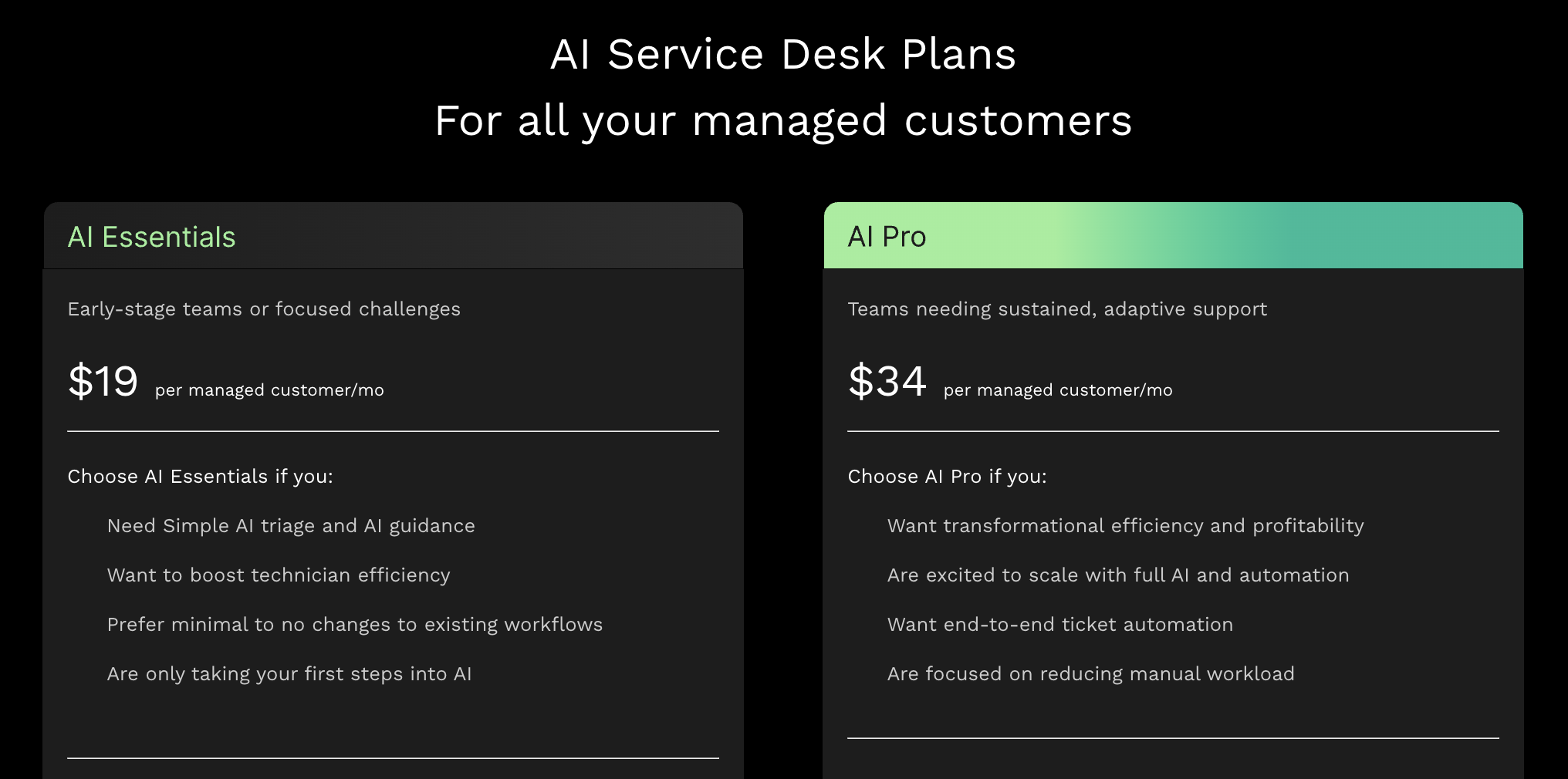
Thread offers two base plans: AI Essentials ($19 per month, per managed customer) and AI Pro ($34 per month, per managed customer).
Plus, Thread has two add-ons for Integrated Chat ($5/customer, per month) and Voice AI ($15/customer, per month).
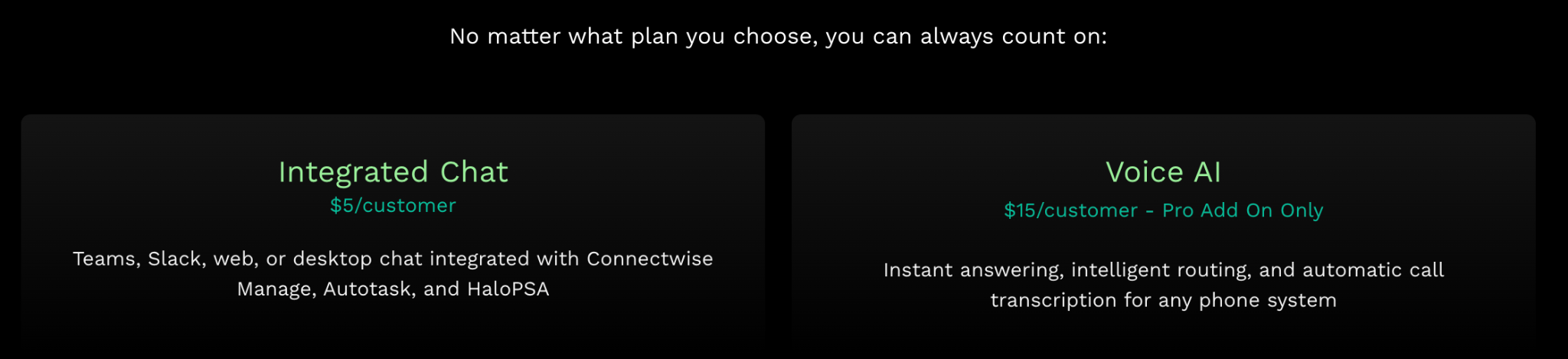
These costs sit on top of your existing RMM/PSA subscription.
In contrast, Atera’s pricing differs from most RMM pricing: it’s based on pay-per-technician.
This means you only pay for the number of technicians using the platform, not for the number of endpoints you need to monitor. Below are Atera’s standard pricing plans listed.
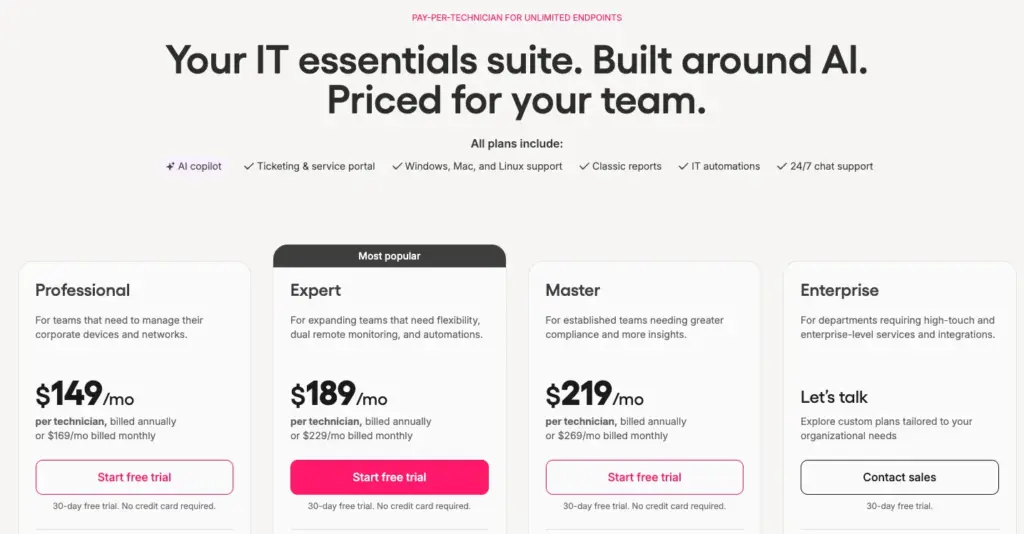
Robin and Network Discovery are available as add-ons on top of Atera’s base plans. If you want to see how much you could save with Atera’s AI, you can access the Robin Savings Calculator here.
One Atera user, Emil C. on G2 commented on the benefits of Atera’s pricing, saying:
- “Another strong point is the pricing model and ROI. Because Atera is priced per technician rather than per device, it makes a lot of sense for growing IT teams and MSPs. It lets us manage more endpoints without driving up costs too much, which is a real advantage.”
Thread doesn’t offer a public free trial to try out the platform. Atera offers a 30-day free trial.
#4: User interface and usability
Thread is a newer AI service desk solution, and hasn’t received enough reviews on G2 yet to form an ease of use rating. In contrast, Atera has 1,200+ G2 reviews, with these ease-of-use ratings:
Category | Atera | Thread |
Ease of Use | 9.2 (800+ reviews) | n/a (not enough reviews) |
Ease of Setup | 9.1 (650+ reviews) | n/a (not enough reviews) |
Ease of Admin | 9.0 (550+ reviews) | n/a (not enough reviews) |
Atera’s high ease of use ratings are arguably linked to its intuitive dashboards. Atera’s dashboards have a low barrier to entry and quick implementation. Yet, they’re fully customizable to your IT team’s needs.
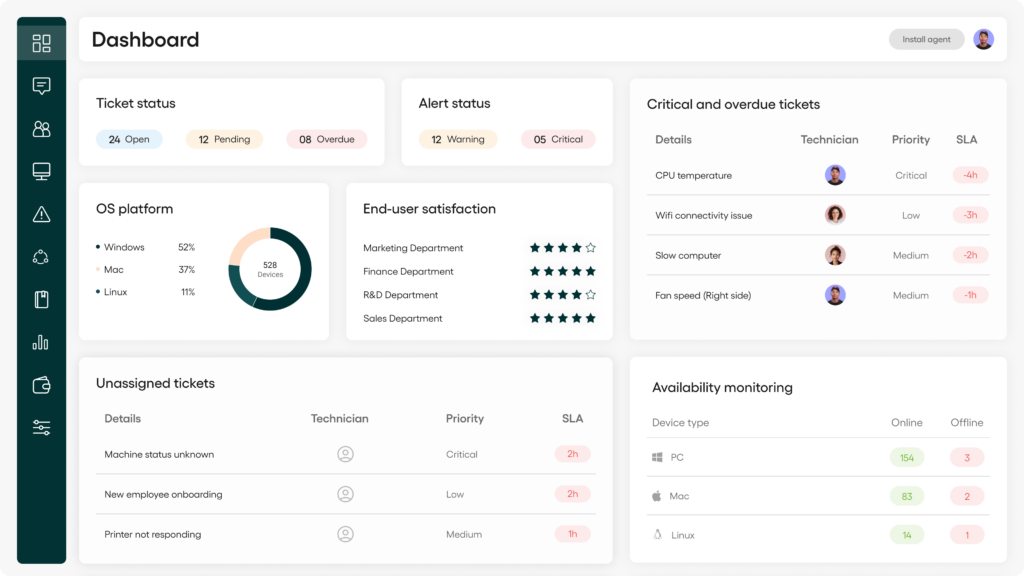
Here’s what one long-time Atera user, Chris C., said about the interface:
- “We’ve been using Atera for the better part of about 10 years now. I would say that their ticketing platform has come a long way since then. It’s much more intuitive. Atera as a whole is flexible; more so now than ever before.”
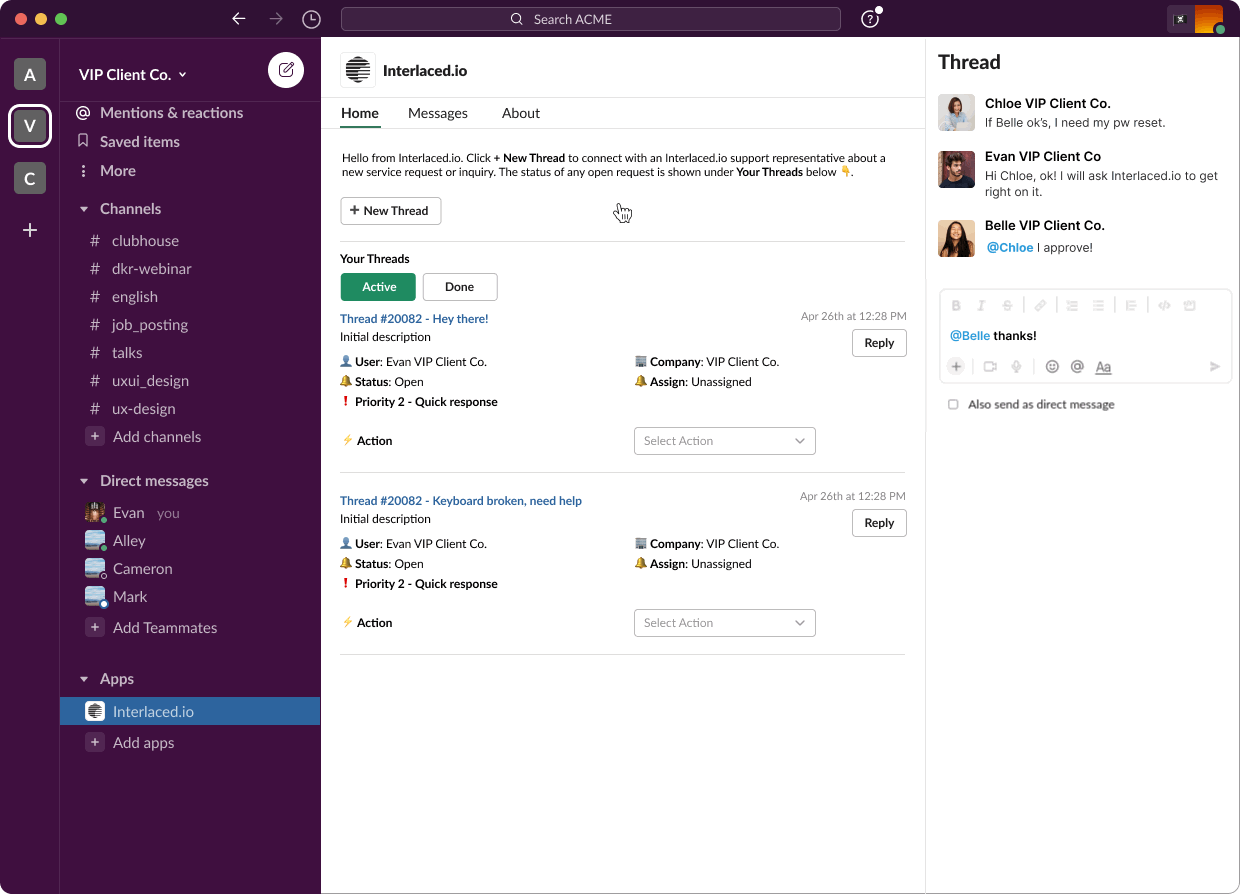
For Thread, there are fewer images of what the dashboard looks like. Here’s one image from their G2 profile, showing how the end-user chat experience works inside Slack.
#5: Customer support and community
Thread has two ways to contact support: via email and via live chat. For email support, they “typically reply within 24 hours.”
The live chat is also only available during Thread’s working US business hours.
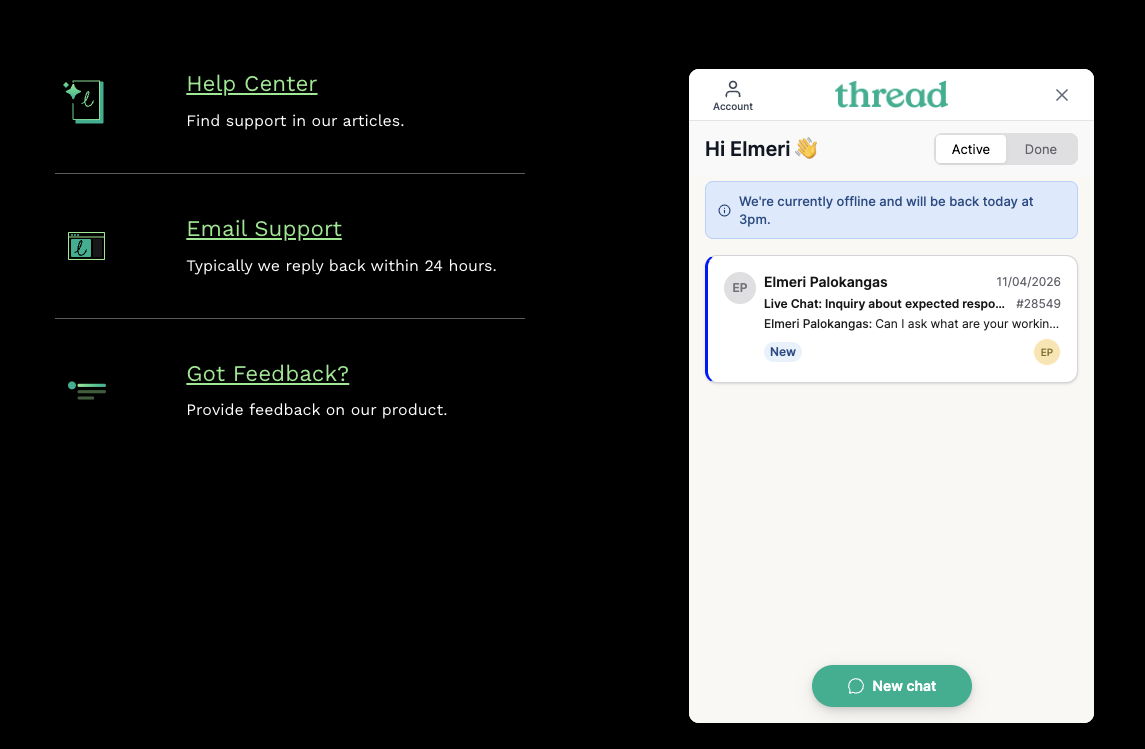
Compared to Atera, Thread’s support hours are narrower. With Atera, all users get access to 24/7 live chat and email support.
Atera users often say support is one of the main advantages of it. One G2 user praised the support shortly, saying: “Their chat support answered immediately and within just a couple minutes the issues were fixed.”

Both Atera and Thread also have user communities and knowledge bases. Atera also offers webinars, video tutorials, a shared script library, and Atera Academy with different courses.
#6: User feedback and reviews
Thread is a relatively new platform, so there are far fewer user reviews. Across G2, Software Advice, and Capterra, we found a total of 12 reviews.
However, some Reddit threads discuss users’ experiences with Thread. Users like Banto2000 mention having a great success:

Others say Thread works well for Teams-based ticket creation and automatic categorization:
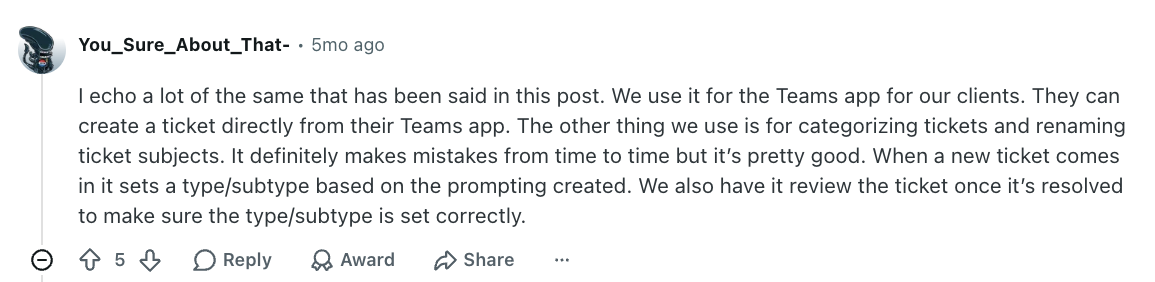
Despite this, other users found Thread’s AI didn’t work as intended, and that their existing PSA handled the same work just as well:
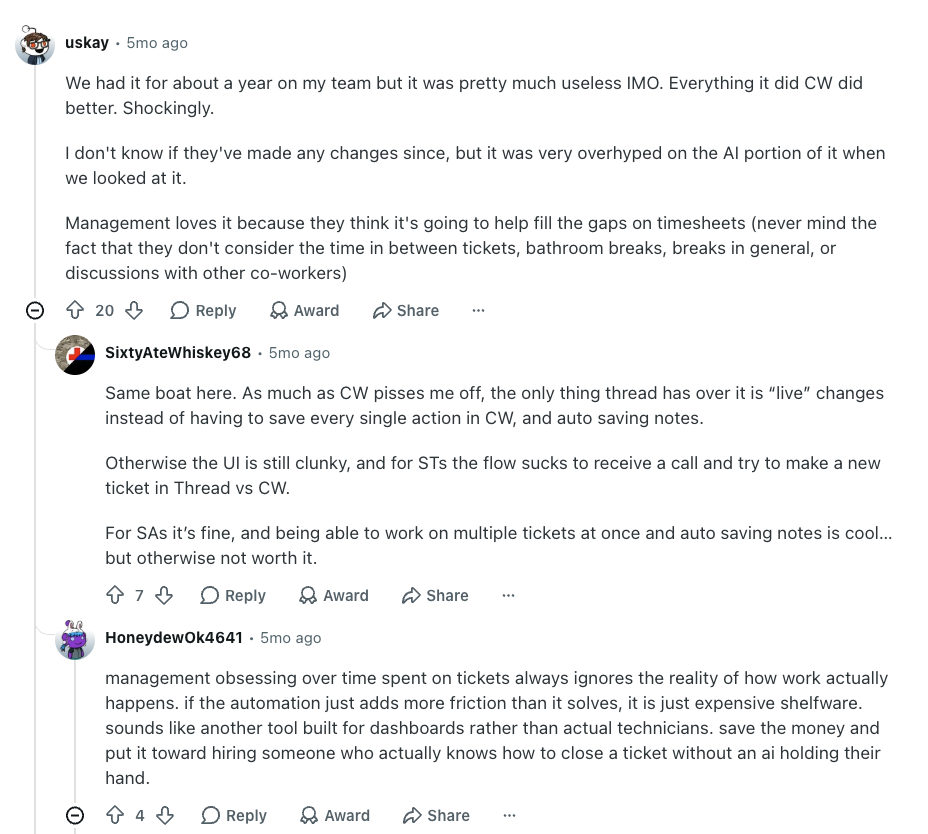
Like HoneydewOk4641 says, “if the automation just adds more friction than it solves, it is just expensive shelfware.”
That’s the real test for any AI tool: does it actually take work off, or just add another layer to manage?
Robin by Atera is built to remove real friction for technicians and end users. Instead of triaging tickets for a technician to pick up, it resolves technical incidents autonomously.
Users like Emil C. on G2 have commented on the benefits of Robin:

CCI, a property management firm, took around 30 days to decide to roll Robin out organization-wide:
“At around 500 tickets a month, Atera’s Robin is saving our IT team ~200 hours a month. It touches almost every support interaction we have. It’s not just resolving issues, it’s reshaping how employees perceive IT support at CCI.”
Atera vs. Thread for autonomous IT support
Thread can be genuinely useful for MSPs that already have PSA and RMM software and want AI on top of them. However, it adds a third subscription to pay for. Plus, based on its public materials, its AI works at the ticket layer, and fixes run through a technician or your RMM.
Robin by Atera takes a different approach. It captures requests via Teams, Slack, email, or your Customer Portal, and reaches the device, network, or cloud directly to fix the issue end to end. It resolves up to 92% of Tier-1 and complex Tier-2 technical incidents, without a technician in the loop.
Ready to learn more? Use the Robin savings calculator to see how much your organization could save, or contact our sales team today to see how Robin can help!
Frequently Asked Questions
Related Articles
Robin vs. Otto vs. Flow: which AI agent fits which IT job
Robin by Atera and ServiceNow’s Otto and Flow are competing AI tools for employee support, but each resolves requests at a different layer. This article looks at how they differ and which one is best for your organization.
Read now
Robin vs. Flow: comparing two different approaches to autonomous IT support
Robin by Atera and ServiceNow Flow both capture employee requests inside tools like Slack and email, but differ in how they solve them. This Robin vs. Flow comparison explains the differences and helps you choose the right one.
Read now
Atera vs. MSP Process: A comparison for IT support teams
Atera and MSP Process both offer AI agents for end-user support, but they operate differently. In this comparison, we’ll look at the two platforms’ features, AI, pricing, support, and user feedback.
Read now
Atera vs. Automox: A full comparison for IT decision-makers in 2026
Compare Atera vs. Automox across all key categories: Agentic AI, features, pricing, user interface, customer support, and user feedback. Choose the best one for your organization.
Read nowEndless IT possibilities
Boost your productivity with Atera’s intuitive, centralized all-in-one platform