
Generate summary with AI

Nearly 60% of cyber compromises trace back to unpatched vulnerabilities, according to security executive John Morello (2024). And keeping up is hard: in Adaptiva’s 2026 survey of 200+ IT and security professionals, 74% named coordinating vulnerability prioritization and remediation as their biggest security issue.
This is exactly what the best patch management software helps with. Whether you need to patch Windows, Mac, Linux, or third-party applications, these tools find and deploy patches on the schedule you set, and some now act autonomously.
Top 6 patch management software for organizations
These are the best patch management software available:
- Atera: best for IT teams and MSPs that want patching inside one platform
- ManageEngine Patch Manager Plus: best for teams already using ManageEngine
- Microsoft Intune: best for Microsoft-centric organizations
- Automox: best for cloud-first teams
- Action1: best for small teams that want to start free
- Jamf Pro: best for Apple-only fleets
Here’s how they compare at a glance, followed by a closer look at each option.
Option | Best for | Third-party apps | Pricing model | Starting price | AI and autonomy |
|---|---|---|---|---|---|
Atera | IT teams and MSPs wanting RMM and patching in one platform | Yes, selectable in IT automation profiles | Per technician, unlimited endpoints | From $149 (IT departments) or $129 (MSPs) per technician per month, billed annually | Robin (add-on) acts autonomously on devices |
ManageEngine Patch Manager Plus | Teams already on ManageEngine | 1,100+ | Per endpoint | Free for up to 25 computers; paid from under $1 per endpoint per month | Policy-based patching |
Microsoft Intune | Microsoft 365 and Windows environments | Enterprise App Catalog (still limited, per G2 users) | Per user, bundled in Microsoft 365 | $22 per user per month (Business Premium), or $8 standalone | Policy-based update management |
Automox | Cloud-first teams | 580+ (Automate tiers only) | Per endpoint | $1 per endpoint per month (OS patching only) | Bring your own AI agent via MCP server |
Action1 | Small teams starting free | Yes | Per endpoint above the free tier | Free for the first 200 endpoints | Policy-based patching |
Jamf Pro | Apple-only fleets | App Installers catalog | Per device | $12.50 per Mac per month (Jamf for Mac) | Policy-based patching |
Prices are US list prices as of October 2026 and may change. Confirm on each vendor’s site before buying.
1. Atera
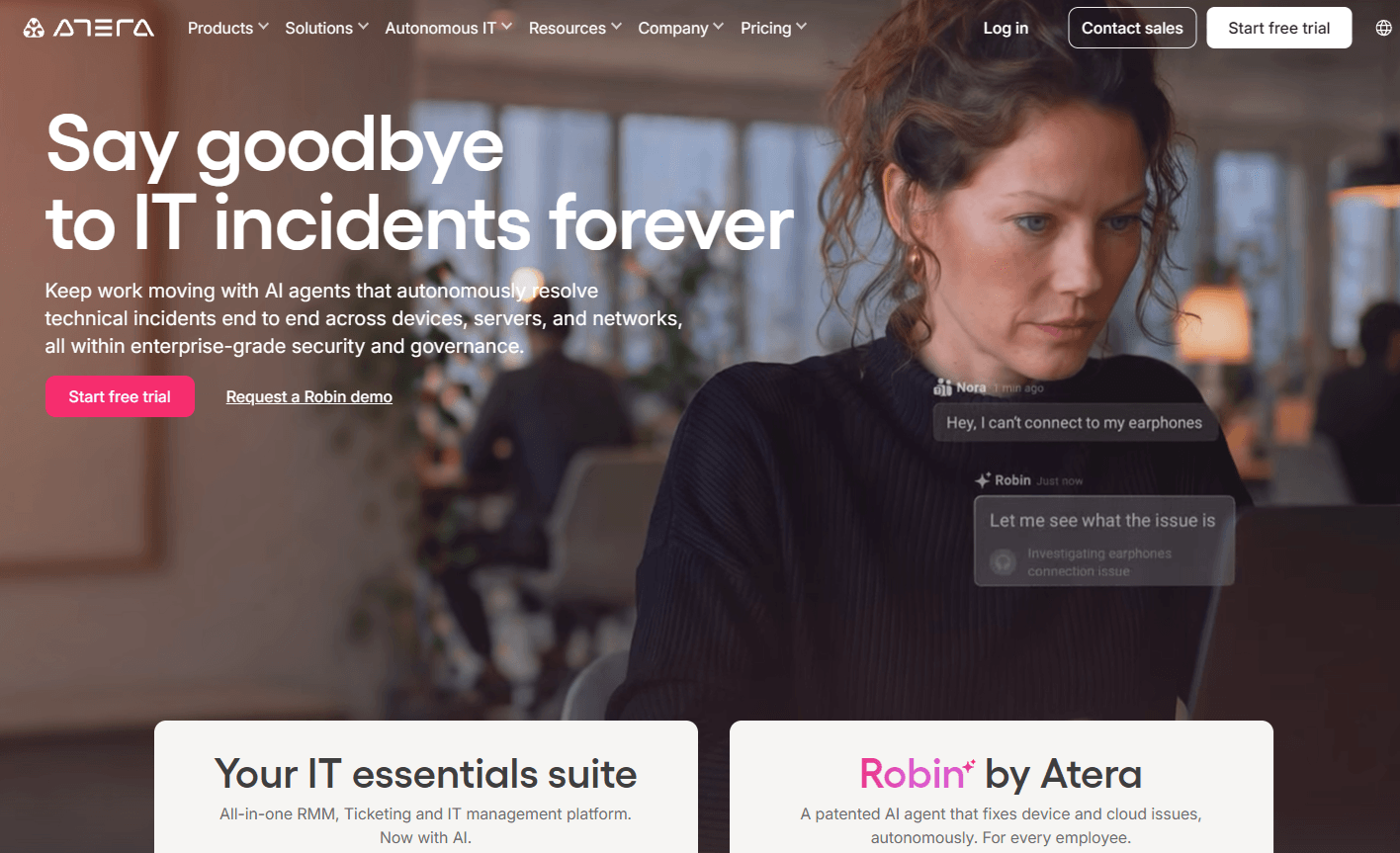
Best for: IT departments and MSPs that want patching, monitoring, remote access, and an autonomous IT agent in one platform.
1.Patch management: Atera’s patch management is part of its wider autonomous IT platform. With it, you can automatically scan, identify, download, deploy, and verify patches on Windows, Mac, Linux, and third-party applications, on schedules you define.
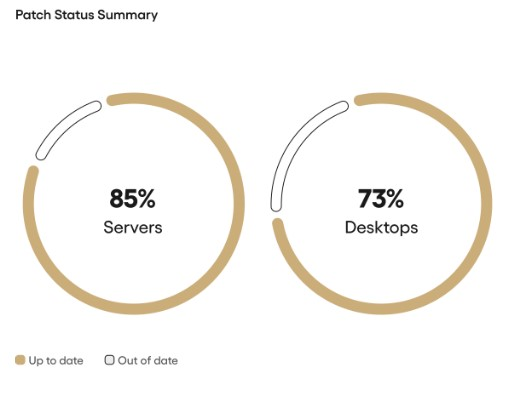
Atera’s reporting and analytic tools give you an overview of your patch status and a list of missing patches.
2. Autonomous patching with Robin: More organizations aim for autonomous patch management, but only 8% report fully autonomous patching today, though 21% expect to get there in the near term (Adaptiva, 2026).
Robin by Atera is an AI technician that takes real actions directly on devices. For patching, Robin can check a device’s update status, run update scans, install approved updates, and schedule restarts, autonomously and within the rules you set. When a patch fails, Robin runs an update scan, identifies what is blocking the install (such as low disk space), and retries the update. If something falls outside its scope, or your rules require sign-off, Robin hands off to a technician with the context and a summary of what it already did.
Robin is available as an add-on. It resolves up to 92% of Tier-1 and complex Tier-2 technical incidents autonomously. That rate covers incidents broadly, not patch success specifically.
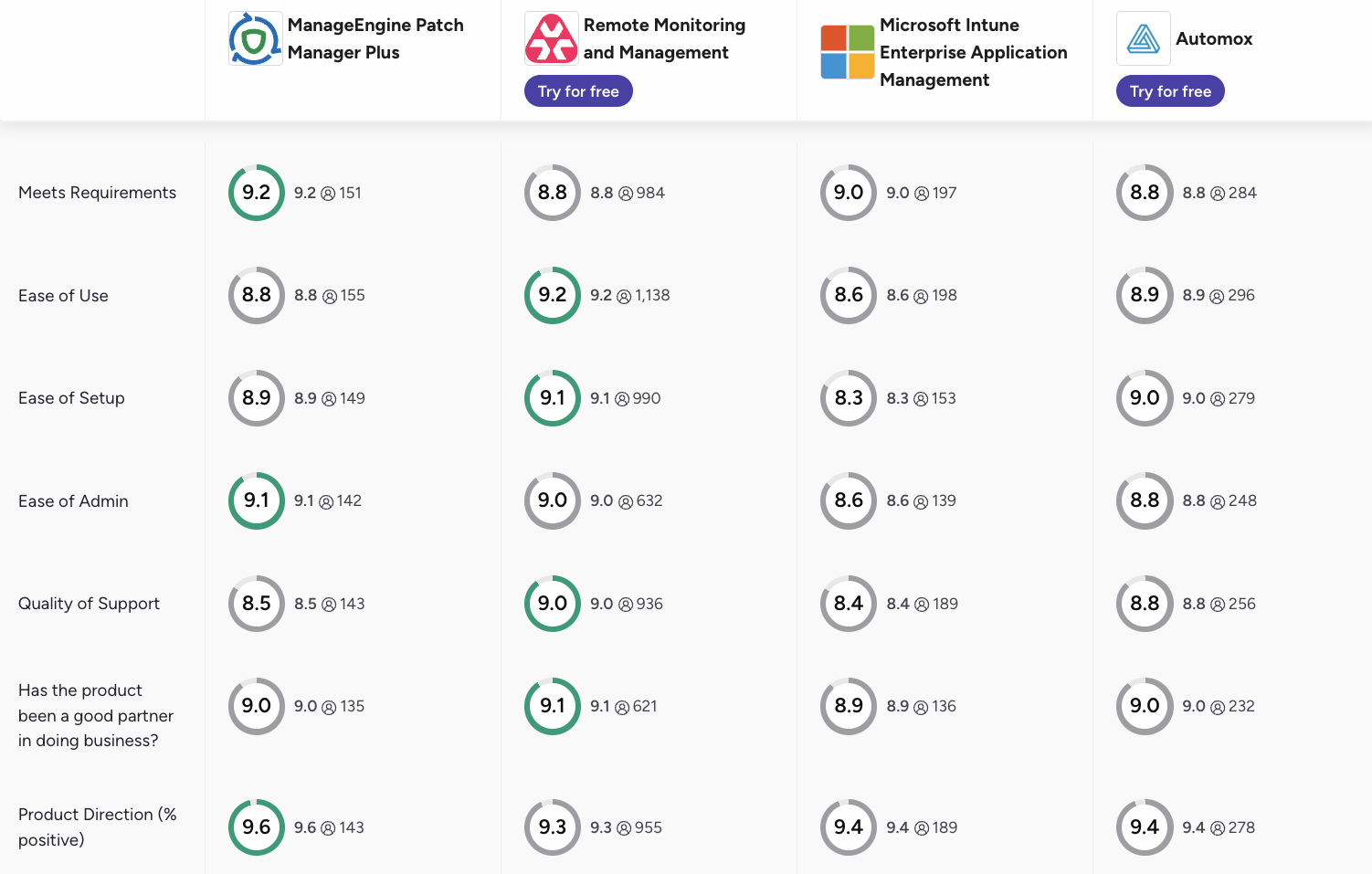
3. UI and ease of use: In G2’s category scores, Atera leads these four options on Ease of Use and Ease of Setup, and is a close second on Ease of Admin:
G2’s Category | 1. Atera | 2. ManageEngine Patch Manager Plus | 3. Microsoft Intune | 4. Automox |
1. Ease of Use | 9.2 (1,100+ reviews) | 8.8 (150+ reviews) | 8.6 (190+ reviews) | 8.9 (290+ reviews) |
2. Ease of Setup | 9.1 (990+ reviews) | 8.9 (140+ reviews) | 8.3 (150+ reviews) | 9.0 (270+ reviews) |
3. Ease of Admin | 9.0 (600+ reviews) | 9.1 (140+ reviews) | 8.6 (130+ reviews) | 8.8 (240+ reviews) |
Features and capabilities
Atera goes beyond standalone patching. It’s an autonomous IT platform that includes:
- Atera’s RMM for real-time device monitoring and alerting
- Remote access through Splashtop and AnyDesk
- Reporting and analytics for patch status and more
- Robin (add-on) for resolving up to 92% of Tier-1 and complex Tier-2 technical incidents autonomously
- AI Copilot for technicians, available at no extra cost
- Network Discovery as an add-on
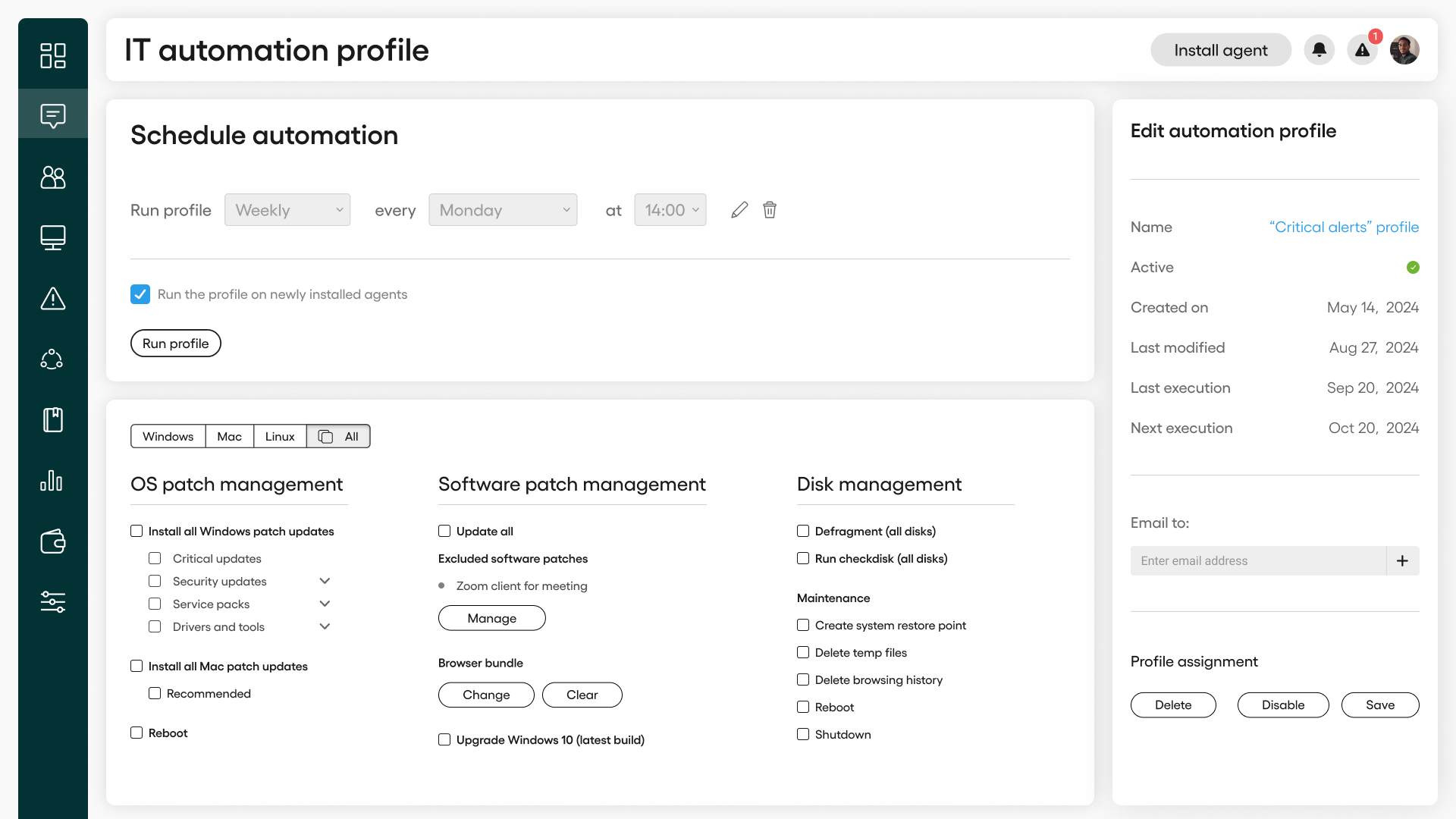
To set up patch schedules, Atera’s IT automation profile is available. You can decide what tasks the tool should perform, whether that be patch updates for Windows, Mac, Linux OS, or third-party applications.
Patch deployment can be scheduled for specific times to reduce the impact on end users’ productivity and system performance.
To see all up-to-date agents and get a complete list of missing patches, Atera provides users with patch status summaries.
When a patch fails, a technician usually has to step in and figure out why. With Atera, Robin does that for you. It runs an update scan, identifies what’s blocking the install (like low disk space), and retries the update.
User interface and usability
From the “Admin” section on Atera’s left sidebar, you can manage patches and create IT automation profiles.
Although Atera has an intuitive interface, you may still face issues from time to time, which is why Atera offers 24/7 live chat support.
Atera also provides a wealth of self-help documentation, including Atera’s knowledge base and an active IT community that can assist with troubleshooting IT issues.
Pricing and value for money
Atera prices per technician, not per device. You pay for the number of technicians using the platform, with unlimited endpoints, however many devices you need to patch.
Consider: Per-technician pricing works best when each technician manages many devices. Teams with many technicians and relatively few endpoints may find per-endpoint pricing cheaper.
Atera G2 rating: 4.6 out of 5.0 stars (1,200+ reviews)
What Atera users are saying on G2:
- “Having monitoring, remote access, patch management, automation and asset information in the same platform made day-to-day support much easier,” Kyle R. says.
- “Patch management is accurate and quick. Built in Copilot allows for quick and efficient troubleshooting. Any support questions are quickly answered, and the documentation is very helpful,” Sam W. says.
Atera Capterra rating: 4.6 out of 5.0 stars (400+ reviews)
What Atera users are saying on Capterra:
- “I mainly like it because it gives us monitoring, patch management and remote management capabilities in one place instead of having to switch between different tools for every task,” Varshini B. says.
- “It reduces repetitive work and gives good visibility into system health without requiring too many separate tools,” Dymasius S. says.
Atera pricing
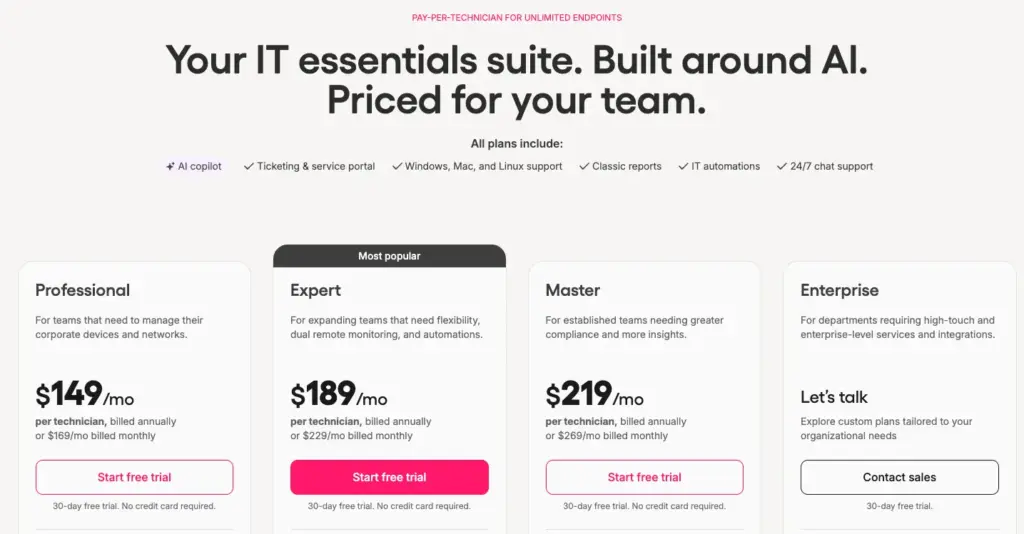
Pricing plans for IT departments:
- Professional: $149 per month, per technician
- Expert: $189 per month, per technician
- Master: $219 per month, per technician
- Enterprise: Custom quotation. Contact sales for pricing.
- Pro: $129 per month, per technician
- Growth: $159 per month, per technician
- Power: $209 per month, per technician
- Superpower (Enterprise): Custom quotation. Contact sales for pricing.
Robin is priced separately as an add-on. Contact sales for details.
Get started with Atera with a 30-day free trial with no credit card required.
2. ManageEngine Patch Manager Plus
Best for: Teams already using other ManageEngine products.
ManageEngine Patch Manager Plus supports patching for Windows, macOS, Linux, and 1,100+ third-party applications. Like with most patching tools, you can set up your own patching policies, select preferred days for deployment, and test patches on a group of devices before doing a wider rollout.
Patch Manager Plus’ advantage is its native integration with other ManageEngine products, like Endpoint Central and Service Desk, although this comes at an extra cost.
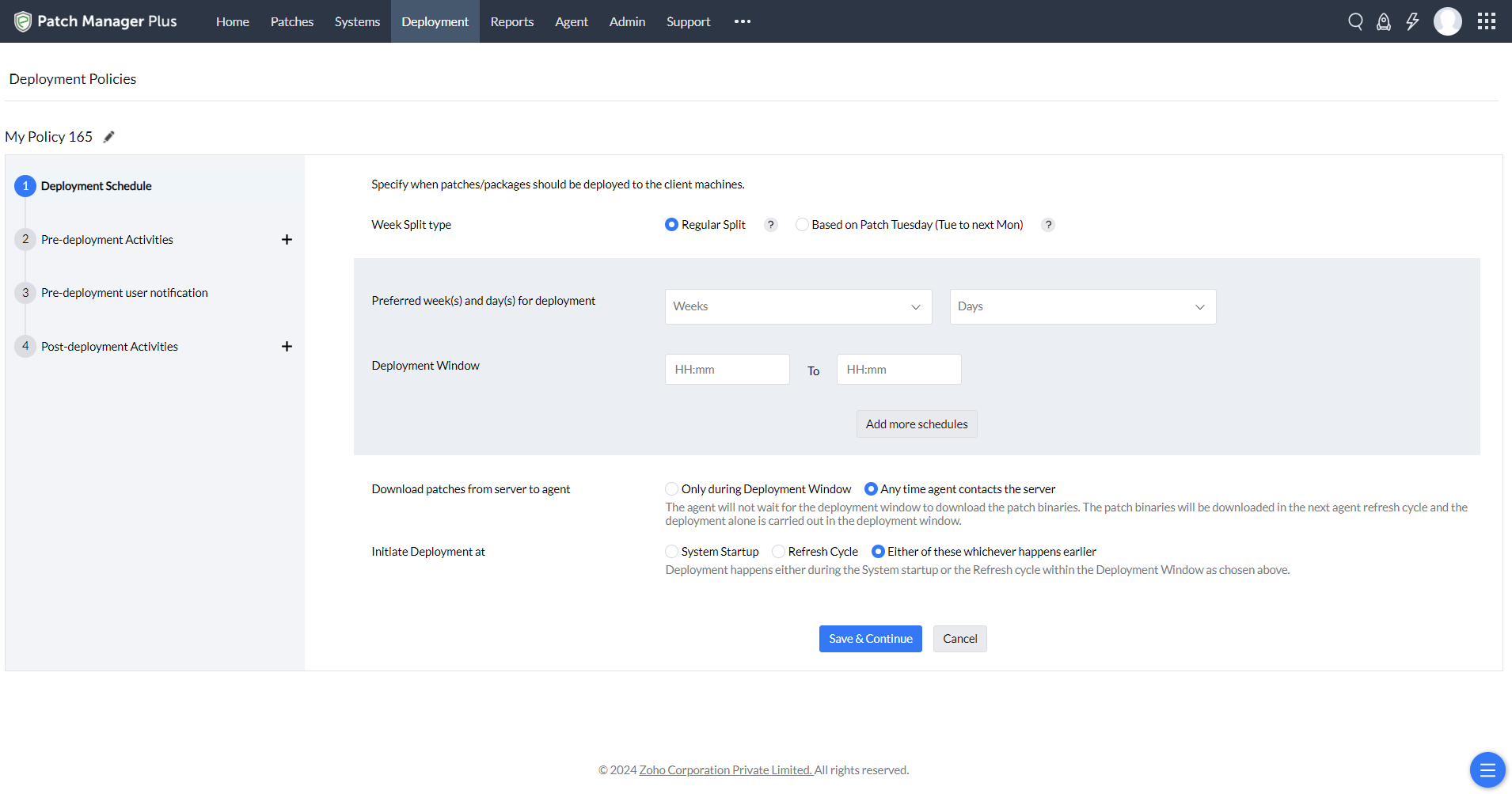
Patch Manager Plus deployment policies
G2 Rating: 4.5 out of 5.0 stars (190+ reviews)
Capterra Rating: 4.6 out of 5.0 stars (410+ reviews)
ManageEngine Patch Manager Plus Pricing:
- Free plan: Only suitable for small-scale patch management of up to 25 computers
- Professional: Starting from less than $1/endpoint, per month
- Enterprise: Starting from $1/endpoint, per month
3. Microsoft Intune
Best for: Organizations already standardized on Microsoft 365 and Windows.
If you already operate in the Microsoft environment, Intune (or SCCM) is suitable for patching. Intune is included in the Microsoft 365 Business Premium, E3, and E5 plans, so you might already have access to it.
In 2026, Microsoft expanded its Enterprise App Catalog to cover more applications. However, many users on G2, like Jaspreet S. and Deepak C., still find the catalog too small. According to these users, you still need to manually package the software not available, which kills the idea of the tool. Since July 2026, Microsoft 365 E5 also includes Enterprise App Management, and E3 and E5 both bundle more advanced Intune capabilities, such as Remote Help and Advanced Analytics.
G2 Rating: 4.5 out of 5.0 stars (270+ reviews)
Capterra Rating: 4.5 out of 5.0 stars (40+ reviews)
Microsoft Intune Pricing:
- Microsoft 365 Business Premium: $22/month per user (includes Intune Plan 1)
- Intune Plan 1 (standalone): $8/month per user
- Microsoft 365 E3: $39/month per user (includes Intune)
- Microsoft 365 E5: $60/month per user (includes Intune)
- Microsoft 365 E7: $99/month per user (includes Intune)
4. Automox
Best for: Cloud-first teams that want OS and third-party patching without on-premises servers.
Automox is a cloud-based patch management software for Windows, Mac, and Linux OS, and 580+ third-party applications. In addition to patching, the platform includes simple asset and inventory management capabilities.
Automox offers a hosted MCP server and API, so you can connect your own AI agent and ask plain-language questions about your patch status. Atera takes a different approach: Robin is built into the platform and acts on devices directly.
Consider: Third-party patching requires the Automate tiers, which are priced by quote.
G2 Rating: 4.5 out of 5.0 stars (300+ reviews)
Capterra Rating: 4.7 out of 5.0 stars (150+ reviews)
Automox Pricing:
- Patch OS: $1 per endpoint per month, with annual commitment
- Automate Essentials: Pricing is based on a custom quotation; please contact Automox for details
- Automate Enterprise: Based on custom quotation
5. Action1
Best for: Small IT teams that want to start patching for free.
If you’re part of a small IT team and want to get started with patching for free, Action1 offers a fair plan for that. Its free forever plan includes up to 200 endpoints, letting you patch Windows, macOS, and Linux devices, and third-party applications.
A simple endpoint management tool is also available for detecting and mitigating threats across your IT environment. However, Action1’s endpoint management doesn’t match the depth of a full RMM platform, like Atera.
Consider: Beyond the free 200 endpoints, you need a paid subscription, which is priced by quote.
G2 Rating: 4.9 out of 5.0 (1,200+ reviews)
Capterra Rating: 4.9 out of 5.0 (230+ reviews)
Action1 Pricing:
- Free for the first 200 endpoints
- Custom quotation for organizations with more than 200 endpoints
6. Jamf Pro
Best for: Organizations that manage only Apple devices.
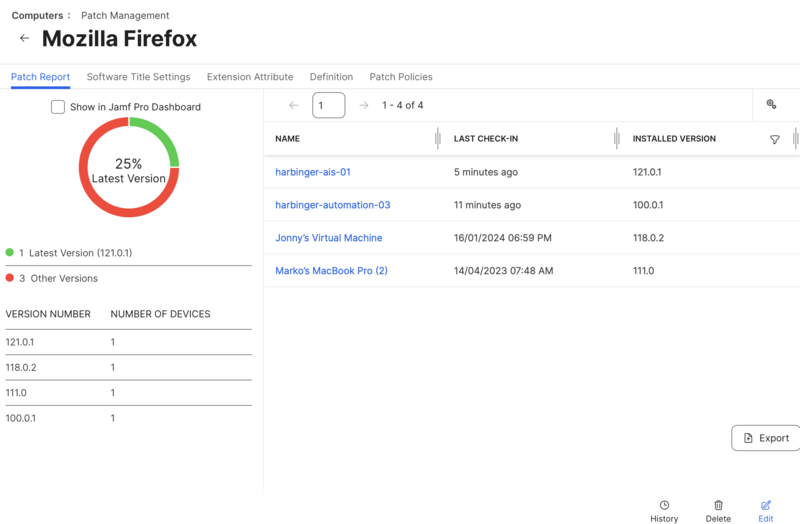
If you solely have Apple devices to patch, Jamf Pro is one of the top options. With its Apple Business Manager integration, it helps to automatically discover all Apple devices. Then, you can keep them up to date by running macOS, iOS, and iPadOS updates with set deadlines. Third-party app patching is also available through Jamf’s App Installers catalog.
If you also need to patch Windows devices, Jamf isn’t suitable on its own. Platforms with multi-OS patching capabilities, like Atera, are a better fit in this case.
G2 Rating: 4.7 out of 5.0 stars (2,300+ reviews)
Capterra Rating: 4.7 out of 5.0 stars (540+ reviews)
Jamf Pricing:
- Jamf for Mac (includes Jamf Pro, Jamf Connect, and Jamf Protect): $12.50 per Mac, per month (25-device minimum)
- Jamf for Mobile: $5.75 per mobile device, per month (25-device minimum)
- Jamf Now (for organizations with fewer than 25 employees): starts at $4 per device, per month
What is patch management software?
Patch management refers to the process of acquiring, testing, and installing software updates (patches) on computer operating systems, as well as third-party applications.
Instead of doing this manually, patch management software tools help to automate the entire patching process.
Types of patch management software
Patch management tools differ in how much they automate and in how they are delivered and licensed. Here are the main types.
1. Automated patch management
Automated patch management tools automatically identify, download, and deploy patches without significant manual intervention.
These tools can schedule patch deployments at convenient times to minimize disruptions and keep systems up-to-date.
Suitable for:
- IT departments
- Managed service providers (MSPs)
- Small and midsize businesses (SMBs)
- Enterprises
2. Autonomous patch management
Autonomous patch management takes automation a step further. Instead of relying only on fixed patch schedules set by technicians, autonomous tools use AI to monitor for missing updates around the clock and act on them within rules you define, without a technician starting each task.
Atera, for example, offers autonomous patching through Robin, which runs update scans, installs approved updates, and schedules restarts directly on devices, within your rules.
3. Cloud-based patch management
Cloud-based patch management tools are hosted in the cloud and accessible via the internet. These solutions enable scalability, ease of deployment, and management across multiple locations without on-premises infrastructure.
Suitable for:
- IT departments
- Managed service providers (MSPs)
- Small and midsize businesses (SMBs)
- Enterprises
4. Open-source patch management
Open-source patch management tools are free software solutions that allow anyone to manage patches. One advantage of open-source patch management tools is their cost-effectiveness.
The disadvantages of most open-source solutions include limited customization, community-based rather than vendor support, fewer integrations, and more setup and maintenance work. That makes them a harder fit for IT teams and MSPs with strict uptime, support, or compliance requirements.
Suitable for:
- IT departments
- Small and midsize businesses (SMBs)
Why do you need patch management software?
Manual patching poses a serious security risk, and that’s why patch management software exists. Here’s what the data shows.
1. Unpatched vulnerabilities drive nearly 60% of cyber compromises
Nearly 60% of cyber compromises come from unpatched vulnerabilities, according to John Morello (2024). His point: these compromises mostly come from known, fixable vulnerabilities rather than sophisticated zero-day exploits.
This is what patch management software helps to prevent. Instead of relying on manual work, it automatically detects missing patches and deploys them.
2. Technical disruptions lose you 10.5 workdays annually
Organizations lose an average of 10.5 workdays annually due to preventable technical disruptions, according to Nexthink’s 2025 report. The average employee runs into 14 negative digital experiences a week, such as device crashes and slow load times.
Not every disruption comes from outdated software, but keeping your OS and third-party apps patched removes a common source of crashes and slowdowns, not just security risk.
3. Manual patching costs you technician time
More than 60% of organizations still rely on manual processes at some point in the patch lifecycle, and 44% report partially automated patching workflows, according to Adaptiva’s report.
For MSPs, that time is billable. For IT departments, it’s time not spent on projects that move the business forward.
4. Third-party app patching is a real blind spot
Adaptiva’s report calls third-party patching the industry’s biggest blind spot.
74% of organizations have experienced vulnerabilities in third-party apps, yet only 49% include third-party applications in their patching process. This creates a serious security risk.
Fortunately, most patch management software includes third-party app patching. For example, within Atera’s IT automation profile, you can select the third-party applications you want to automatically update.
5. Compliance and governance
Most regulatory frameworks like SOC 2, HIPAA, PCI DSS, and ISO 27001 require organizations to show they patch consistently. This includes keeping records of what was patched, when, and on which devices.
Most patching tools include built-in reports. For example, with Atera’s reports, you can see which devices are up to date and which miss patches.
How to choose patch management software
Match the tool to your environment before you compare features:
- Operating systems: Confirm Windows, macOS, and Linux coverage. Apple-only fleets point toward Jamf.
- Third-party apps: Check catalog size, and whether third-party patching is included in the tier you would buy.
- Pricing model: Per technician (Atera), per endpoint (ManageEngine, Automox, Action1), per user (Intune), or per device (Jamf). Pick the one that scales well with your environment.
- Reporting: Make sure you can show what was patched, when, and where, for audits.
- Level of automation: Decide whether scheduled patching is enough, or whether you want patching actions to happen autonomously.
Illustrative example: Say you patch 500 endpoints. At $1 per endpoint per month, that’s $500 a month, and $1,000 at $2. Three technicians on Atera’s Professional plan cost $447 a month (billed annually) with unlimited endpoints, and that covers a full RMM platform, not only patching. Per-endpoint pricing tends to win on small fleets. Per-technician pricing wins as each technician manages more devices. Robin and other add-ons are priced separately.
Move toward autonomous patch management
More organizations want to move toward autonomous patching, but only 8% report fully autonomous patching today, and 21% expect to get there in the near term.
Atera already covers patching on Windows, Mac, Linux, and third-party apps. With Robin, you can go a step further: Robin checks update status, runs update scans, installs approved updates, and schedules restarts directly on devices, autonomously and within your rules.
See how Atera can automate your patching from day one. Start a free 30-day trial or book a demo with our sales team.
Frequently Asked Questions
Related Articles

What is patch management?
In May 2017, hospitals across England started turning away ambulances. Surgeries were canceled and doctors went back to pen and paper. The fix that would have prevented all of it had been available from Microsoft for two months. Nobody had installed it.
Read now
Top 10 Windows Patch Management Software
Choose a Windows patch management software to automatically monitor, deploy, and verify your Windows patch installations.
Read now
Atera Patch Management: features, key benefits & pricing
Patch management is a key component of Atera's IT management platform. In this article, we examine its key features, customer reviews, and pricing.
Read now
5 Open Source Patch Management Tools, Their Pros & Hidden Costs
These 5 open source patch management tools keep you efficient & secure… really ? Let’s talk hidden costs, so you can take the best decision.
Read nowEndless IT possibilities
Boost your productivity with Atera’s intuitive, centralized all-in-one platform







