
Generate summary with AI

For any IT department or technology solutions business, selecting an effective IT management platform is a key component of daily efficiency.
Atera and ConnectWise are two of the leading IT management platforms, used by IT teams to:
- Monitor and secure various endpoints
- Handle end-user support requests
- Autonomously manage routine IT tasks
- Deploy security patches
- Streamline IT operations
Both Atera and ConnectWise have thousands of reviews on review sites, but on G2, for example, Atera garnered a rating of 4.6, while ConnectWise has a rating of 4.1. Plus, when comparing the two platforms more closely, we can start seeing distinct differences.
So, which is right for you and your company’s unique goals? In this article, we will provide an in-depth comparison of each platform’s features, usability, pricing, and support.
This guide is formulated specifically for IT department decision-makers, so you’ll find all the relevant information you need to make an informed choice.
So, is Atera the right ConnectWise alternative for you?
Why should you trust our reviews? 💡
Choosing the right IT management platform is critical to the success of your IT department.
Our reviews are based on extensive analysis and real user feedback from Atera and ConnectWise. We consider functionality, user experience, customer service, value for money and security standards.
Our goal is to provide you with the information you need to make an informed decision.
Quick Comparison: Atera vs. ConnectWise at a Glance
| Category | Atera | ConnectWise |
| Platform Model | All-in-one (RMM + PSA + AI) | Modular (separate products) |
| Pricing Model | Per technician, unlimited endpoints | Per endpoint / per module (custom quote) |
| Starting Price | $149/month (IT dept) or $129/month (MSP) | Custom quote required |
| AI Capabilities | Agentic AI (autonomous task execution) | Sidekick and AI Agents (autonomous task execution) |
| Deployment | Cloud-native, minutes to deploy | Cloud or on-premise (Windows Server 2019+) |
| Setup Time | Under 1 hour for most environments | Days to weeks (dedicated admin recommended) |
| G2 Rating | 4.6 / 5 (840+ reviews) | 4.1 / 5 |
| Best For | SMBs, fast-scaling MSPs, lean IT teams | Large enterprises, complex multi-site ops |
Use Case Scenarios: How Each Platform Handles Real IT Challenges
Feature lists only tell part of the story. Here’s how Atera and ConnectWise perform in the situations IT teams actually face day to day.
Small Business IT Management (10–50 Employees)
The Challenge
A 25-employee marketing agency needs to deploy security patches across 40 endpoints (mix of Windows 10/11 and macOS) while maintaining 99.5% uptime during business hours. The single internal IT technician has no dedicated patching window and cannot afford downtime during client deliverable periods.
Atera’s Approach
Atera’s autonomous patching agent can be configured to run during off-peak hours (e.g., 10 PM–4 AM) without manual intervention. The technician sets a patching policy once—choosing which patches to include, which to exclude, and the rollout schedule—and Atera’s Agentic AI handles execution. Real-world outcomes reported by similar-sized customers include a 75% reduction in manual patching time and patch compliance rates exceeding 95% within 48 hours of release. Cost for this scenario: approximately $149/month for one technician, covering all 40 endpoints.
ConnectWise’s Approach
ConnectWise Automate provides powerful patch management with detailed scripting capabilities. However, initial configuration requires familiarity with its scripting engine and typically takes several days to set up correctly. For a one-person IT team, the learning curve and ongoing maintenance overhead can be significant. ConnectWise’s per-endpoint pricing for 40 endpoints typically runs $100–$150/month for the RMM module alone, with PSA functionality requiring a separate ConnectWise Manage license.
Implementation Timeline & Costs
- Atera: Day 1 onboarding, patching policy live within 2 hours. ~$149/month all-inclusive.
- ConnectWise: 3–5 days setup with admin guidance. $100–$150/month for RMM + additional PSA licensing.
Enterprise Multi-Location Deployment
The Challenge
A 500-employee professional services firm with offices in New York, Chicago, and London needs centralized visibility across 800+ endpoints, role-based access for 8 IT technicians, and SOC 2 Type II compliance documentation for an upcoming audit.
Atera’s Approach
Atera’s cloud-native architecture means no on-premise infrastructure is required at any location—agents are deployed remotely via email link or GPO/MDM push. A centralized dashboard provides real-time visibility across all three sites. Role-based access control (RBAC) allows different permission sets for junior technicians, senior engineers, and managers. Atera maintains SOC 2 Type II certification and GDPR compliance, with audit reports available on request. For 8 technicians, pricing is fixed at 8x the per-technician rate regardless of endpoint count.
ConnectWise’s Approach
ConnectWise’s Asio platform is purpose-built for enterprise-scale deployments and offers deep customization for complex environments. On-premise deployment options are available for organizations with data residency requirements. ConnectWise supports extensive custom reporting and integration with enterprise tools like ServiceNow and Microsoft SCCM. ConnectWise holds SOC 2 Type II, HIPAA, and ISO 27001 certifications. However, deploying across three geographic locations typically requires a dedicated ConnectWise administrator and a multi-week implementation project.
Implementation Timeline & Costs
- Atera: 2–3 days for full multi-site deployment. Pricing scales with technician count, not endpoint count.
- ConnectWise: 2–4 weeks for full enterprise rollout. Pricing requires custom enterprise quote; budget for implementation services.
MSP Client Management at Scale
The Challenge
A managed service provider manages 50 clients with a total of 3,000 endpoints and 6 technicians. The MSP needs multi-tenant isolation, automated ticketing, SLA tracking, and the ability to onboard new clients in under 24 hours.
Atera’s Approach
Atera was built from the ground up for MSPs. Each client has an isolated tenant within the platform, with separate dashboards, alert policies, and reporting. The ticketing system integrates directly with the RMM, so alerts auto-generate tickets that are triaged and, in many cases, resolved autonomously by Atera’s AI agents before a technician even sees them. Customers report that Atera’s AI automation handles 30–40% of routine tickets without human intervention. For 6 technicians managing 3,000 endpoints, Atera’s per-technician pricing delivers a significant cost advantage over per-endpoint models.
ConnectWise’s Approach
ConnectWise is deeply established in the MSP market and offers a mature ecosystem of integrations with PSA, billing, and quoting tools. ConnectWise PSA (formerly Manage) is widely regarded as one of the most feature-rich service management platforms available, with advanced contract management, time entry, and billing automation. The tradeoff is complexity: new technicians typically require 1–2 weeks of training to become proficient, and the platform demands ongoing administrative investment to keep automations and integrations running smoothly.
Implementation Timeline & Costs
- Atera: New client onboarding under 2 hours using email-based agent deployment. Fixed monthly cost per technician.
- ConnectWise: Client onboarding 4–8 hours. Per-endpoint pricing plus separate PSA module costs.
Rapid Remote Workforce Support
The Challenge
An organization needs to support 200 remote workers across 15 countries following a rapid expansion. IT must provide remote access, endpoint monitoring, and helpdesk support across mixed operating systems (Windows, macOS, Linux) with a 2-person IT team.
Atera’s Approach
Atera supports Windows (7 and above), macOS (10.13+), and Linux (major distros including Ubuntu, Debian, CentOS) from a single unified agent. Remote access is built in via Splashtop and AnyDesk integrations included in the platform. The helpdesk portal allows end users to submit tickets that feed directly into the technician dashboard. With only 2 technicians, the per-technician pricing keeps costs minimal at approximately $298/month while covering all 200 endpoints.
ConnectWise’s Approach
ConnectWise Control (ScreenConnect) is a standalone remote access product with an excellent reputation for reliability and performance. For organizations already using ConnectWise’s ecosystem, it integrates natively with Automate and Manage. However, licensing remote access separately adds to the per-module cost structure. Linux support is more limited compared to Windows-centric environments.
Implementation Timeline & Costs
- Atera: Remote agents deployable via email to end users in minutes, no IT presence required at endpoint location.
- ConnectWise: ConnectWise Control available as standalone at $28–$43/technician/month; full stack requires Automate + Manage + Control licensing.
#1: Features and capabilities
Both Atera and ConnectWise offer a suite of advanced features designed to meet the specialized needs of enterprises and growing IT teams.
ConnectWise’s features include cybersecurity management, unified monitoring and management, PSA offerings, and more. Many of the features are split between different ConnectWise products, such as ConnectWise Automate and ConnectWise PSA.

ConnectWise products
The downside is that you may have to pay for two or more licenses to access key features, like RMM and IT ticketing.
Over at Atera, our platform offers many similar features, including world-class RMM, network discovery, patch management, helpdesk and PSA, backed up by our innovative Agentic AI technology. The features are included in our all-in-one platform, which means you don’t need to juggle multiple products to access key IT management tools.
Atera’s RMM capabilities allow for real-time monitoring and alerts, making it easy to gain complete visibility into device, network, or group behaviors. Plus, our integrations with tools like Webroot, Acronis, Emsisoft, AnyDesk, and Splashtop help extend the software’s functionality.
What really differentiates Atera from ConnectWise is our Agentic AI technology, capable of autonomously resolving up to 92% of your IT incidents. We’ll have a look at this next.
#2: Agentic AI development
OOf Atera and ConnectWise, Atera was the first to develop its Agentic AI technology, launching it in May 2025 as IT Autopilot, later rebranded as Robin by Atera.
ConnectWise first introduced its AI assistant, Sidekick, on November 8, 2023, at IT Nation Connect. While helpful for technicians, Sidekick doesn’t use Agentic AI. In January 2026, ConnectWise acquired zofiQ in January 2026 and used it to build a separate product called AI Agents. It reached availability in mid-2026.
ConnectWise Sidekick works similarly to Atera’s AI Copilot, helping with ticket categorization and summarization, generating scripts, and more.
AI Agents, ConnectWise’s newer product, consist of four AI agents:
- Service desk agent: Uses context from PSA to recommend and execute next steps within the ticket workflow.
- Triage agent: Automates the work of classifying, labeling, prioritizing, and routing incoming tickets.
- Data analyst agent: Turns data into insights, letting users query business and service metrics across PSA, RMM, and financial data.
- Oversight agent: Monitors workflows to support compliance, accountability, and service quality.
ConnectWise’s own materials describe its AI Agents as closed-loop and autonomous, taking actions rather than only suggesting them. But its own materials say that autonomy is limited only to the ticket lifecycle: triage, routing, documentation, and technician guidance.
Atera’s Robin, in contrast, is fully autonomous and resolves the underlying issue directly on the device, network, or in the cloud, without a technician needing to review or approve each action first.
This is the four-step process Atera’s Robin follows:
- Diagnose: Robin interacts with end-users via Slack, Teams, email, the Customer Portal, or third-party ITSM tools, picking up on intent and asking follow-up questions to understand the issue fully.
- Remediate: Once Robin has enough context, it carries out the fix directly, on the device, in the network, or in the cloud.
- Verify: Robin confirms the issue is actually resolved before closing anything, and escalates to a technician with full context if it isn’t.
- Close: Robin updates the ticket in whatever ITSM your team already runs, with the outcome and any follow-up noted. Every action gets logged for audit and compliance.
What’s best, Robin works on the channels your users already live in, whether it’s email, chat, Slack, Teams, or your Customer Portal.
Robin’s autonomous resolution rate is up to 92%, with a 120-second average resolution time and 0.1-second first response.
ConnectWise doesn’t publish a comparable resolution rate for AI Agents. The closest figures on its own site are an 80% reduction in escalations, a 25% increase in first-touch resolution, and 30+ hours of manual configuration eliminated.
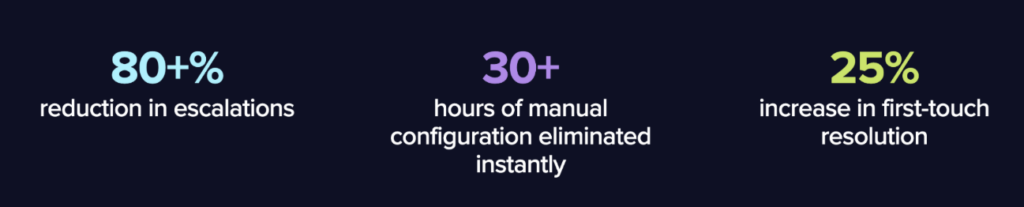
Peak Global Solutions is the main testimonial on ConnectWise’s AI Agents, and that case study reports only a 20% drop in escalations.
Similar to ConnectWise Sidekick, Atera also offers an AI Copilot at no extra cost to assist technicians. Whether you’re working on devices, tickets, or alerts, Copilot is ready to run health checks and execute actionable solutions in real-time.
For example, if you need help managing your devices, you can ask Copilot to:
- “Reset local password on a user’s machine”
- “Install missing Windows updates on endpoints”
- “Check ink, paper jams, and tray damage on printers”
- “Run a full system scan”
Note: For more in-depth comparison, see Robin vs. ConnectWise Sidekick & AI Agents.
#3: User interface and usability
If you want first-hand experience with Atera and ConnectWise’s user interfaces, here’s how each one looks:

ConnectWise dashboard (via G2)
With the new ConnectWise Platform launch, their team updated the interface, but there are no available screenshots of what the new UI looks like.
One G2 user had a word to say about the new interface updates:

In contrast, here’s a look at Atera’s admin interface:

Atera’s admin dashboard
Based on G2’s comparison of Atera and ConnectWise PSA and Automate, this is how real users have rated their ease of use experiences:
| G2’s Ease Of Use Category | 1. Atera | 2. ConnectWise PSA | 3. ConnectWise Automate |
| 1. Ease of Use | 9.2 stars (1,100+ reviews) | 7.4 stars (110+ reviews) | 7.4 stars (490+ reviews) |
| 2. Ease of Setup | 9.2 stars (970+ reviews) | 6.6 stars (70+ reviews) | 6.6 stars (260+ reviews) |
| 3. Ease of Admin | 9.0 stars (620+ reviews) | 7.4 stars (60+ reviews) | 7.1 stars (240+ reviews) |
As evident from the reviews, most users agree that Atera’s interfaces are easier to use.
Plus, Atera’s wide variety of integration options makes its potential for customization virtually endless, positioning it as a strong ConnectWise alternative.
#4: Performance and reliability
When it comes to choosing the right IT management software, reliability is key — after all, what’s the point of next-generation capabilities if they’re not working properly? ConnectWise and Atera are both recognized for reliability and limited downtime, with users commenting that Atera’s system is easy to use and easy to troubleshoot should something go wrong.
ConnectWise offers a resource center with materials like infographics, checklists, and guides to provide asynchronous support for users. At Atera, we take reliability to the next level with a self-service knowledge base as well as a robust IT community that can help with troubleshooting and support 24/7.
Although Atera is an Agentic AI, RMM software that’s been around for more than a dozen years and racked up thousands of reviews across countless platforms, you’ll be hard-pressed to find people who are disappointed in our reliability.
#5: Pricing and value for money
Pricing Structure and Total Cost Analysis
Atera uses a per-technician pricing model with unlimited endpoints, servers, and workstations. This approach provides complete cost predictability as your managed device count grows. Plans for MSPs start at $129/month per technician; IT department plans start at $149/month per technician. Enterprise plans are available with custom pricing.
ConnectWise does not publish pricing publicly and requires a custom quote through a sales representative. Based on publicly available market data and user reviews, ConnectWise RMM (Automate) typically runs approximately $2.50 per endpoint per month, with PSA (Manage) adding additional per-user licensing. The modular structure means costs expand as you add automation, security, and reporting capabilities.
| Scenario | Atera (est.) | ConnectWise (est.) |
| 1 tech, 50 endpoints | $129–$149/mo | $125–$200/mo (RMM + PSA) |
| 3 techs, 200 endpoints | $387–$447/mo | $600–$900/mo (RMM + PSA) |
| 6 techs, 500 endpoints | $774–$894/mo | $1,500–$2,000/mo (RMM + PSA) |
| 10 techs, 1,000 endpoints | $1,290–$1,490/mo | $3,000–$4,500/mo (RMM + PSA + extras) |
| Pricing transparency | Public, flat rate | Custom quote required |
| Free trial | 30-day free trial | Demo available |
Note: ConnectWise estimates are based on publicly reported pricing data and user reviews. Actual pricing varies by negotiation, contract length, and selected modules. Always request a formal quote.

However, doing some online research, we can find that pricing can vary widely based on the price that your sales rep gives you. So if you don’t like dealing with hidden pricing models where you’re never sure if you’re getting a good deal or not, ConnectWise may not be for you.
At Atera, on the other hand, we believe in upfront and transparent pricing for IT departments and MSPs. While enterprises can request a custom quotation tailored to their needs, Atera’s basic plans start at $149 per month for IT departments, and our RMM pricing model is billed by the technician — rather than the user or endpoint.
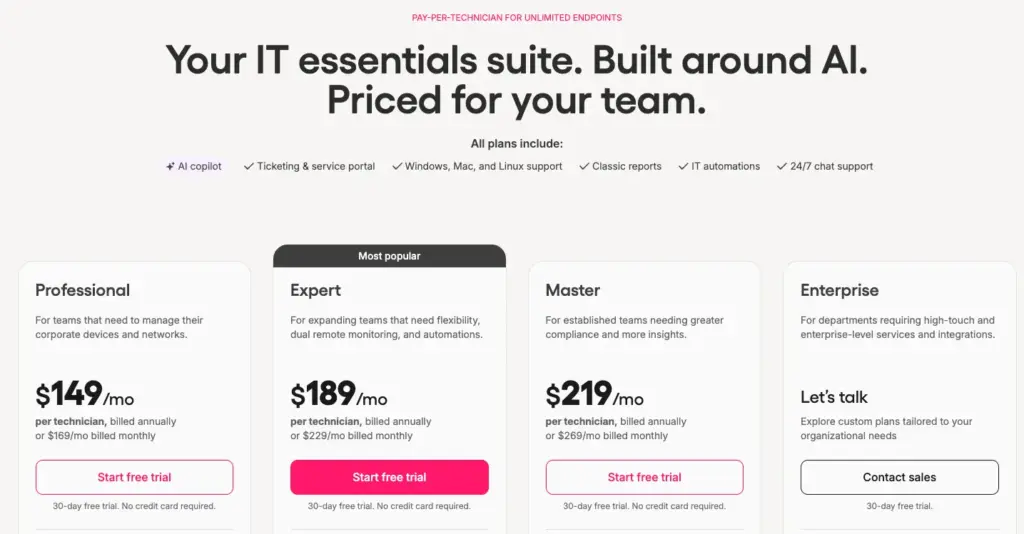
Atera’s IT department pricing
This approach makes Atera’s system more cost-effective and adaptable for startups and large organizations alike, as we base charges on the number of IT department professionals rather than the number of employees in the company, providing a flexible ConnectWise alternative.
Our goal is to keep IT pricing simple, so you don’t need to worry about a large number of devices on your network causing mayhem on your next credit card bill.
#6: Customer support and community
Customer support is an important part of IT management. When problems arise (as they inevitably will), support and resources should be easily available.
To address this, both Atera and ConnectWise offer IT communities where users can troubleshoot problems and share best practices with other IT professionals. Both platforms also offer self-help resources, such as blog posts, recorded webinars, manuals, and more.
Where Atera stands out is its extensive knowledge base, packed with resources you can look into at your own pace. Users can also access our shared script library and can always seek assistance from Atera’s active IT community. Many users applaud our live community, in particular as an excellent source of industry knowledge and support from others in similar roles benefiting from Atera.
But when you’re not able to solve your problem using online blog posts or IT communities, you want to speak to a real human.
That’s why at Atera, we have support staff via live chat who are standing by 24/7. And we even have support staff available for our customers who speak German and French, who are available from Monday to Friday from 9 AM to 6 PM CEST (UTC +2).
Atera customers often praise the customer service, and one G2 user specifically said, “Customer support has been good on the few occasions we needed to talk to them. They are fast and able to answer all of our questions.”
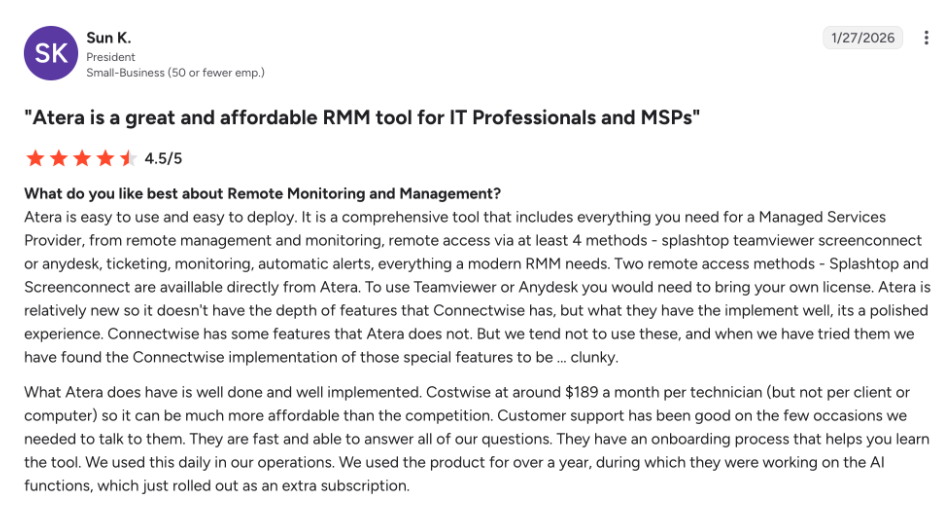
With ConnectWise, support is tier-based, depending on the plan that you sign up for, with only “Premium plan” members having access to inbound phone support.
#7: Customer reviews and rating
Atera has gained 1200+ G2 reviews with an average rating of 4.6 out of 5.0 stars, while ConnectWise Automate has an average rating of 4.1 out of 5.0 stars with 130 reviews.
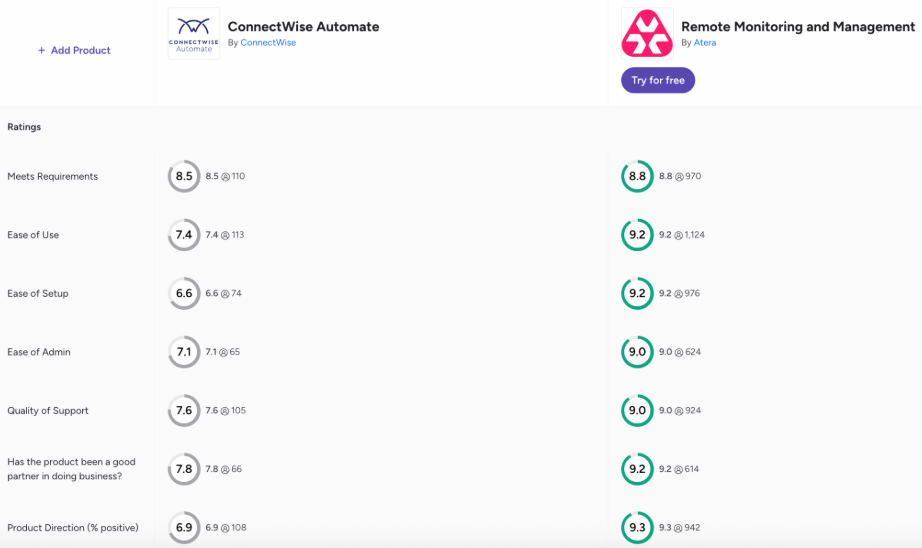
Comparison via G2
When comparing Atera and ConnectWise across G2’s ease-of-use categories and how well the software meets user requirements, Atera is a clear winner:
Comparison via G2
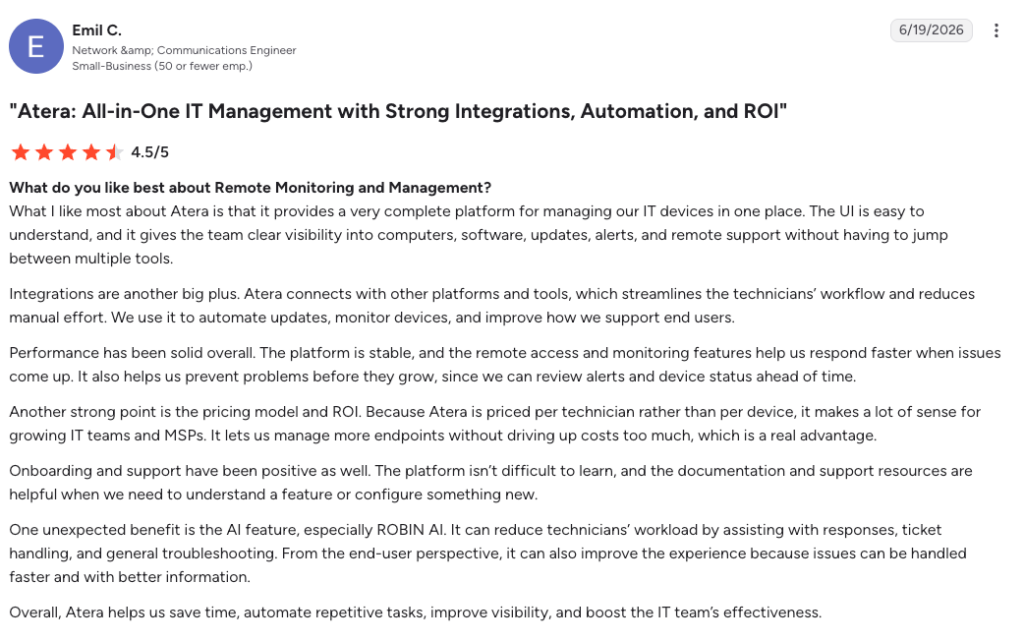
One Atera user, Emil C., commented on Robin’s capabilities and said:
“One unexpected benefit is the AI feature, especially Robin. It can reduce technicians’ workload by assisting with responses, ticket handling, and general troubleshooting. From the end-user perspective, it can also improve the experience because issues can be handled faster and with better information.”
In comparison, ConnectWise’s reviews are more mixed, and its G2 Ease of Setup score is 6.5 out of 10, suggesting that customers have had difficulty with onboarding.
After reading ConnectWise customer reviews, the low rating for ease of use seems more logical, as many users mention having difficulties using it.

ConnectWise PSA on G2
Not all ConnectWise reviews are as negative, but a common theme is the lack of training and support, and a clunky interface.
#8: Security and compliance
Atera is a cloud-native platform built on Microsoft Azure with end-to-end encryption (TLS 1.2+) for all data in transit and AES-256 encryption for data at rest. Atera maintains SOC 2 Type II certification, is GDPR compliant, and supports two-factor authentication (2FA) and single sign-on (SSO) via SAML 2.0 on Professional and Expert plans. Role-based access control (RBAC) allows granular permission management across technician roles.
ConnectWise maintains SOC 2 Type II, HIPAA, ISO 27001, and GDPR compliance certifications across its product suite. The ConnectWise Asio platform includes built-in cybersecurity modules through ConnectWise Cybersecurity Management (formerly Perch). On-premise deployment options give organizations with strict data sovereignty requirements full control over data location. 2FA and SSO are supported across all major ConnectWise products.
| Security Feature | Atera | ConnectWise |
| SOC 2 Type II | Yes | Yes |
| HIPAA | Upon request | Yes |
| GDPR | Yes | Yes |
| ISO 27001 | Yes | Yes |
| Encryption (Transit) | TLS 1.2+ | TLS 1.2+ |
| Encryption (Rest) | AES-256 | AES-256 |
| 2FA / MFA | Yes (all plans) | Yes (all plans) |
| SSO (SAML) | Professional+ plans | All major products |
| RBAC | Yes | Yes (granular) |
| On-Premise Option | No (cloud only) | Yes |
Here at Atera, we have integrations with numerous highly regarded cybersecurity platforms. We also take Atera’s AI security seriously for our AI agents.
Regarding the integrations, one G2 user mentioned, “I really like how there are multiple 3rd party integrations for the same need, like endpoint protection or backups.”

In addition, Atera allows IT departments to bulletproof their IT cybersecurity strategies with strong endpoint management. With real-time health checks, anomaly detection, and the capability to automatically remediate issues, Atera’s AI agents help prevent incidents before they escalate.
Atera is also SOC II compliant, HIPAA compliant, and more! You can view Atera’s trust page here.
Deployment Requirements and Timelines
Atera is fully cloud-hosted on Microsoft Azure and requires no on-premise infrastructure. The Atera agent (Windows .exe / macOS .pkg / Linux .deb/.rpm) is approximately 5MB and can be deployed via email link, Group Policy Object (GPO), Microsoft Intune, SCCM, or manual installation. Minimum system requirements for the Atera agent: Windows 7 SP1 or higher, macOS 10.13 High Sierra or higher, 100MB disk space, 512MB RAM, and an active internet connection.
ConnectWise Automate supports both cloud-hosted and on-premise deployment. On-premise deployment requires Windows Server 2019 or higher, SQL Server 2019 or higher, minimum 8-core CPU and 32GB RAM for environments under 2,000 endpoints (16-core / 64GB RAM recommended for larger deployments), and 500GB+ storage. Cloud-hosted deployment through ConnectWise eliminates these infrastructure requirements.
Pre-Deployment Requirements for Atera
- Active Atera account (free 30-day trial available at atera.com)
- Network connectivity from managed endpoints to Atera cloud (HTTPS outbound on port 443)
- Local admin or SYSTEM privileges on target endpoints for agent installation
- GPO or MDM access for bulk deployment across domain-joined devices
- Whitelist Atera agent domains in endpoint security software
- Define technician roles and assign permissions before inviting team members
- Configure alert thresholds and notification rules before deploying agents to production
ConnectWise Setup Checklist (Cloud-Hosted)
- Obtain ConnectWise account credentials from sales representative post-contract
- Configure database and data retention settings through the admin console
- Deploy ConnectWise Automate agent via GPO, SCCM, or manual download from your hosted portal
- Configure monitors, alert templates, and scripting policies (plan for 2–5 days of admin time)
- Set up ConnectWise PSA (Manage) integration if licensed—requires separate configuration
- Configure billing integration and client contract templates
- Train technicians on the platform—budget 3–5 days for new users to reach proficiency
- Set up NOC integration if using ConnectWise’s managed NOC services
Atera’s Agentic AI platform compared to ConnectWise
To conclude, it’s clear that both Atera and ConnectWise offer reliable, advanced solutions for IT departments.
But the question remains: which one is best for your company and your growth? Of course, we’re a little biased… yet we strongly believe that Atera can serve emerging and enterprise teams alike.
From cybersecurity to helpdesk to patch management to RMM, and our Agentic AI technology to support it all, Atera consistently comes out on top.
When it comes to a dynamic and comprehensive solution, Atera proves to be the better fit, enabling businesses to navigate the ever-evolving landscape of IT management with ease.
If you are ready to switch from ConnectWise to Atera, then read here on how to do so.
You can also reach out to our sales team today to talk about your unique needs.
Frequently Asked Questions
Related Articles
Robin vs Request Resolver (Former Rovo)
Robin and Atlassian's Request Resolver (Former Rovo) both bring Autonomous IT into ITSM, but they operate at different levels. This full comparison breaks down where each one's autonomy actually reaches.
Read now
Robin vs Kaseya Intelligence
Robin by Atera and Kaseya Intelligence both talk about autonomous IT, but structure their AI technologies differently. See where each one's autonomy actually reaches and which works for your org.
Read now
Robin by Atera vs. Ivanti Neurons: comparing two very different approaches to autonomous IT
In this article, we'll compare Robin vs. Ivanti Neurons: one AI agent that resolves IT incidents end to end, and one platform that splits autonomy across two separate AI capabilities.
Read now
Robin vs Freddy AI Agent Studio
Not all agentic ITSM starts from the same place. See how Robin's deploy-ready model compares to Freddy AI Agent Studio's no-code, build-it-yourself approach.
Read nowEndless IT possibilities
Boost your productivity with Atera’s intuitive, centralized all-in-one platform










